
Neste artigo
- Microsoft plans to bring eight Windows security checks together in 2027
- Windows baseline protection will flag missing safeguards and let you turn some on with one click
- Apps could use the result to warn you, limit features, or block access
Microsoft announced plans to introduce Windows baseline protection, a feature that brings eight existing safeguards together into a single, verifiable security status.
With the feature expected to become generally available in 2027, Microsoft wants to make a familiar Windows security problem less confusing. Your PC has a collection of built-in protections, but working out which ones are enabled and what to do when they aren’t can take some digging.
Windows baseline protection will show you what’s missing and help you fix it. It will also give software developers a simpler way to check whether your computer meets their requirements and decide whether to let an app run at all.
On the positive side, that could make security easier to manage. But it could also mean more encounters with software that says your PC isn’t secure enough to use it.
The protections already exist in Windows. What’s new is the way Windows evaluates them together and shares the result. For people using personal or unmanaged PCs, the most immediately useful change may be the explanation that comes with the result.
Microsoft says the new baseline protection page in Windows Settings will show which protections are missing.
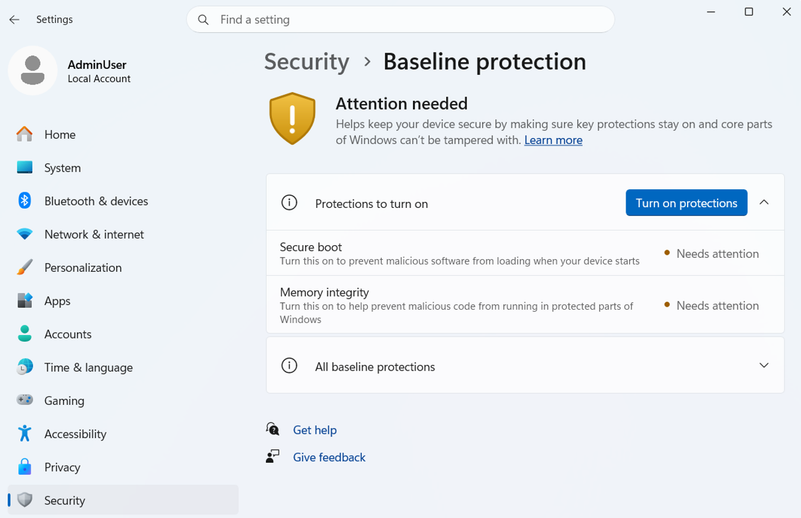
Where possible, a single button will enable the missing protections and restart the computer. If you need to change your PC’s firmware settings, for example to enable Secure Boot or the Trusted Platform Module (TPM), Windows will provide guidance.
The first version checks these eight requirements:
- Security processor: Dedicated hardware, such as a TPM, that helps protect sensitive information.
- Secure Boot: Protection against malicious software loading during startup.
- Virtualization-based security: Hardware-assisted isolation that helps protect critical processes.
- Memory integrity: Protection against malicious code running in protected parts of Windows.
- Signed drivers only: A requirement that drivers have digital signatures.
- Windows-certified drivers: A requirement that drivers meet Windows hardware signing requirements.
- Kernel debugger protection: Restrictions that help prevent debugging tools from bypassing Windows security protections.
- Vulnerable driver protection: Protection against known vulnerable drivers that could weaken the system’s security.
An application that wants to check a computer’s security configuration can use Windows’ baseline protection signal instead of maintaining its own collection of checks.
The intended uses are straightforward. An exam service might want to verify a student’s device before a test. A game might check protections relevant to anti-cheat measures. An organization might require a device to meet its security requirements before granting access.
Main takeaways
Windows baseline protection brings existing safeguards together into a common, hardware-backed security assessment and helps users enable any missing protections. That could make Windows security less confusing, but it also gives software vendors a simpler way to warn users, restrict features, or deny access when a computer falls short.
The developer decides what happens next. Will they require the entire baseline, or only the protections their application actually needs?
Windows baseline protection and security software such as Malwarebytes address different parts of the problem. Microsoft’s checks establish whether a set of underlying Windows safeguards is enabled. Malwarebytes Premium Plus adds protection against threats such as malware, ransomware, exploits, and malicious websites, along with browser protection and a VPN. Neither replaces the other: Installing security software does not switch on a missing Windows safeguard, and passing Microsoft’s checklist is not a guarantee that your PC is free of malware.
The feature is still in preview, and Microsoft says feedback will shape it before general availability.

“Um dos melhores pacotes de segurança cibernética do mundo.”
De acordo com a CNET.Leia a resenha deles →