
Socket’s threat researchers found three malicious Firefox extensions that impersonated the Phantom, Jupiter, and Bitget crypto wallets.
Once installed, the malicious extensions stole recovery phrases and private keys, which would provide the attacker with full control of a wallet.
A crypto wallet is an app, browser extension, or physical device that lets you manage cryptocurrency such as Bitcoin. Despite its name, it doesn’t actually hold your coins. Those are recorded on a blockchain, a shared digital record of transactions. Instead, the wallet manages the secret digital keys that let you access and spend them.
When you create a wallet, you may be given a recovery phrase: a list of words you can use to restore access. Write it down and store it offline. It’s a backup of your keys, not just an ordinary password. Anyone who gets hold of it can take control of your funds, which is why fake wallet extensions try to steal it.
Cybercriminals listed three fake wallet extensions on Firefox Add-ons, impersonating Phantom, Jupiter, and Bitget. The genuine wallets offer extensions for other browsers: Jupiter lists Chrome, Brave, and Edge; Bitget’s extension is for Chrome; and Phantom says its Firefox extension is no longer supported.
The malicious extensions looked for 12-, 15-, 18-, and 24-word recovery phrases, as well as Ethereum and Solana private keys. They could read input fields, detect pasted text, and scan screens displaying recovery phrases.
A recovery phrase or private key is a bearer secret: whoever holds it controls the wallet and can move its assets. The Phantom variant’s backend logged captured secrets, sent them to a Telegram bot, and automatically moved funds to hardcoded payout addresses. Those addresses covered Ethereum, BSC, Polygon, Arbitrum, Optimism, Base, Avalanche, Solana, and Bitcoin. The Phantom variant could read a phrase both when it was typed during import and when it was displayed on a reveal screen.
Comment rester en sécurité
Socket says all three listings were live on Firefox Add-ons during its analysis and have since been removed. But if you find one of these extensions in your Firefox browser, you should:
- Remove the extension. Use the three-dot menu next to it and choose Remove.
- If you ever entered a phrase or key, create a new wallet on a clean device and move your assets immediately. Treat the old wallet as compromised.
- In the future, install wallets only from the vendor’s official website link, not from store search results.
- The fake Phantom listing asked to access data on all websites and had no privacy policy. These are warning signs to look out for.
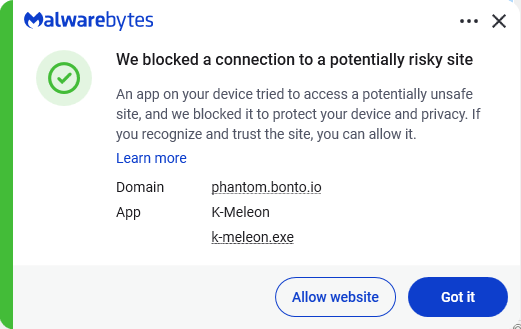
- Use an up-to-date, real-time anti-malware solution that blocks malicious websites.
Never enter your recovery phrase on a website. Enter it only in the official wallet app when restoring. Wallet support will never ask for it.
IOCs
The malicious extensions:
- Phantom impersonator: add-on ID 3092199
- Jupiter impersonator: add-on ID 3092666
- Bitget impersonator: add-on ID 3092059
Subdomains:
bonto[.]iophantom[.]bonto[.]iojupiter[.]bonto[.]iobitget[.]bonto[.]iocoinbase[.]bonto[.]ioexodus[.]bonto[.]io
IP addresses:
104.21.34[.]69172.67.155[.]198
Du signalement des menaces à leur élimination.
Les risques liés à la cybersécurité ne devraient jamais dépasser le stade des gros titres. Protégez vos appareils contre les menaces entéléchargeant dès aujourd'hui « Malwarebytes ».