Best scam detection tools and software [2026]
This guide below reviews the best scam detection tools for phones and computers to help you find the right level of protection for your everyday digital life.
Online scams are everywhere, from fake delivery texts to look-alike websites that seem trustworthy at first glance. Whether you’re shopping, banking, or catching up on social media, scammers are constantly finding new ways to trick people into sharing personal information.
In fact, research shows that nearly 70% of people have faced some form of cybersecurity threat, from online scams to financial breaches to malware and virus infections. Losses tied to online scams recently topped $12.5 billion in a single year, and those numbers keep climbing as scammers use AI to make their attacks look more convincing.
The good news? You can protect yourself and your family. Scam detection tools help you spot suspicious links, texts, and websites before you click to give you more control and confidence online.
In this guide, we’ll look at some of the best scam detection tools for phones and computers, explain what makes each one useful, and help you find the right level of protection for your everyday digital life.
Key takeaways
- Scam attempts show up daily through texts, emails, websites, and social media.
- Scam detection tools vary widely, with some only filtering texts, others relying on manual lookups, and only a few offering real-time guidance.
- Free scam checkers can help with quick, one-off checks, but they usually lack automatic protection and broader device coverage.
- Scam detection works best when it’s paired with everyday mobile security, like blocking malicious sites and stopping threats before they escalate.
The growing importance of scam detection software
Scam detection software matters more than ever as scams become more frequent, more convincing, and easier to miss, especially when they show up in everyday texts, emails, and links that don’t look suspicious at first glance. In a 2025 Pew Research Center survey, 73% of US adults said they’ve experienced at least one type of online scam or attack.
Here are the key trends driving that shift:
- Scams affect most adults, across all age groups: Pew found that about three-quarters of adults under 65 have experienced at least one online scam or digital attack, including phishing emails, scam texts, or fraudulent purchases. And among adults 65 and older, 66% report the same.
- Scam attempts happen frequently, not occasionally: Many adults report receiving scam emails, text messages, or phone calls at least weekly, and in some cases daily. Relying on manual judgment alone becomes unrealistic when constant messages arrive while people are busy or distracted.
- Financial loss is common, but disruption is even more widespread: Roughly 1 in 5 adults who experienced a scam or online attack report losing money. Beyond financial loss, many people also report spending time resetting passwords, monitoring accounts, and dealing with the stress of potential identity misuse.
- AI can help scams look legitimate: While earlier scams often included obvious red flags like poor grammar or awkward wording, Generative AI tools can help scammers produce smoother, more personalized messages (and at higher volume). Research shows that many adults now struggle to tell the difference between real and fake online content.
Taken together, these trends explain why scam detection software has become a practical layer of everyday protection. When scams show up constantly, tools that help you verify suspicious messages, links, and websites in real time can reduce risk before a mistake happens.
Scam detection tools vs fraud detection software
Scam detection tools and fraud detection software are often mentioned together, but they’re designed for different jobs and work at different points in the process. Scam detection tools are built to help you decide whether something is safe before you click, reply, or download. They focus on the messages, links, and websites you see every day and look for signs that something isn’t legitimate.
Most scam detection software uses a combination of:
- Link and website analysis to check if a page is known to be unsafe or behaving suspiciously.
- Pattern recognition to flag common scam language, fake alerts, or impersonation attempts.
- Real-time monitoring that warns you as soon as something risky appears.
These tools usually run directly on your phone or computer, so they can step in while you’re browsing, texting, or checking email. If something looks off, you get a warning before taking action.
Fraud detection software works at a later stage. It’s designed to monitor suspicious activity within accounts, such as unusual purchases, account changes, or login behavior that doesn’t align with your normal patterns. This type of software typically relies on:
- Transaction monitoring to spot unusual spending or transfers.
- Account behavior analysis to detect unauthorized changes.
- Alerts and recovery tools to help respond once fraud is suspected.
Fraud detection is valuable for alerts and recovery, but it usually doesn’t help you evaluate whether a text, email, or website is safe before you engage. In day-to-day life, scam detection tools are often the ones people interact with most, because they’re built for that split-second decision.
Best scam detection tools for your phone
To build this list, we focused on tools designed specifically for mobile scam detection. We looked at how they analyze texts, links, calls, and messages in real time, how easy they are to use day to day, and whether they work where scams target users.
Your phone is a primary target for scams. From fake shipping updates to “account locked” alerts, scammers rely on speed, distraction, and good timing. The scam detection tools below are designed to help you verify what you’re seeing right when it shows up.
Rated 1 – Malwarebytes Scam Guard: Best for iPhone and Android phishing protection, real-time scam messages detection
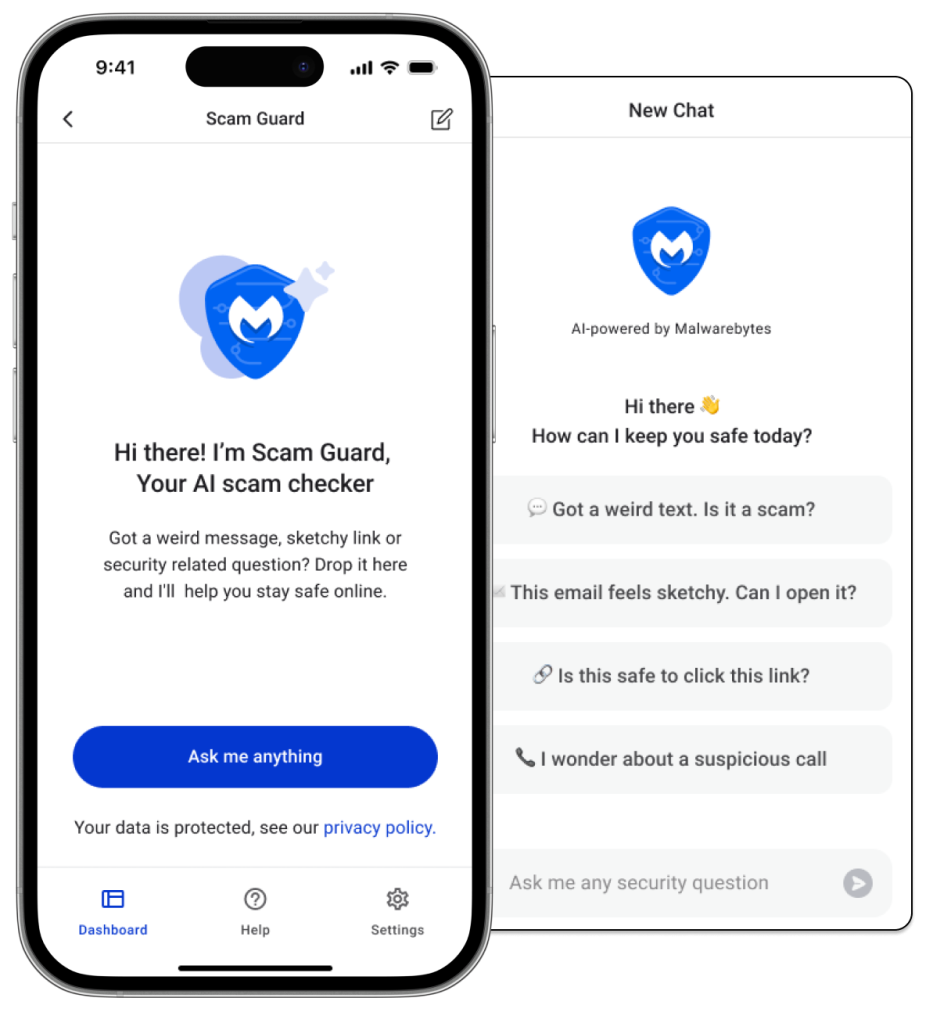
Malwarebytes is an award-winning cybersecurity and antivirus software with real-time scam detection. If you get a strange text, a fake delivery notice, a job message that sounds too good to be true, or a suspicious link, Malwarebytes’ Scam Guard feature lets you verify its safety instantly. Just upload a screenshot, paste a link, share a phone number, or submit an email, and find out in seconds whether it’s safe or a scam and what to do next. It explains why something looks suspicious and gives simple advice you can actually follow, like “Don’t click the link. Go to the company’s official website/app instead.”
Malwarebytes Scam Guard sits inside the platform’s broader mobile security setup that protects your phone day to day. That includes blocking malicious websites, stopping scam texts before you open them, scanning apps and files for hidden threats, and helping prevent your personal information from being exposed.
If a scam slips past one layer of protection, another feature can step in so you’re not relying on a single alert or filter to stay safe. The result is mobile protection that feels complete, without being overwhelming or hard to manage.
Key features
- Compatible devices: Windows PCs, Macs, Android phones/tablets, iPhones/iPads.
- Number of devices: Varies by subscription.
- Scam inputs supported: Screenshots, text messages, phone numbers, URLs, emails, and images.
- Detection type: On-demand checks with real-time, AI-powered responses.
- Coverage: Scam texts, smishing messages, phishing links, fake shipping alerts, dating scams, job scams, robocalls, and suspicious emails.
- Support: 24/7 AI guidance backed by Malwarebytes security experts.
Pros:
- Includes human support and clear next steps if someone thinks they may have already interacted with a scam.
- Works across phones and computers under one app.
- Responds quickly, making it useful in high-pressure moments before you click or reply.
- Updates itself and gets smarter with ongoing scam research and real-world threat reporting.
Cons:
- Requires an internet connection to analyze messages, links, or screenshots in real time.
Pricing:
- Free: $0
- Standard: 59.99/yr
- Plus: 79.99/yr
- Ultimate: 139.99/yr
Learn more about Malwarebytes Scam Guard
Rated 2 – Bitdefender’s Scamio: Best for WhatsApp/Messenger
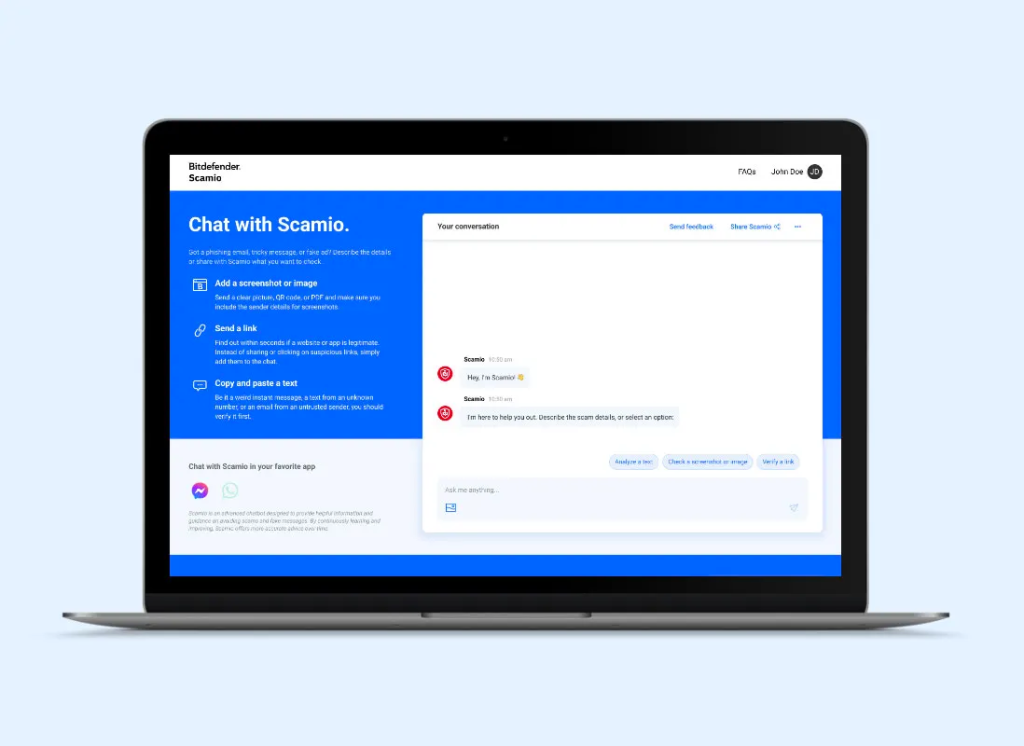
Bitdefender Scamio is an AI-powered scam detection chatbot that helps users check suspicious messages. Instead of running as a full security app, Scamio works through chat platforms like WhatsApp, Facebook Messenger, Discord, and a web app. Users can paste text, send links, upload screenshots, or scan QR codes to get a quick assessment of whether something looks like a scam.
Scamio focuses on analyzing message language, structure, and known scam patterns, then compares what you submit against Bitdefender’s threat databases. After reviewing the content, it flags potential risks and offers general advice on how to avoid scams.
Key features
- Compatible platforms: Web app, WhatsApp, Facebook Messenger, Discord
- Scam inputs supported: Text messages, emails, social media messages, links, screenshots, QR codes
- Detection type: On-demand, chat-based AI analysis
- Coverage: Phishing attempts, fraudulent websites, deceptive messages, and social engineering scams
Pros:
- Works inside popular messaging platforms
- Supports multiple input types
Cons:
- Lacks real-time scam blocking or automatic protection on the device
- Leaves out built-in protection for malicious apps, websites, or ongoing scam campaigns
Pricing: Free
Rated 3 – Google Messages Scam Detection: Best for Android text filtering
Google Messages includes built-in spam and scam detection to flag suspicious text messages as they arrive. The feature focuses on identifying known spam patterns, phishing attempts, and conversational behaviors commonly associated with scams. When a message looks risky, Google Messages can warn you, move the message to a spam folder, or prompt you to block and report the sender.
Google Messages’ scam detection mostly uses on-device machine learning, so many checks happen on your phone without uploading full message content. If a message includes a link, the URL may be checked against Google’s systems to see if it’s known to be harmful.
Key features
- Compatible devices: Android phones using Google Messages
- Detection type: Automatic, real-time scam and spam detection for SMS/RCS
- Coverage: Spam texts, phishing attempts, scam conversations that escalate over time
- Actions available: Warnings, message filtering, blocking, and reporting
Pros:
- Works directly in Android’s default messaging app
- Flags suspicious texts as they arrive
Cons:
- Limits functionality to text messages only
- Does not allow manual scam checks for messages outside the Messages app
Pricing: Free
Rated 4 – Scam Adviser: Best for checking website legitimacy
Scam Advisor is an online scam-checking platform focused primarily on helping users determine whether a website, phone number, or online entity appears legitimate. It works by analyzing public data like domain age, hosting details, reported user complaints, and known scam signals, and then assigning a trust score that indicates how risky something may be.
ScamAdviser is designed as a straightforward lookup tool. You can enter a website URL, phone number, crypto address, or similar identifier to see whether it has been reported or flagged, using a mix of available data and community feedback. Because it’s based on what information is currently available for each entry, results may be more detailed for well-documented sites than for newer or less-reported ones.
Key features
- Compatible platforms: Web-based browser access
- Scam inputs supported: Websites, phone numbers, crypto addresses, IBANs
- Detection type: Manual lookup using algorithmic risk scoring and user reports
- Coverage: Scam websites, fake online stores, fraudulent services, reported scam numbers

Pros:
- Uses a large database of reported scam websites and online stores
- Allows users to report scams to help protect others
Cons:
- Lacks real-time protection or automatic scam blocking
- Relies on manual searches rather than monitoring scams as they happen
Pricing: Free
Rated 5 – McAfee’s Scam Detector: Best for scam alerts across devices
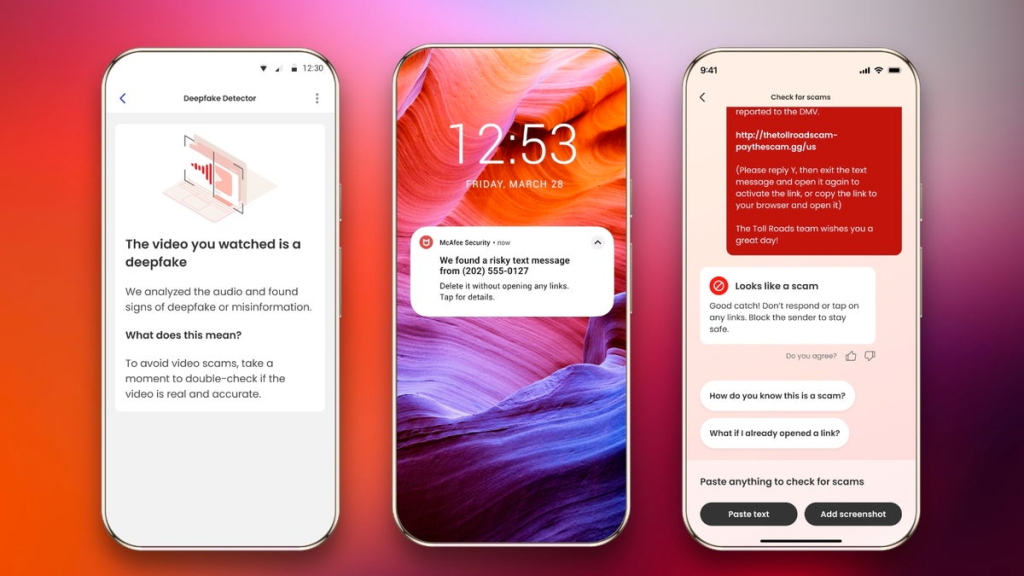
McAfee Scam Detector is part of McAfee’s security suite and helps identify scam messages across text, email, and online interactions. It focuses on flagging risky links, detecting scam patterns in messages, and warning users before or after they interact with something suspicious. The tool uses AI-driven analysis to spot common scam behaviors, including phishing attempts and emotionally manipulative messages.
Scam detection is bundled into McAfee’s all-in-one plans rather than offered as a standalone tool. Depending on the plan and device, users may receive automatic alerts, the option to run on-demand checks, or controls to adjust how aggressively scam messages are filtered.
Key features
- Compatible devices: Windows PCs, macOS computers, Android phones, iPhones/iPads
- Number of devices: 5 to unlimited
- Detection type: Automatic scam alerts with optional on-demand checks
- Coverage: Scam texts, phishing emails, risky links, and some social or video-based scam scenarios
[Source]
Pros:
- Covers scam detection across multiple device types under one subscription
- Includes basic on-demand scam checks for messages that raise concern
Cons:
- Lacks transparency into why a message is flagged beyond general warnings
- Less flexible for manually checking screenshots, phone numbers, or messages outside supported apps
Pricing:
- Essential: $119.99/yr
- Advanced Individual: $199.99/yr
- Advanced Family: $269.99/yr
Rated 6 – Norton Genie: Best for basic, AI-powered scam checks
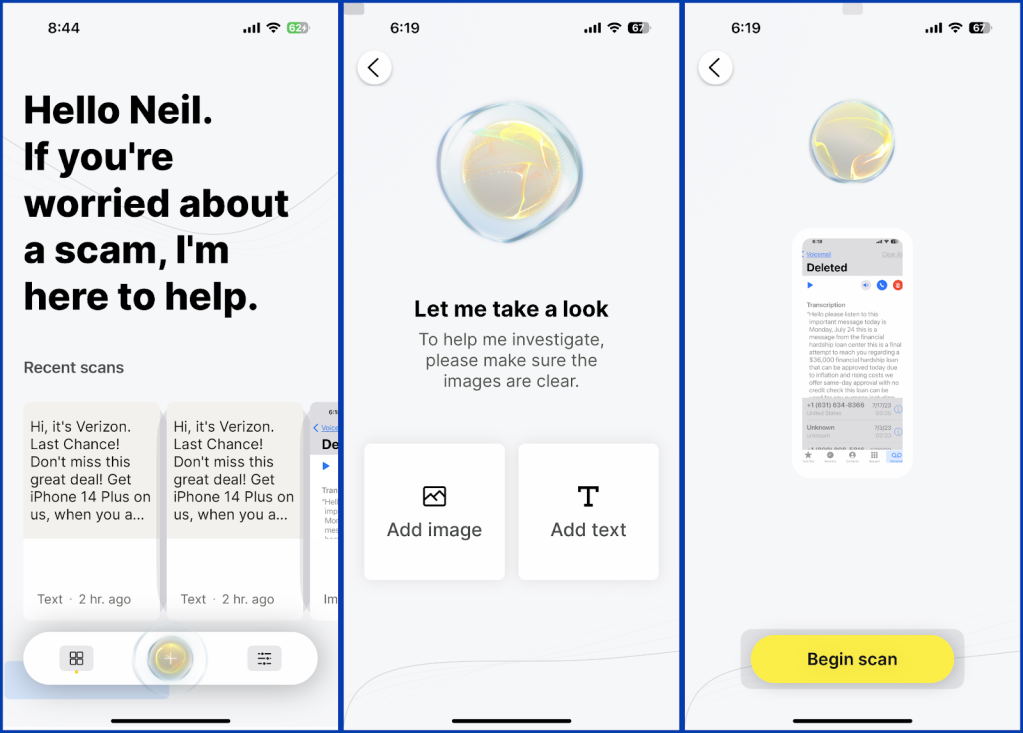
Norton Genie is a free, AI-powered scam detection tool that helps users assess whether a message, link, or website could be a scam. It works by letting users paste text, upload screenshots, or submit URLs from emails, texts, or social media messages. Genie analyzes the content for scam signals, gives a verdict along with basic guidance on what to do next, and allows users to ask follow-up questions about scams.
Key features
- Compatible devices: iOS, Android, web browser
- Scam inputs supported: Text messages, emails, social media messages, screenshots, URLs
- Detection type: On-demand, AI-powered scam analysis
- Coverage: Phishing emails, smishing texts, scam links, suspicious websites
[Source]
Pros:
- Works for free without a subscription
- Supports manual scam checks
Cons:
- Lacks real-time scam blocking or automatic protection on the device
- Operates as a standalone scam-checking tool rather than a full security system
Pricing: Free
Rated 7 – Apple: Best for simple iMessage protection
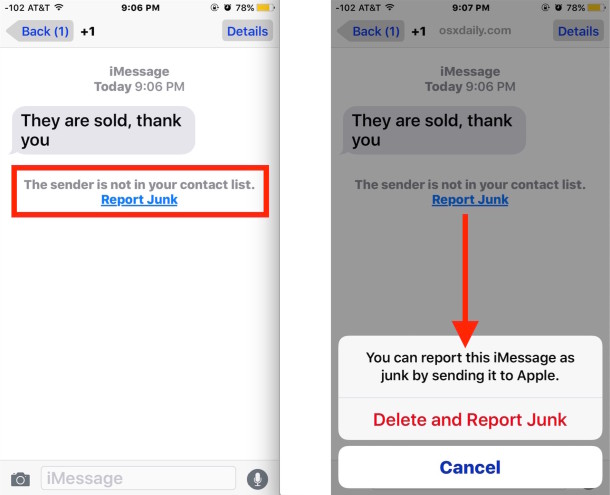
On iPhones, Apple automatically filters suspected spam texts into a separate “Junk” folder and labels some messages as potential spam. Safari includes fraudulent website warnings that block known phishing or fake sites before they load, showing a clear alert if a page is considered dangerous. Apple also offers features like “Silence Unknown Callers,” which sends calls from unfamiliar numbers straight to voicemail to reduce robocalls and scam interruptions.
Apple’s scam protections are preventive rather than interactive. They don’t explain why a message is suspicious, analyze screenshots or copied text, or offer real-time advice if a scam looks convincing.
Key features
- Compatible devices: iPhone and iPad (iOS and iPadOS)
- Number of devices: 1
- Scam detection type: Automatic filtering and warnings
- Coverage: Spam texts, phishing websites, unknown callers
[Source]
Pros:
- Comes natively with iOS and iPadOS
- Filters spam texts and blocks known phishing websites automatically
Cons:
- Lacks the capability to upload screenshots, paste links, or check suspicious messages on demand
- Limits itself to Apple devices and Apple apps like Safari and Messages
Pricing: Free
How to choose between scam detection solutions
When you’re comparing scam detection tools, focus less on marketing claims and more on how the tool helps you in real life. Here’s what to look for:
Real-time responses
Scams are designed to pressure you into acting fast. A strong scam detection solution should give you answers immediately—while you’re still deciding whether to click, reply, or share information. When you submit a suspicious message, link, or phone number, look for clear guidance on whether it seems risky and what to do next.
If the response is slow, unclear, or filled with technical language, it doesn’t help when you’re staring at a message and wondering whether to click. The best tools feel like a calm second opinion from a scam expert exactly when you need it.
Input range options
Scams don’t arrive in just one format anymore. One day it’s a text about a package delivery, the next it’s a job offer email, a dating message, or a robocall from an unfamiliar number. That means the more ways you can submit something for review, the easier it is to stay protected. Look for the capability to paste a link, share a message, upload a screenshot, or check a phone number.
The goal is simple: one solution that fits your daily life, not one that only works in a single scenario.
Ease of use
When it comes to scam detection, a tool only helps if you can reliably use it. The best solutions are simple to open, easy to understand, and don’t require you to know anything technical. You should be able to check something suspicious in seconds and get an explanation in plain language—not security jargon.
Customer trust
Scam detection tools deal with sensitive information, so trust matters. You’re often sharing personal messages, phone numbers, or screenshots, and you need to know that data is handled responsibly. Look for a tool backed by an established security company that’s transparent about how data is handled. Independent testing, strong reviews, and credible third-party recognition can also help show if a platform delivers on what it promises.
Additional security features
Scam detection works best when it’s part of a bigger safety net, versus a standalone tool you only open when something feels off. Scams can lead to other problems, like malware infections, account takeovers, or identity theft, so it’s worth looking for solutions that help protect you before and after a scam attempt.
The most useful tools help reduce the damage and keep you protected moving forward, all from one place. When everything works together, you spend less time reacting and more time staying safe without constant worry.
Choose the right scam detection tool for your mobile
Scam attempts are constant. Roughly 70% of people have personally experienced a cybersecurity threat, and US consumers alone lost $12.5 billion to online scams in a single year. On top of that, many people report receiving scam texts, emails, or calls weekly, if not daily.
If you want scam protection that responds quickly, explains what you’re seeing clearly, and helps across the places scams show up most, Malwarebytes can help. With on-demand scam checks plus everyday mobile security features, you can verify suspicious messages without guessing and get guidance on what to do next.
Learn more about how Scam Guard protects you 24/7.

How Malwarebytes Scam Guard works

Share a number, text, email, URL, or image
Whether it’s a suspicious text, email, website, ad, or message, Scam Guard will detect in seconds whether or not it’s concerning while recommending actions to keep your data and devices safe.

Receive fast AI-powered advice
Get real-time tips backed by Malwarebytes’ extensive knowledge base to avert and report scams, keeping yourself and others safe from scammers.

Get back to streaming, browsing, and connecting
Scam Guard is ready whenever you need, just open the chat in the Malwarebytes Premium Security app.


Trusted by the best








Frequently asked questions about scam detection tools
How long does scam detection take?
What are the best tools to detect phishing scams?
Are there scam detection tools that protect against social engineering?
Are there any free scam detection tools?
Comprehensive cybersecurity at your fingertips.