Apple has shipped a hefty round of July security patches, headlined by iOS/iPadOS 26.6, macOS Tahoe 26.6, and Safari 26.6, with dozens of vulnerabilities squashed across kernel, WebKit, media frameworks, and core apps. These updates are primarily about improving security rather than adding new features, and users should install them as soon as possible.
Updates for your particular device
The table below shows which updates are available and points you to the relevant security content for that subject.
| iOS 26.6 and iPadOS 26.6 | iPhone 11 and later, iPad Pro 12.9-inch 3rd generation and later, iPad Pro 11-inch 1st generation and later, iPad Air 3rd generation and later, iPad 8th generation and later, and iPad mini 5th generation and later | |
| macOS Tahoe 26.6 | macOS Tahoe | |
| macOS Sequoia 15.7.8 | macOS Sequoia | |
| macOS Sonoma 14.8.8 | macOS Sonoma | |
| tvOS 26.6 | Apple TV HD and Apple TV 4K (all models) | |
| watchOS 26.6 | Apple Watch Series 6 and later | |
| visionOS 26.6 | Apple Vision Pro (all models) | |
| Safari 26.6 | macOS Sonoma and macOS Sequoia |
How to update your Apple devices
How to update your iPhone or iPad
For iOS and iPadOS users, here’s how to check if you’re using the latest software version:
Go to Settings > General > Software Update. You will see if there are updates available and be guided through installing them.
Turn on Automatic Updates if you haven’t already—you’ll find it on the same screen.
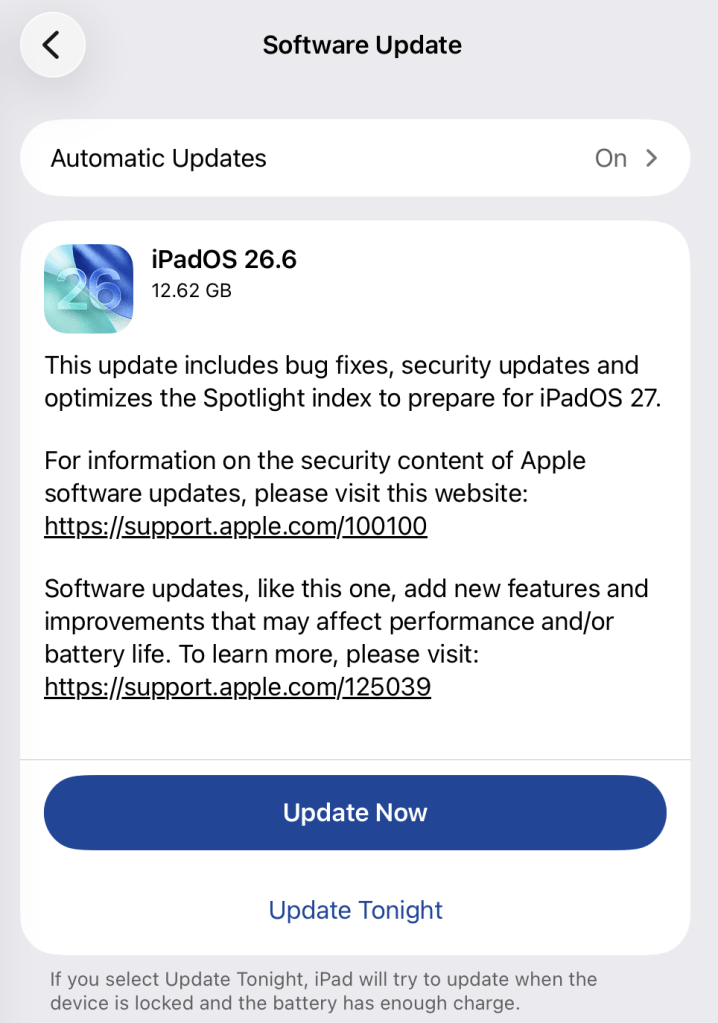
How to update macOS on any version
To update macOS on any supported Mac, use the Software Update feature, which Apple designed to work consistently across all recent versions. Here are the steps:
- Click the Apple menu in the upper-left corner of your screen.
- Choose System Settings (or System Preferences on older versions).
- Select General in the sidebar, then click Software Update on the right. On older macOS, just look for Software Update directly.
- Your Mac will check for updates automatically. If updates are available, click Update Now (or Upgrade Now for major new versions) and follow the on-screen instructions. Before you upgrade to macOS Tahoe 26, please read these instructions.
- Enter your administrator password if prompted, then let your Mac finish the update (it might need to restart during this process).
- Make sure your Mac stays plugged in and connected to the internet until the update is done.
How to update your Safari browser
Safari updates are included with macOS updates, so installing the latest version of macOS will also update Safari. To check manually:
- Open the Apple menu > System Settings > General > Software Update.
- If you see a Safari update listed separately, click Update Now to install it.
- Restart your device when prompted.
If you’re on an older macOS version that’s still supported (like Sonoma or Sequoia), Apple may offer Safari updates independently through Software Update.
Technical details
Among the more interesting vulnerabilities patched in this update are CVE-2026-43818 in ImageIO, CVE-2026-43776 in AppleDouble, and CVE-2026-64763 to 64766 in SceneKit.
Although found in different applications, these vulnerabilities have one thing in common. Their descriptions say:
“Processing a maliciously crafted file may lead to unexpected app termination or arbitrary code execution.”
The identical “processing a maliciously crafted file may lead to unexpected app termination or arbitrary code execution” language is not a coincidence. It’s Apple’s standard impact boilerplate for file‑parsing bugs across multiple frameworks, including ImageIO, AppleDouble, and SceneKit. The similarities reflect shared exploitation patterns (untrusted file input hitting native parsers), while the differences lie in what each framework does and which file types/contexts are affected.
ImageIO is the system framework responsible for reading and displaying image formats such as JPEG, PNG, TIFF, RAW, GIF, and other formats. It’s used throughout iOS and macOS by apps including Photos, Safari, Messages, Mail, and Preview.
SceneKit is a 3D graphics and scene graph framework used for rendering models, animations, and complex 3D scenes in apps and games on Apple platforms. It parses scene description files and 3D assets and turns them into renderable content.
AppleDouble is something macOS uses behind the scenes to keep extra file information like icons and other Finder details in cases where your files live on certain types of disks or servers. When Apple mentions “AppleDouble” in security notes, it’s talking about the code that reads and writes that hidden metadata, particularly when files are stored on network drives or shared with non‑Apple systems.
Apple’s advisories reuse a standard warning for any memory‑corruption bug in a file parser: the best‑case outcome is just a crash, the worst case is someone running their malicious code on your device. ImageIO, AppleDouble, and SceneKit all sit in that same danger zone. Although the file types are different, they all present the same underlying risk.
Until you’ve installed this update, it’s an even worse idea than usual to open unsolicited messages and emails with images in them.
Scammers know more about you than you think.
Malwarebytes Mobile Security protects you from phishing, scam texts, malicious sites, and more. With real-time AI-powered Scam Guard built right in.