Recently, we found a listing on BuzzFeed from someone pretending to be Malwarebytes Support. It reminded us why we need to be cautious about content on platforms where anyone can create an entry.
Based on the phone number, we suspect the people behind this listing are trying to draw callers into a tech support scam. The scammer may use social engineering to persuade victims to grant remote access to their devices.
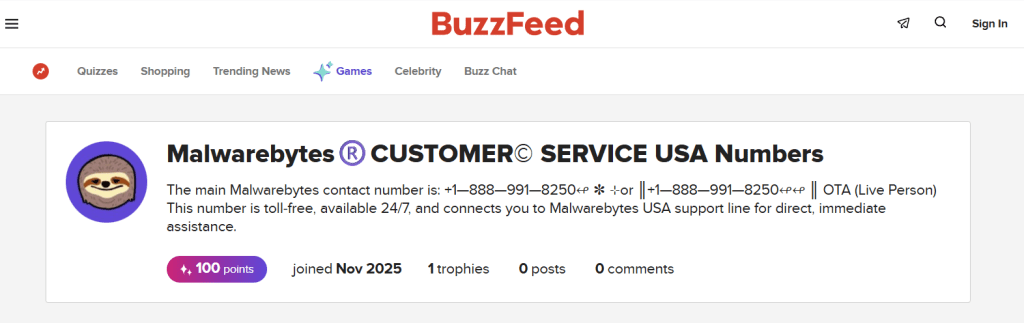
At first glance, this kind of lure can look convincing. It borrows the familiarity of a well-known publication, uses a recognizable security brand, and may appear in an ad placement or search result where people expect to find legitimate information.
But the combination of a trusted platform and a trusted brand does not make something trustworthy.
The phone number in the listing has also been used in similar scams impersonating McAfee and Norton.
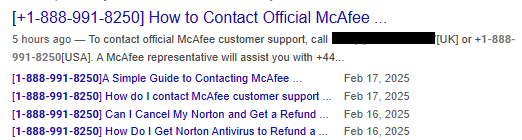

Don’t recognize that number? We’ll check it.
Scammers do not always need to build a convincing website from scratch. They can use platforms that let people create listings, ads, storefronts, pages, reviews, or posts, relying on the platform’s reputation to do part of the work for them.
How scammers borrow a platform’s credibility
The whole point of online marketplaces and social media is to make it easy for people to create posts and listings.
Someone wants to sell an old camera, a handcrafted item, a digital product, or perhaps offer a service. They create an account, fill out a form, add a few photos, write a description, and make their listing visible to a huge audience.
You can imagine how attractive this is to scammers.
Our own research found that 47% of people encountered scams on social media at least once a week, while 36% encountered them on buying-and-selling platforms.
A fake listing can borrow credibility from:
- The platform’s familiar design
- Its domain name and security certificate
- The assumption that listings have been reviewed
- Brand names and logos used without permission
- Ratings, reviews, or sales claims that look legitimate at first glance
The scammer does not need to persuade victims that an unfamiliar domain is safe. They only need them to believe that content hosted by a marketplace, classified site, social-media platform, advertising network, or review site is safe.
People are rightly cautious when they land on a random website with an odd name. But they may lower their guard when they see a familiar marketplace or media brand in the browser address bar.
Many marketplace scams are straightforward. A seller advertises a product that does not exist, sends a counterfeit item, or tries to persuade the buyer to pay outside the platform.
From listing to scam
But some listings are only the beginning of the scam.
A listing might advertise:
- Antimalware software or a “lifetime” security subscription
- Device-cleaning or PC-repair services
- Account-recovery help
- Printer, router, smart-TV, or smartphone support
- A low-cost or free trial that requires victims to call a number
- A product description containing a “support” phone number or an external link
The product or service being advertised is irrelevant. The real purpose is to get victims to call a number, visit another website, install remote-access software, or hand over payment details.
How to stay safe
Large platforms do try to remove fraudulent listings. They use automated detection, seller controls, user reports, brand-protection programs, and moderation teams.
But platforms operating at scale face a difficult problem: legitimate users can create an enormous number of listings, posts, ads, and product pages in a short time. Review systems can miss malicious content, particularly when scammers change names, images, wording, accounts, phone numbers, and links faster than moderators can respond.
Users therefore need to take precautions:
- Be suspicious of listings offering security software, technical support, account recovery, or device repair at an unusually low price.
- Treat unexpected phone numbers in ads, listings, product images, comments, and pop-ups as untrusted, especially when they appear in an unrelated category. Our example appeared in the “Quizzes” section of BuzzFeed.
- Do not assume a listing is genuine because it appears on a large, familiar platform.
- Before engaging, check the seller’s history, reviews, contact details, and return information, bearing in mind that these can also be manipulated.
- Avoid sellers who pressure you to continue the conversation off-platform.
- Never allow an unsolicited “support agent” to access your computer remotely.
- Do not pay with gift cards, cryptocurrency, wire transfers, or payment apps. Use a payment method that offers purchase protection and may allow you to dispute an unauthorized or fraudulent charge.
- Type the company’s official website address into your browser, use its official app, or rely on a saved bookmark. Verify any support number through one of these official channels.
- Report suspicious listings to the hosting platform and to the impersonated brand.
If you have already called a scammer or granted remote access:
- Disconnect the device from the internet
- Remove remote-access software
- Change important passwords from a known-clean device
- Contact your bank or card provider if any payment details were shared
The rule of thumb is simple: a trusted platform can host untrusted content. Scammers thrive on borrowed credibility.
Pro tip: Use Malwarebytes Scam Guard to help you figure out whether something is a scam and what to do next.
Our Support team is available 24/7 to help with anything from quick questions to complex issues. Visit help.malwarebytes.com to contact us directly or search our knowledge base.
Something feel off? Check it before you click.
Malwarebytes Scam Guard helps you analyze suspicious links, texts, and screenshots instantly.
Available with Malwarebytes Premium Security for all your devices, and in the Malwarebytes app for iOS and Android.