Most of us click on search results without knowing much about the website we’re about to visit. And once we’re there, it’s not always obvious when something isn’t quite right.
Now, we’ve added two new features to Malwarebytes Browser Guard that will do even more to keep you safe online.
Search Reputation gives you a quick read on your search results, before you even click on anything. And with Scam Guard Lite, you can analyze the contents of a webpage directly from the Browser Guard extension in Google Chrome.
These new features build on Browser Guard’s existing protections against scams, malware, ads, trackers, and plenty of other threats while you browse. So, from the moment you begin a search to when you land on a website, we’ve got you covered.
Check a website before you click
Search results don’t always make it easy to tell a legitimate website from a malicious one. Scam sites are uncannily good at imitating brands, and one misleading link can send you down a dangerous rabbit hole.
Browser Guard’s new Search Reputation feature gives you more information before you click.
When you use Google, DuckDuckGo, Brave, or Bing, Search Reputation will display a rating alongside your search results. A green “Good” rating means the website appears safe based on Malwarebytes’ reputation database, while a red “Malicious” rating tells you Malwarebytes has identified the site as unsafe.
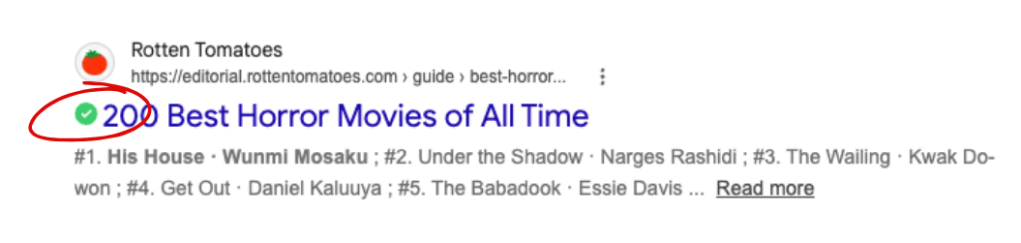
But that green check mark is only the first layer of protection.
A “Good” rating isn’t a guarantee that a website is safe. New threats appear all the time, and no reputation database can catalog every malicious site on the internet. For as long as you’re online, Browser Guard will continue working in the background and checking for other signs of danger. It may block or warn you about a site even if Search Reputation initially gave it a “Good” rating.
Already on a website? Ask Scam Guard Lite
If you’re already on a website and something feels off, Scam Guard Lite can help you take a closer look.
Available directly in the Browser Guard extension on Google Chrome, Scam Guard Lite analyzes the contents of the webpage you’re viewing without asking you to copy a link, take a screenshot, or leave the page.
Just open Browser Guard, select Scam Guard Lite, and it will immediately examine the page for signs of a scam. (The first time you use the feature, Browser Guard will download Gemini to your device to power it.)
The analysis happens on your device using a large language model (LLM). And if you’re concerned about privacy, we’ve got your back: Your browsing history isn’t saved or sent to an AI cloud.
More questions? Open the full Scam Guard
If you have other security concerns, you can open the Browser Guard dashboard and use the full version of Scam Guard. There, you can ask Scam Guard to review suspicious emails and links, or ask questions about something you’ve encountered online.
Something feel off? Check it before you click.
Malwarebytes Scam Guard helps you analyze suspicious links, texts, and screenshots instantly.
Available with Malwarebytes Premium Security for all your devices, and in the Malwarebytes app for iOS and Android.