A scam is spreading through WhatsApp with the goal of taking over victims’ accounts entirely.
It starts with a message that feels harmless and familiar. Someone—often a contact whose account has already been compromised—asks you to support a friend or relative of theirs by voting in an online contest. The theme varies: a ballet performance, a dog competition, a school event. The wording is casual, sometimes urgent, and designed to get a quick click.
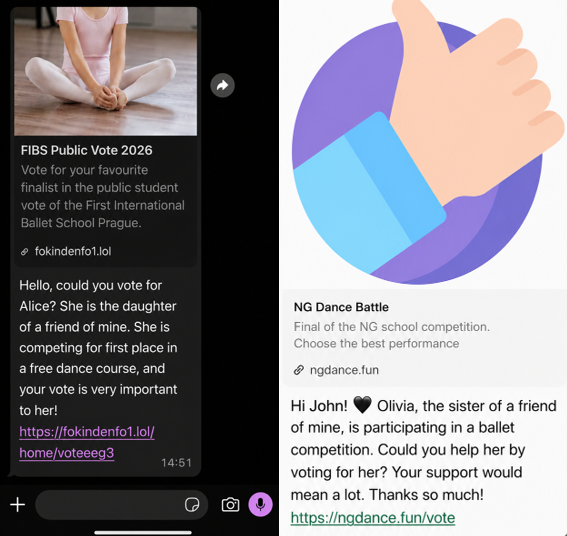
We spotted the scam showing up in our anonymized Scam Guard submissions. WhatsApp is popular with cybercriminals, and the third most common channel where we see scams delivered, behind websites and email.
At first glance, nothing seems out of the ordinary. But the link doesn’t lead to a real voting page. Instead, it redirects to a page that appears to be related to WhatsApp, often involving the legitimate wa.me domain, where the real attack begins.
This scam works because it combines trust and curiosity. If the message comes from someone you know, you’re far less likely to question it and far more likely to follow through to do them a small favor.
In some versions of the scam, the link redirects you into a flow that abuses WhatsApp’s legitimate “Linked devices” feature.
Depending on your device, you may see what looks like a WhatsApp page prompting you to continue, verify, or connect. In some cases, the victim is guided through steps that resemble setting up WhatsApp Web or linking a new device.
The goal is to trick you into authorizing a new linked session that gives the attacker access to your WhatsApp account.
A typical flow looks like this:
- You tap the “vote” link.
- A page opens that appears to be related to WhatsApp.
- You’re prompted to complete a connection or verification step.
- That action links your WhatsApp account to a device controlled by the attacker.
Some versions of this scam take a less direct route. Instead of sending victims to a fake voting page, the message or the landing page instructs victims to open WhatsApp, go to “Connected Devices,” and enter a code supplied by the scammer.
These scammers aren’t trying to steal your password. Instead, they’re tricking you into giving them access to your account yourself.
How WhatsApp’s Linked devices feature works
WhatsApp allows you to use your account on multiple devices, including a web browser or desktop app, through its Linked devices feature.
Normally, this works by:
- Opening WhatsApp on your phone.
- Scanning a QR code displayed on another device.
- Approving the connection.
Once linked, that secondary device can:
- Read your messages.
- Send messages as you.
- Access your ongoing conversations in near real time.
But if you follow those steps, you could be giving an attacker access to your messages, contacts, and ongoing conversations.
This is a legitimate and widely used feature, especially for WhatsApp Web. But in this scam, attackers abuse it to gain the same level of access without your informed consent.
Once a scammer links their device to your WhatsApp account, they can continue accessing your conversations until that device is removed.
From there, they can:
- Send messages pretending to be you, including forwarding the same scam to your contacts.
- Ask friends or family for money or sensitive information.
- Read your chats and harvest personal information.
Because this doesn’t involve a traditional login, there are no obvious signs like password reset emails or failed login alerts. The attacker’s device simply appears as another linked session on your account.
Unless you check your linked devices, the compromise can go unnoticed for quite some time.
How to stay safe
Scams like this rely on quick reactions and misplaced trust. A few simple precautions can make a big difference:
- Be cautious with unexpected “vote” or “support” requests, even if they come from someone you know.
- Don’t click unexpected links, especially if you’re immediately asked to verify, connect, or link your WhatsApp account.
- Never follow instructions to link devices or scan QR codes unless you initiated the action yourself.
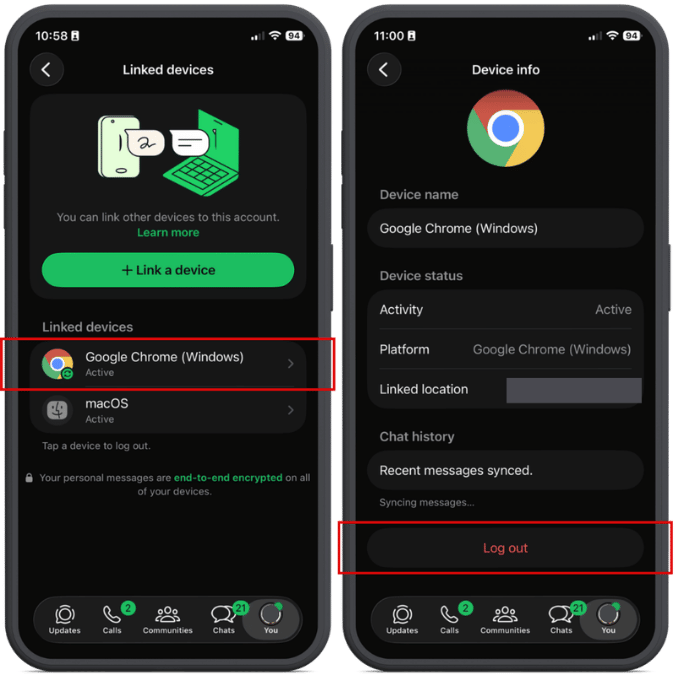
- Regularly review your linked devices in WhatsApp (Settings > Linked devices) and log out of any you don’t recognize.
- Enable two-step verification in WhatsApp for an extra layer of protection.
- If a message feels off, verify it with the sender through another channel before acting.
- Malwarebytes Scam Guard can also help spot scams like this. It’s included with the Malwarebytes Mobile Security app for Android and iPhone.
If you suspect your account has already been compromised, immediately log out of all linked devices and warn your contacts so they don’t fall for follow-up scams.
Indicators of Compromise (IOCs)
These domains are typically short-lived and quickly replaced. However, they may help you recognize similar scams if you encounter them:
ngdance[.]fun/votefokindenfo1[.]lol/home/voteeeg3
stardancer[.]fun/home/voteCZ03
thebestscollato[.]top/home/scolatica
vatiter[.]click/home/voteerok
megadencer[.]top/home/eng10
Something feel off? Check it before you click.
Malwarebytes Scam Guard helps you analyze suspicious links, texts, and screenshots instantly.
Available with Malwarebytes Premium Security for all your devices, and in the Malwarebytes app for iOS and Android.