Attackers are abusing a critical Ghost Content Management System (CMS) vulnerability to hijack more than 700 legitimate websites and inject a fake Cloudflare verification step that tricks visitors into running a Windows command that installs malware.
These social engineering campaigns—where website visitors are tricked into running malicious commands on their systems—are commonly known as “ClickFix” attacks. In this case, cybercriminals turned websites belonging to trusted organizations, including universities and tech companies, into delivery platforms for the malware campaign.
More than 700 Ghost‑powered websites were compromised through a known SQL injection vulnerability tracked as CVE‑2026‑26980. The attackers used this bug to steal administrative API keys and silently inject malicious JavaScript into posts and pages across affected sites.
Researchers found that the injected script loads a second‑stage ClickFix flow, presenting visitors with a fake Cloudflare or CAPTCHA verification dialog.
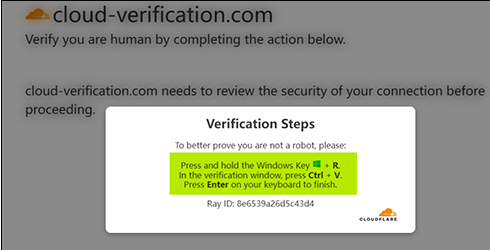
Instead of a normal checkbox, the page instructs users to copy‑paste a command into the Windows Run dialog or PowerShell, effectively tricking them into installing malware on their own systems.
Details for website managers
At the heart of this campaign is a critical SQL injection bug in Ghost’s Content API. The researchers noted:
“Without any authentication, an attacker can directly read the database contents through this vulnerability, including the Admin API Key used to call the Ghost Admin API.”
The vulnerability affects Ghost versions 3.24.0 through 6.19.0 and can be exploited without logging in.
A patched version is now available and should be installed as soon as possible. Not just because of the ClickFix campaign; once attackers steal an Admin API key, they can edit, delete, or create posts, inject scripts, hijack themes, and tamper with user‑facing content in other ways.
How to stay safe
This campaign is likely to be particularly effective because the instructions are framed as harmless technical steps such as “verify you’re human,” “fix your connection,” or “continue to the site.” Worse still, the content appears on websites users already trust.
With ClickFix running rampant—and it doesn’t look like it’s going away anytime soon—it’s important to be aware, careful, and protected.
- Slow down. Don’t follow instructions on a webpage without thinking them through, especially if the page asks you to run commands on your device or copy-paste code. Attackers rely on urgency to bypass critical thinking, and many ClickFix pages use countdowns, fake user counters, or other pressure tactics to make you act quickly.
- Avoid running commands or scripts from untrusted sources. Never run code or commands copied from websites, emails, or messages unless you trust the source and understand the action’s purpose. If a website tells you to execute a command or perform a technical action, check official documentation or contact support before proceeding.
- Be cautious when copy-pasting commands. Attackers often disguise malicious payloads inside clipboard text. Typing commands manually instead of copy-pasting them can reduce the risk of unknowingly running hidden malicious payloads.
- Secure your devices. Use an up-to-date, real-time anti-malware solution with a web protection component.
- Stay informed about evolving attack techniques. Cybercriminals constantly adapt their methods, and awareness remains one of your best defenses, so keep reading our blog!
Pro tip: Did you know the free Malwarebytes Browser Guard extension warns you when a website tries to copy something to your clipboard?
Stop threats before they can do any harm.
Malwarebytes Browser Guard blocks phishing pages and malicious sites automatically. Free, one click to install. Add it to your browser →