A website built to look almost exactly like CNN’s homepage is telling visitors to download “the new CNN app.” But it’s not CNN’s app, and has nothing to do with the news company.
The campaign doesn’t stop at CNN. It also uses fake Stremio and Avast installers hosted on similarly convincing lookalike sites, all targeting Windows users. The installers are part of the same campaign to trick people into installing legitimate remote-management software that’s already linked to the attacker’s account.
Instead of downloading the software they expected, victims install O&O Syspectr, a genuine, digitally signed remote administration tool used by IT teams to manage computers. In the wrong hands, that tool can give an attacker remote access to a victim’s PC, allowing them to run commands, install additional software, or explore files and data. The CNN, Avast, and Stremio lures all point back to the same Syspectr account.
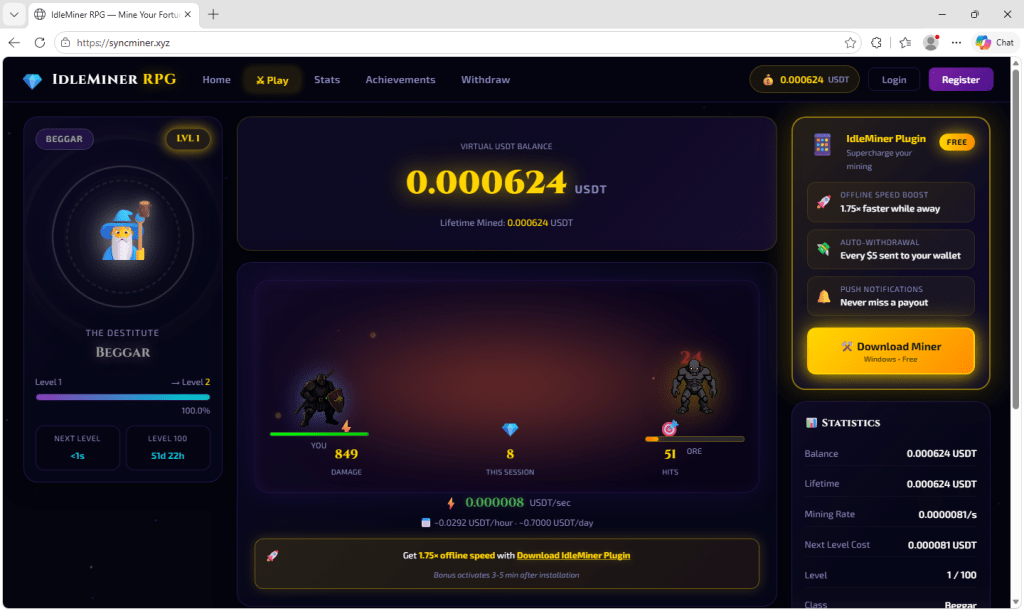
Another lookalike site uses a fake crypto-mining browser game instead of a trusted brand, but delivers the same software from a different Syspectr account.
Here’s what we found, why your antivirus has no reason to stop it, and the one 10-second check that would have caught it every time.
What the fake CNN page looks like
The site copies CNN’s real homepage closely enough that most people wouldn’t look twice. It has current headlines, the same layout, and even a red “Live Updates” tag on a real story. A pop-up interrupts almost immediately: “Get the latest news first in the new CNN app—it’s live and free,” with a red Download button underneath.
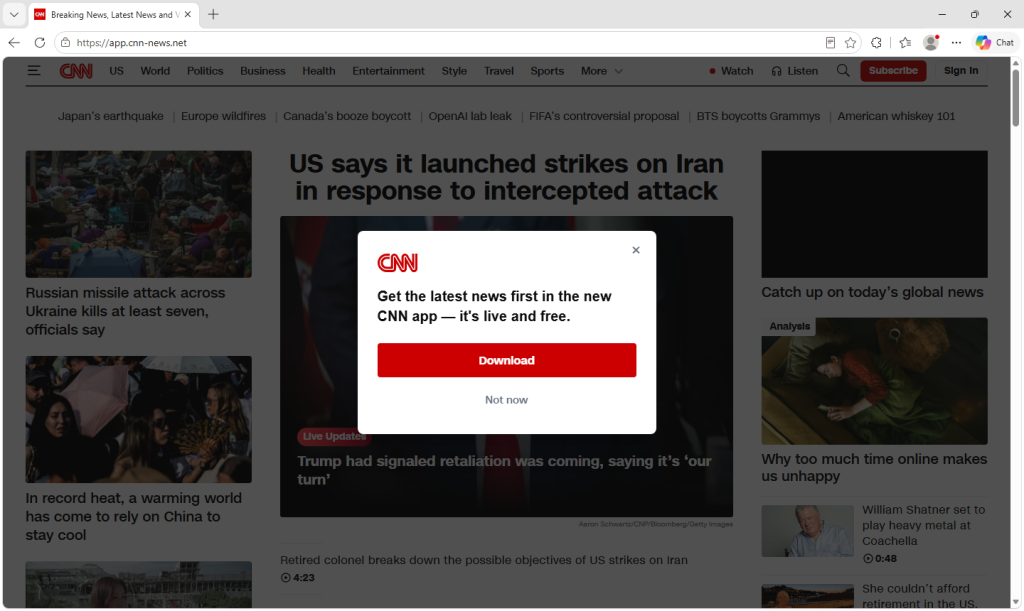
The file behind that button is named CNN_App.setupad4693fd-d903-4791-8f58-975261c93ca2.exe—the same Syspectr installer that shows up under different branding elsewhere, down to the account ID embedded in the filename.
The same trick, impersonating other brands
A lookalike site at avast-premium[.]shop mimics Avast’s real download page closely, including the logo, review scores, and a blue “Free download” button for “Avast One.” The file behind it is named AVAST_App.setup4693fd-d903-4791-8f58-975261c93ca2.exe.

Another malicious site, stremiotv[.]online, copies Stremio, a legitimate media-center app. The file it pushes visitors to download is named Stremio_App.setup4693fd-d903-4791-8f58-975261c93ca2.exe.

Both carry the same account ID found in the CNN installer.
By impersonating trusted brands, the attackers trick visitors into installing the legitimate O&O Syspectr remote-access tool, which gives the attackers remote access to the victims’ computers.
A different kind of bait
Not every lure needs a trusted brand, however.
syncminer[.]xyz invents its own hook instead: an “idle miner” browser game showing a slowly-ticking cryptocurrency balance, with a “Download Miner Plugin” button promising faster payouts. The identical site also runs at idleminer[.]pro with the same layout, same game, and same download.
Both distribute the same file, named oo-syspectr-setup9158bf2a-ff25-4290-b96c-2dc5eb310391.exe outright, carrying its own account ID that is different from the CNN, Avast, and Stremio lures we saw.
It’s not malware, which is why antivirus can miss it
Every one of these files is a real, digitally signed piece of software from O&O Software GmbH, a legitimate German company. Syspectr is sold openly to IT departments and gives an operator remote desktop control and an admin-level command line on whatever machine it’s installed on.
That’s why antivirus software may not stop it. Antivirus is designed to detect malicious software, not flag a legitimately signed business tool just because of how it arrived on a computer. The attacker only has to convince victims to install a legitimate remote-management tool that’s already linked to the attacker’s account.
The 10-second check that gives it away
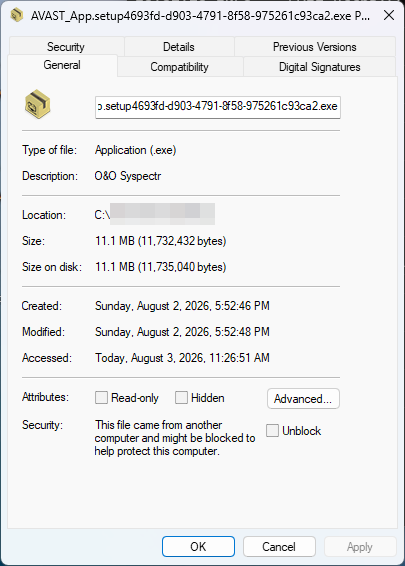
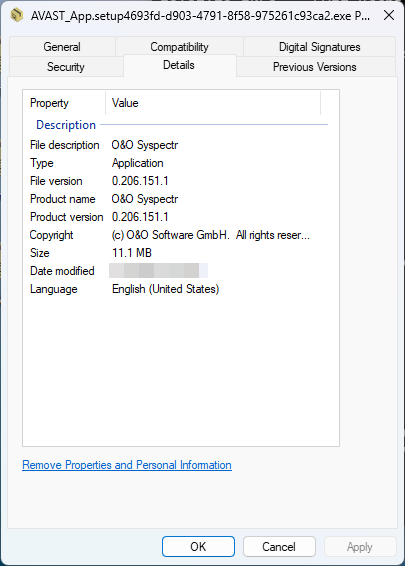
On Windows, right-click any installer like this, choose Properties, and open the Details tab. Two fields—File description and Product name—identify every installer we examined as O&O Syspectr, alongside a copyright notice for O&O Software GmbH.
The filename can be changed by anyone distributing the file, but those embedded details come from the signed software itself. Changing them would invalidate the digital signature, so they reveal what the installer really is.
How we know these are connected
Every Syspectr installer includes the account ID of whoever generated it, embedded directly in the filename. The CNN-, Avast-, and Stremio-branded files all carry the exact same account ID, showing they were created from a single Syspectr account and simply reskinned for different lures.
The Syspectr installer distributed through the fake crypto-mining game carries a different account ID, suggesting either a second operator using the same playbook or the same group operating under another account.
What this tool can actually do
Syspectr is designed to let IT administrators manage computers remotely. Depending on the subscription level, that can include viewing system information, monitoring running processes and services, managing Microsoft Defender, and restricting USB devices.
The paid plans add the features that matter most to attackers. They allow an operator to remotely control the victim’s computer, browse files, run commands, install additional software, and make changes to the system as though they were sitting in front of it. Higher tiers add tools for managing large numbers of devices and, on compatible hardware, even allow remote access when Windows won’t boot.
These remote-control features aren’t available on free Syspectr accounts. They require a Premium subscription or higher.
O&O Software response
O&O responded quickly. Within days, the company disabled Remote Desktop and Remote Console access for free Syspectr accounts, restricting both to paid plans only.
O&O has since identified and suspended the abusive accounts, also blocking them from adding new devices. O&O’s analysis found the attackers relied exclusively on Remote Console, not Remote Desktop. The company says it will keep scanning for this pattern and tighten restrictions further if needed.
It’s a solid response and O&O clearly has a handle on how the abuse is happening. Not every vendor moves this quickly or this effectively when their software gets abused.
How to protect yourself
- Only download software from the vendor’s actual website. Search results and ads can lead to convincing fakes.
- Before running any installer you’re unsure about, on Windows you can right-click it, open Properties > Details, and check the File description and Product name fields.
- If you find O&O Syspectr installed and didn’t set it up yourself, uninstall it through Settings > Apps and run a full antivirus scan.
- If you ran an installer like this recently, change passwords for anything you accessed on that machine afterward from a clean machine.
- Protect yourself while browsing online. Malwarebytes Browser Guard blocks known scam and lookalike pages before you land on them.
Remember
Fake download sites don’t always deliver malware. Sometimes they deliver legitimate software that’s been weaponized by the person distributing it. That’s why it’s important to download software from the real vendor and, if something doesn’t feel right, check what the installer actually is before you run it.
Indicators of Compromise (IOCs)
Account ID 4693fd-d903-4791-8f58-975261c93ca2:
app.cnn-news[.]net→CNN_App.setupad4693fd-d903-4791-8f58-975261c93ca2.exeavast-premium[.]shop→AVAST_App.setup4693fd-d903-4791-8f58-975261c93ca2.exestremiotv[.]online→Stremio_App.setup4693fd-d903-4791-8f58-975261c93ca2.exe
Account ID 9158bf2a-ff25-4290-b96c-2dc5eb310391:
syncminer[.]xyz→oo-syspectr-setup9158bf2a-ff25-4290-b96c-2dc5eb310391.exeidleminer[.]pro→oo-syspectr-setup9158bf2a-ff25-4290-b96c-2dc5eb310391.exe
Stop threats before they can do any harm.
Malwarebytes Browser Guard blocks phishing pages and malicious sites automatically. Free, one click to install. Add it to your browser →