iPhone users are being targeted in a new tech support scam, using a fake Apple Pay notification to trick users.
Tech support scams that use fake warnings to push victims into calling a phone number have been around for years, but this page has been designed specifically for phones.
Instead of a desktop warning claiming your computer has a virus, the scam imitates familiar iPhone features in an attempt to scam you.
What happens
A page opens on your phone and appears to show Apple Pay processing a $657 App Store payment. A spinner turns. “Face ID · verifying identity” appears beneath the amount. There is a transaction ID, a padlock, and all the visual cues of a payment in progress.
A few seconds later, the story changes.
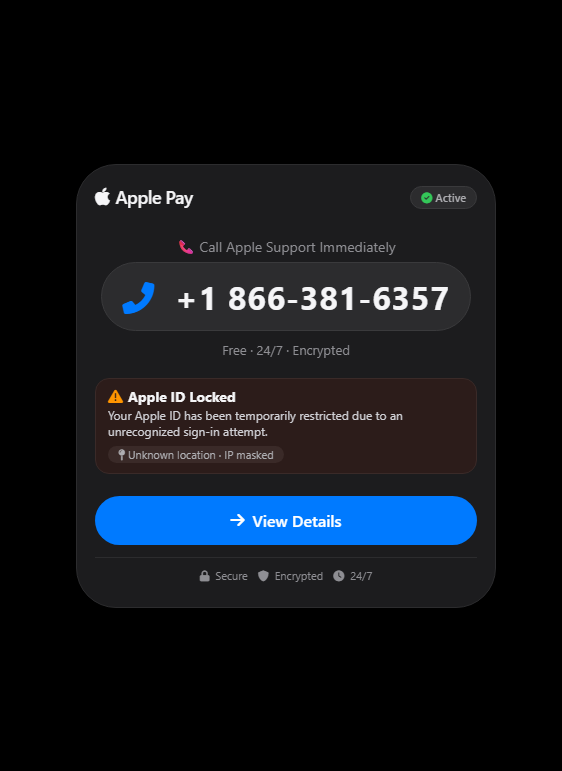
You get an alert saying your Apple ID is locked because of an unrecognized sign-in. A phone number appears under the instruction to call Apple Support immediately. When you open the transaction details, the payment is marked “Completed.” Then your phone begins speaking an alert about the unauthorized charge.
It’s all completely made up.
The page we analyzed contains no real Apple Pay transaction and no biometric verification. Instead, it uses hardcoded payment details, browser-generated speech, fake security warnings, and aggressive navigation tricks to get the victim to call the scammer.
The “Face ID” check isn’t real
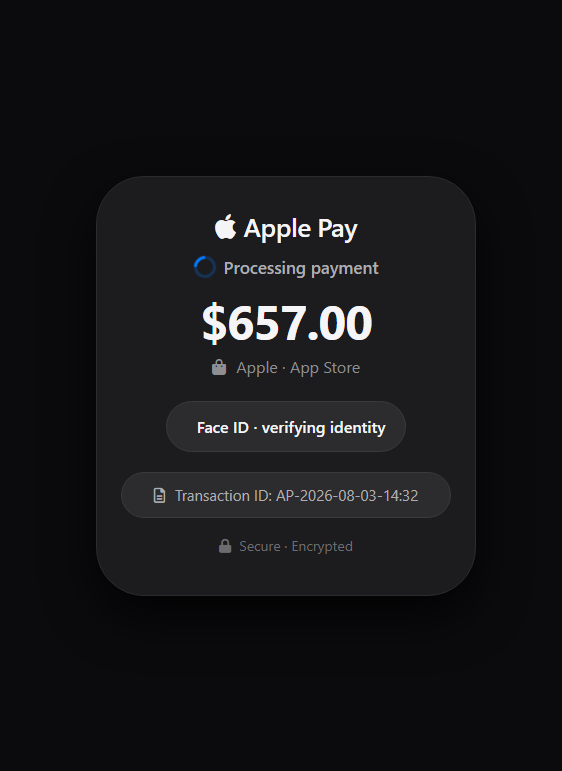
The first screen is designed to make it look as though the phone itself is authorizing a payment.
In this sample, “Face ID · verifying identity” is simply an HTML element displayed beside an icon. There is no Apple Pay request and no biometric-authentication call behind it.
Apple Pay can legitimately be used on websites, but a genuine payment begins when the merchant requests it. The system then immediately displays a payment sheet for the user to review and authenticate, as Apple’s guidelines specify.
Nothing like that happens here. The scam page has simply drawn its own imitation.
The “Processing payment” spinner is equally cosmetic. The entire splash screen disappears on a timer after 2.8 seconds, regardless of anything the user does.
The receipt is fake, and the code is the same for everyone
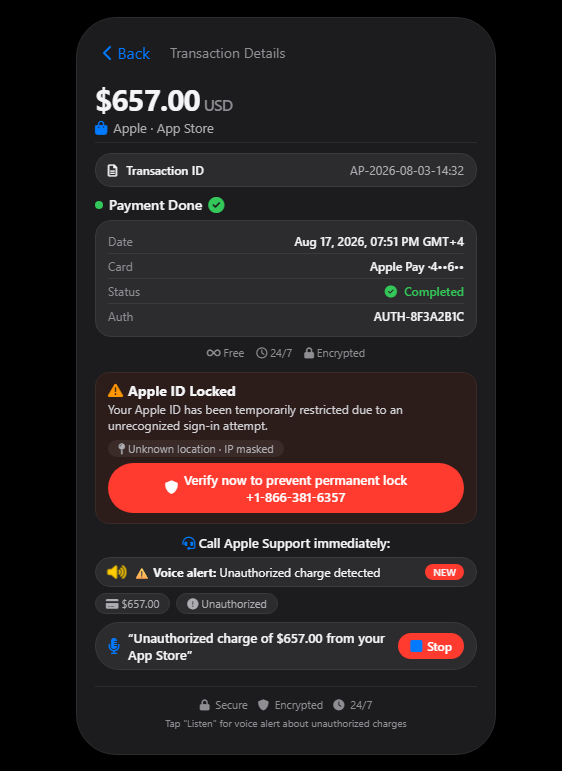
The next screen is dressed up as a transaction receipt. It contains an amount, masked card digits, an authorization code, a transaction ID, and a green “Completed” status.
Most of those values never change.
That’s because the page hardcodes the amount as $657.00, the transaction ID as AP-2026-08-03-14:32, and the authorization code as AUTH-8F3A2B1C. Every visitor is shown the same values.
The date, however, is generated dynamically.
JavaScript calls new Date() and formats it with toLocaleString(), meaning the receipt uses the current date, time, and timezone from the victim’s device.
That creates an obvious contradiction. The fixed transaction ID contains 2026-08-03, while the date field shows the time and date when the victim happens to open the page.
A genuine transaction doesn’t rewrite its transaction date every time somebody looks at it.
The “voice alert” is generated by the browser
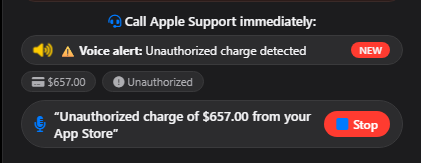
Once the victim opens the transaction details, the page attempts to speak:
“Unauthorized charge of six hundred fifty seven dollars from your Apple ID. Please call support immediately.”
There is no recorded Apple message behind it.
The JavaScript creates a SpeechSynthesisUtterance and sends it to window.speechSynthesis, the browser’s built-in Web Speech API to read the warning aloud.
Using a text-to-speech voice already available on the victim’s own device is a clever social-engineering touch. The warning may sound more like part of the phone itself than audio playing from a random website.
The page tries to make leaving difficult
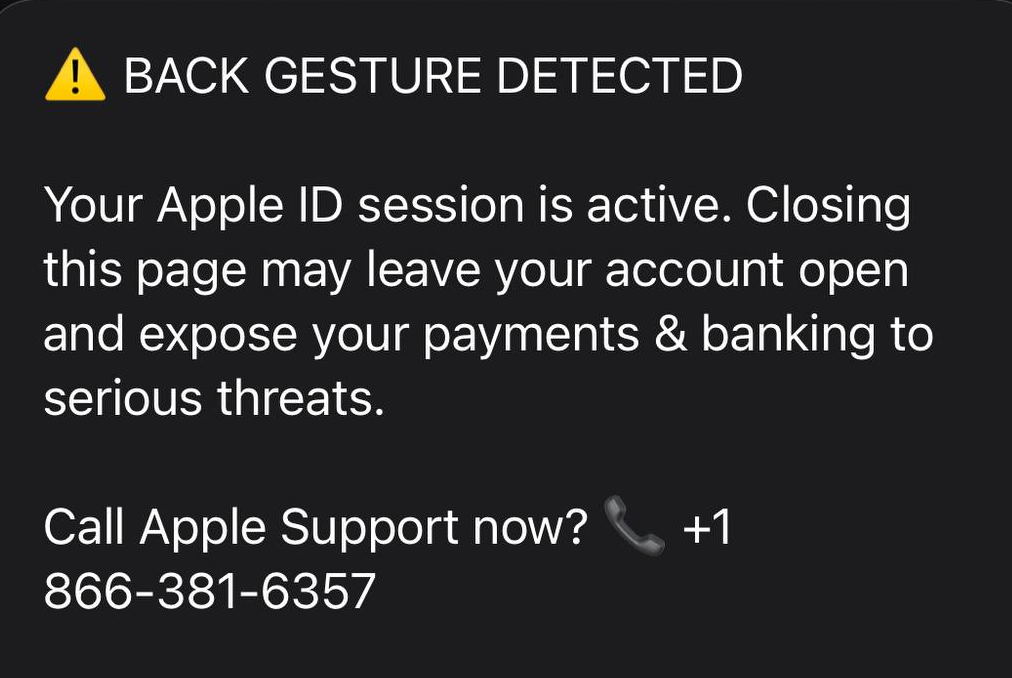
One interesting part of this scam is the code surrounding the exit routes.
The page adds a new browser-history entry and listens for popstate, allowing it to react when a victim tries to navigate backward. It then displays a warning claiming that closing the page could expose the victim’s payments and banking information.
If the victim accepts the prompt to call support, the code navigates to a tel: URL containing the scam number. If they cancel that particular prompt, another warning appears and another history entry is added.
The page also registers handlers for beforeunload, pagehide, the context menu, an edge-swipe gesture, and common keyboard navigation shortcuts. On iOS, its pagehide handler even makes a delayed attempt to navigate directly to the telephone number.
These tricks can make the page persistent and annoying, but they don’t lock the browser or device. Modern browsers restrict what websites can do during navigation. For example, beforeunload isn’t reliably triggered on mobile, generally requires prior user interaction, and can only produce a generic browser-controlled confirmation.
In other words, the code tries several ways to stop you leaving or get you to call, but it can’t take control of the browser itself.
The phone call is the real objective
The $657 charge is bait to get you on the phone.
The support number appears prominently on the page, the red “Verify now” button points to it, and the fake security prompts repeatedly offer to dial it.
This is a well-established tech support scam tactic. The FTC warns that scammers use bogus charge notices to get victims to call, then may request remote access or pressure them into sending money through gift cards, bank transfers, cryptocurrency, or payment apps.
Apple also warns that scammers may claim someone has broken into your Apple account or made unauthorized Apple Pay charges, using urgency to stop you from contacting Apple independently.
What to do if you see a page like this
There is a simple clue worth remembering:
A security pop-up that manufactures an emergency and tells you to call the phone number displayed on the screen should be treated as a scam.
If an Apple Pay–like interface appears inside a website, remember that visual resemblance proves nothing. A site can freely mimic buttons, locks, logos, transaction IDs, and even animated spinners. What matters is whether a genuine Apple Pay payment sheet has actually been invoked.
In this case, it hasn’t. The important part of this scam is not the fake $657 payment. It is the urgency built around it to get the victim onto a call.
- Don’t tap OK, Call, or Verify. Anything you tap on the screen will either call the number or bring up another warning.
- Don’t dial the number, and don’t call it back later to complain or to check.
- Close the tab using your browser’s tab switcher. On iPhone or Android, open the tab switcher and swipe the tab away. Once the tab is closed, the scam page can no longer keep you there or try to make the call.
- If a dialog appears asking whether to leave the site, choose Leave. Web pages can ask you to stay, but they cannot stop you from leaving.
- If in doubt, check your real purchase history. Open the App Store or Settings on your device and review your Apple purchase history. If there’s no $657 charge there, there was never a charge.
If you already called and gave someone remote access to your device, take action immediately:
- Disconnect from the internet
- Uninstall any remote access software they had you install
- Change your Apple ID password and your bank passwords from a different device
- Contact your bank about any payments you sent.
Check if something is a scam
If a number like this one is on your screen or already in your call history, check it before you do anything else. Malwarebytes Scam Number Check is a free way to see whether a number has been linked to scam activity. Just put the number in and we’ll tell you if it’s likely to be a scam.
Got a screenshot or URL of a suspected scam? Upload it to Scam Guard—built in to Malwarebytes Mobile Security—and you’ll get a verdict and safety tips in seconds.