Most of the work that keeps a security product trustworthy is invisible. Users see a scan complete, a threat blocked, an update applied overnight. They don’t see the platform underneath. Runtimes, managed libraries, native drivers, and Windows requirements must all stay current and work together across millions of endpoints. Our migration to .NET 10 is one example of how we keep that platform moving and our focus in this article.
It would be easy to call these upgrades maintenance tasks and move on. But that is underselling them. Our code runs continuously, with elevated privileges, next to some of the most sensitive parts of Windows.
Every dependency in our stack, from the runtime and third-party libraries to native drivers and operating-system requirements, affects the environment in which our software runs. When one changes, everything that relies on it may have to change too.
The problem: platforms fall behind by standing still
In endpoint security, the ground never stops moving. Windows evolves. Threats evolve. Hardware evolves, from ARM64 laptops to machines with far more memory and faster storage than the ones our code was first written for.
A platform that stands still does not stay the same. It falls behind. Every skipped release of a dependency or runtime widens the gap between the ecosystem we built on and the one that is stable today.
A modern runtime and .Net 10 in particular can give us better security, faster code paths, a smaller memory footprint, and richer diagnostics. It also gives our engineers language and tooling improvements that help them work more efficiently.
The stakes are also particularly high for security software:
- A web app can be rolled back with a deployment. Software already installed on a customer’s endpoint cannot.
- Our code runs with high privileges, alongside kernel drivers and anti-tamper protections.
- A runtime regression does not affect one server. It has the potential to affect millions of machines.
So we treat a runtime upgrade with the same rigor as a security feature.
The challenge: everything moves together
Malwarebytes for Windows is not a single program. It is a coordinated system: a user-facing interface, several long-running Windows services, an installer, a self-update pipeline, a plugin surface, and third-party managed dependencies.
These sit above native drivers and our detection engine. The .NET 10 migration covered the managed parts of Malwarebytes while leaving this native core untouched. But the different layers still have to work together.
The migration had to satisfy several requirements at once:
- Security-sensitive code had to behave identically before and after the change.
- Native drivers and anti-tamper layers had to continue working correctly with the managed code.
- The installer and update pipeline had to deploy the new runtime files and clean up old ones.
- Plugins and third-party dependencies had to remain compatible.
- Existing Malwarebytes installations had to continue working.
- Our automated validation had to be extensive enough to trust the result without inspecting every path by hand.
The boundary between managed and native code deserved particular attention. Managed code in our services talks to native components through interfaces such as P/Invoke and COM. A runtime change can subtly affect how these different parts of Malwarebytes communicate and work together.
Those differences may never show up in a demo. They might only surface on one machine in 10,000. Finding them before customers do is the important part.
Not every update looks the same
There are three main reasons we update a dependency: We choose to, the platform underneath forces us to, or a vulnerability makes us. Each comes with a different timeline.
Elective modernization. We may choose to move to a new runtime, a new major version of a library, or a new platform capability to take advantage of new features, fixes, or security improvements.
Baseline shifts. As platform requirements evolve, some older compatibility constraints can hold back modernization. For example, moving to .NET 10 allowed us to update the application baseline and adopt a newer, supported runtime. As part of the same change, Windows 7 support was deprecated.
Forced patches. Sometimes a vulnerability is disclosed in a library we ship or a system we depend on. The change is no longer optional and the timeline is not ours. What we can control is our readiness: the testing, release process, and staged rollout that allow us to respond quickly without introducing new problems.
Different reasons and different timelines, but each requires the same careful approach.
The .NET migration: Why we did it
Moving to .NET 10 gives Malwarebytes a more secure, supported, and capable foundation for Windows, with several compounding benefits:
Security. A modern runtime benefits from Microsoft’s ongoing security work, including safer defaults, stronger cryptography, and mitigations for memory and interoperability bugs. Staying on a runtime that Microsoft actively supports means we can continue to apply fixes when vulnerabilities are discovered.
A supported foundation. It may not be a glamorous reason, but .NET 10 keeps us on a supported, actively developed platform that is better aligned with newer versions of Windows. It makes it easier to adopt future fixes, features, and improvements as routine work instead of one-off projects.
Diagnostics and observability. Modern .NET has stronger built-in tracing, metrics, and crash diagnostics. In a security product, understanding how code behaves in the field matters. Better diagnostics help us identify and resolve reliability issues.
Performance and memory efficiency. Recent .NET releases have improved the just-in-time compiler, garbage collector, and core libraries. Our processes run all day in the background, so how efficiently they run and manage memory matters. These capabilities give us more opportunities to improve efficiency, although the impact will vary between components.
The .NET migration: How we did it
The guiding principle is simple: Never advance faster than the evidence allows.
We started by isolating the work on a dedicated branch. We retargeted the platform and refreshed every managed dependency so the new runtime and the codebase agreed on exactly which components should ship.
That surfaced some of the less obvious consequences of the upgrade early on: libraries that had been renamed or folded into the runtime, files that were no longer needed, and new ones that had to ship in their place.
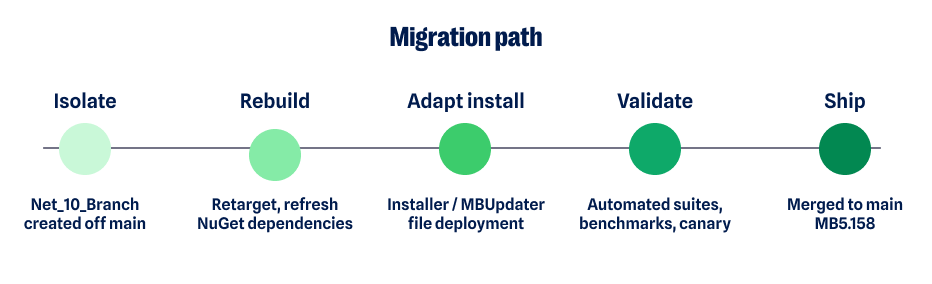
Deployment is easy to overlook and expensive to get wrong. A runtime migration is not only about the code that runs. It is also about what lands on the customer’s disk.
Our installer and update service had to learn the new runtime’s file layout. They had to remove dependencies the runtime now provides, stop shipping renamed files, and deliver replacements cleanly during both fresh installs and in-place updates.
Getting deployment right is the difference between an upgrade users never notice and one that creates a support problem.
Once the build was working correctly, the focus moved to validation.
The migration involved:
- Extensive automated testing across services, install, and update paths.
- Compatibility validation against real-world configurations and previous installations.
- Performance benchmarking to catch regressions in startup, memory, and scan behavior.
- Canary and staged deployment, starting with small populations and expanding only when results showed it was safe to do so.
- Continuous monitoring and automated regression detection in the field.
- Cross-functional work across platform, QA, installation and update, and release engineering.
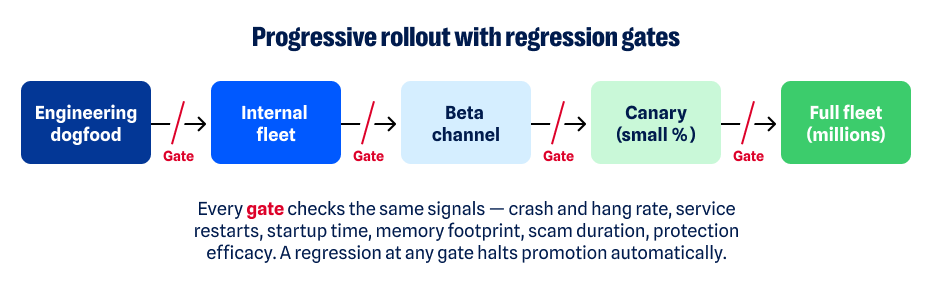
“We never advanced faster than the evidence allowed. Every gate had to turn green on its own.”
The .NET migration: The tradeoffs
None of this was free, and the choices involved deliberate tradeoffs.
The tradeoff on the branch was drift. Isolating the migration protected the main codebase, but the longer that branch existed, the more it could diverge from active development. We managed that risk through frequent integration rather than leaving one large, risky merge until the end.
The tradeoff on rollout was speed. Staged deployment also meant customers received the update later than they would with a big-bang release. We accepted that tradeoff. Evidence from smaller populations gives us an opportunity to catch problems before an update reaches a much larger number of endpoints.
The tradeoff on AOT was flexibility. Ahead-of-time compilation can improve startup performance but can also constrain dynamic behavior. We applied it selectively, component by component, rather than everywhere by default.
What the .NET 10 migration means for customers
The best outcome of infrastructure work is that customers benefit from it without having to think about it.
On .NET 10, those benefits for Malwarebytes customers include:
- Improved reliability on a fully supported, actively maintained runtime.
- A more secure foundation that benefits from the platform’s continuing security improvements.
- Access to new .NET features and fixes.
- Better support for newer versions of Windows.
- Newer .NET tools can help us develop and deliver new protection faster.
Lessons worth keeping
Every one of these updates—the runtime, the baselines, the security patches—leaves the team holding a few convictions more firmly.
Platform upgrades are strategic investments in everything built on top of them. Modernization also works best when it is continuous: the longer a platform falls behind, the more difficult the eventual upgrade can become.
Automation is particularly important for changes of this breadth. So are the small, unglamorous decisions made years earlier, such as maintaining clean boundaries between components and having a build process that knows precisely what it ships.
Those foundations are what make larger changes possible.
“Technical debt compounds like financial debt. The cheapest upgrade is the one you never postponed.”
What comes next
No upgrade is a finish line. Each one is a step in a longer pattern: modernize continuously, in deliberate steps, so the platform never falls behind. Baselines will shift again. Vulnerabilities will land without warning. Each will meet the same discipline: the same tests, the same staged rollout, and the same evidence before we move forward.
That discipline is what a product trusted to run every day, on every machine, without a second thought is actually made of.
Malwarebytes for Windows on .NET 10 shipped in version 5.6.0. It is the latest step in a long-standing commitment to invest in the platform beneath the product so the protection on top of it can keep getting better.

“One of the best cybersecurity suites on the planet.”
According to CNET. Read their review →