Microsoft published new research on GigaWiper, a modular Golang backdoor for Windows that combines robust remote access with multiple ways to permanently destroy systems and data.
GigaWiper is a Windows backdoor that Microsoft has observed in intrusions since October 2025. Rather than being a single-purpose wiper, it’s an operational platform that blends command‑and‑control (C2), data destruction, and remote access options in a single piece of malware.
What’s remarkable is that GigaWiper seems to be built using previously separate tools like the Crucio ransomware and the FlockWiper disk wiper, wrapped into a consolidated framework.
Based on the characteristics of the malware, which include espionage features (screen capture, VNC‑like remote control, system inventory) and multiple ways to irreversibly destroy data, it fits the pattern of an attacker that wants long‑term access but also reserves the option to wipe systems if they choose.
GigaWiper implements about 20 commands, falling broadly into three categories: destruction, remote access/monitoring, and system management. Some examples include:
- Raw disk wiper that overwrites raw disk content in large chunks before forcing an immediate reboot.
- Fake ransomware (Crucio‑based) wiper that masquerades as ransomware. Instead of demanding payment, it encrypts files and then throws away the encryption key, making recovery impossible.
- Windows drive secure wiper that targets the Windows installation drive and performs multi‑pass overwrites using different byte patterns.
- Screen capture and recording, including one‑shot screenshots of each monitor and continuous recording while the user is active.
- Remote control via a TCP (Transmission Control Protocol) server that streams the desktop and allows keyboard and mouse input after creating its own Windows Firewall exceptions.
GigaWiper also sets up a scheduled task called “OneDrive Update” that runs every minute and at startup to maintain persistence.
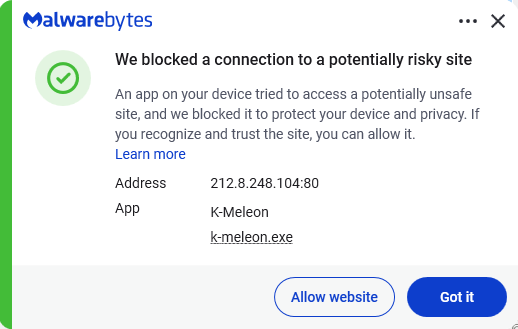
Command-and-control servers were found at 185.182.193[.]21 and 212.8.248[.]104.
Its management utilities include process, service, and registry managers that can create, list, or kill processes, manage Windows services, and navigate and mutate registry keys. It also collects system information, including hardware, operating system, network, firmware, user, and antivirus details.
How to stay safe
Because GigaWiper is deployed after attackers have already compromised a system, the best defence is preventing the initial intrusion and detecting malicious activity before destructive commands can be executed.
Malwarebytes detects GigaWiper components with the detection names Trojan.FlockWiper and Backdoor.GigaWiper.
- If GigaWiper is detected, disconnect the affected machine from the network immediately to prevent attackers from initiating destructive commands.
- Enable tamper protection (or the equivalent feature in your security software) so local admins and malware cannot silently disable anti-malware or other security tools.
- Monitor for connections to the known C2 servers, the creation of the “OneDrive Update” scheduled task, and unauthorized attempts to disable Windows recovery.
- Finally, rotate credentials, particularly for any accounts that may have been compromised, and review logs for privilege escalations or lateral movement to determine if other systems have also been affected.
From reporting threats to removing them.
Cybersecurity risks should never spread beyond a headline. Keep threats off your devices by downloading Malwarebytes today.