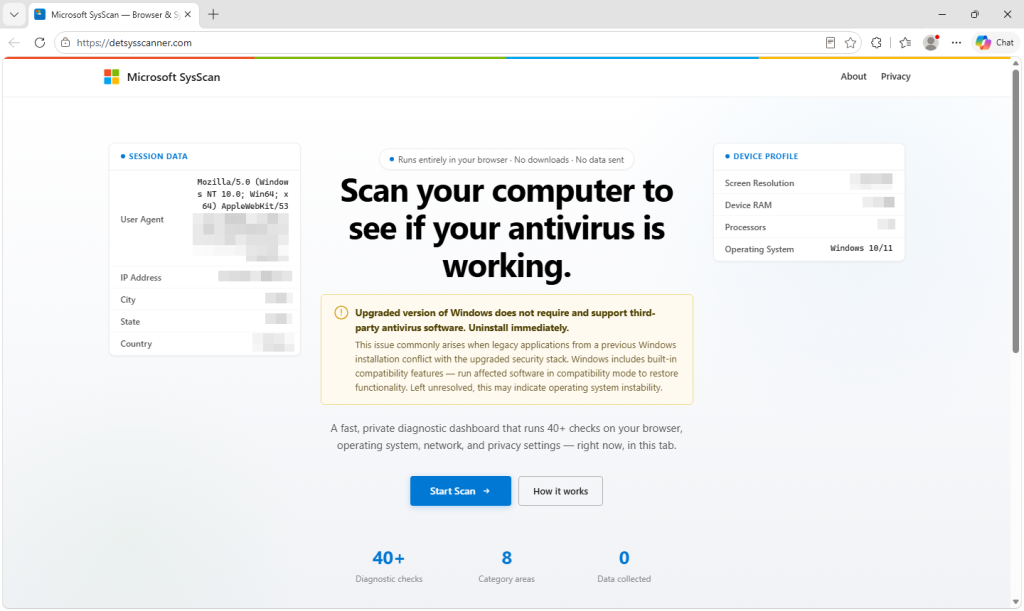
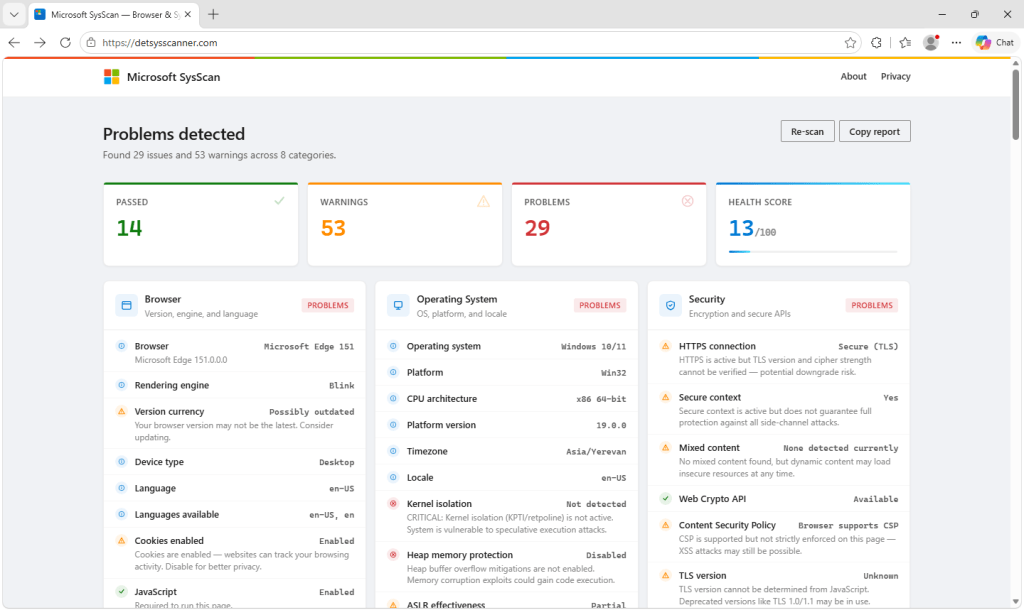
A wave of websites is offering to check whether your antivirus is working. They call themselves SysScan, carry Microsoft branding, and all reach the same conclusion: Your computer has serious problems, and the cause is the antivirus software you installed.
Windows, they claim, no longer supports third-party antivirus. Uninstall it immediately.
That is false, and it is the first step in a refund scam designed to get victims onto the phone, remove their security software, and ultimately hand over personal, banking, and remote-access information.
We found eleven of these sites on a single host. Although the names vary, the sites work in essentially the same way: Run a convincing-looking but fake security scan, tell the victim their antivirus is causing problems, collect their information, and prepare them for a supposed refund call.
What to know if you see one of these scans
A website cannot run a real security scan. It can only read basic browser data like your operating system, screen size, and approximate location—not check for malware, memory issues, or missing security patches.
Microsoft still supports third-party antivirus software, and legitimate refunds never require you to uninstall security tools or install remote-access software.
If a site tells you to do any of that, close it immediately.
Technical analysis
The scan reads real data and draws invented conclusions
Part of what makes the scam convincing is that the page does measure some real things.
It reads information that a browser legitimately exposes—your user agent, screen dimensions, device memory, processor count, permission states, network information, available web features, and some page performance timings. That allows the results to appear specific to your machine.
But the security conclusions aren’t connected to those measurements.
Fifty of the findings are fixed text written into the page, grouped in blocks that the developer labelled as fake checks.
Among them are claims that your browser sandbox is compromised, kernel page-table isolation is inactive, your memory is vulnerable to Rowhammer, no Trusted Platform Module was found, WebRTC is leaking your local IP address, and your processor is thermally throttled.
A web page cannot determine those things.
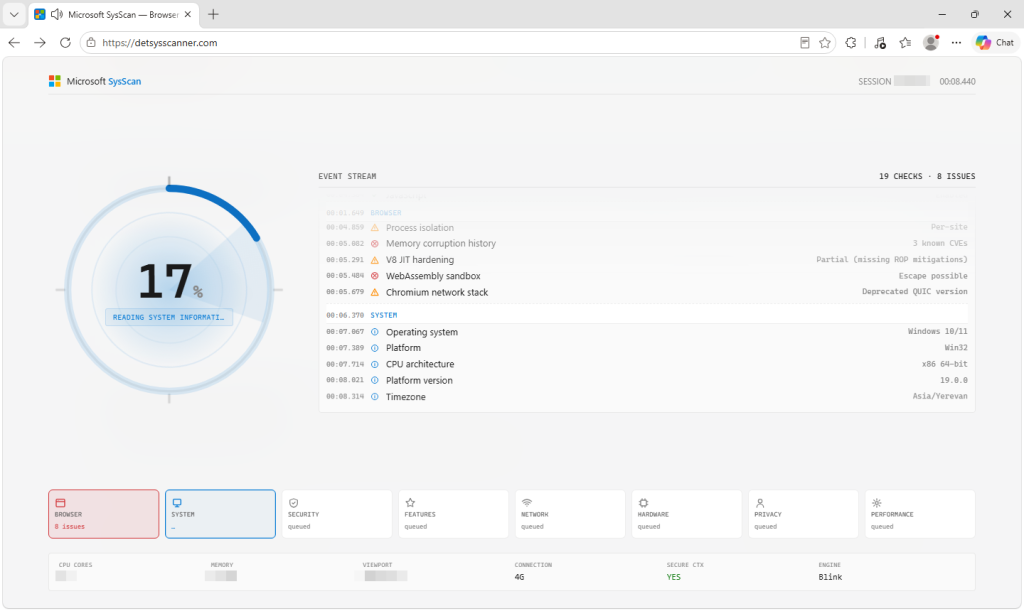
One finding even reports how many days behind your security patches are, using a random number generated whenever that check runs. Run the scan again and you get a different answer.
Even checks that use genuine information are twisted into warnings. An encrypted connection becomes a downgrade risk. Cookies enabled is a warning; cookies disabled is a failure. Ordinary features found in modern browsers are flagged as ways to identify you.
Our fully updated test browser was reported as possibly outdated.
Most tellingly, the score is constrained in the code to between 13 and 30 out of 100. It cannot report anything above 30, regardless of the computer being tested.
Passing is not a possible outcome.
Why the scam tells you to uninstall your antivirus
Telling someone to remove their antivirus is the most consequential thing these pages do, and it serves the scammers in two ways.
First, it removes software that could interfere with what comes next, including remote-access software and anything installed during the session.
Second, it tells the scammers which security product the victim uses.
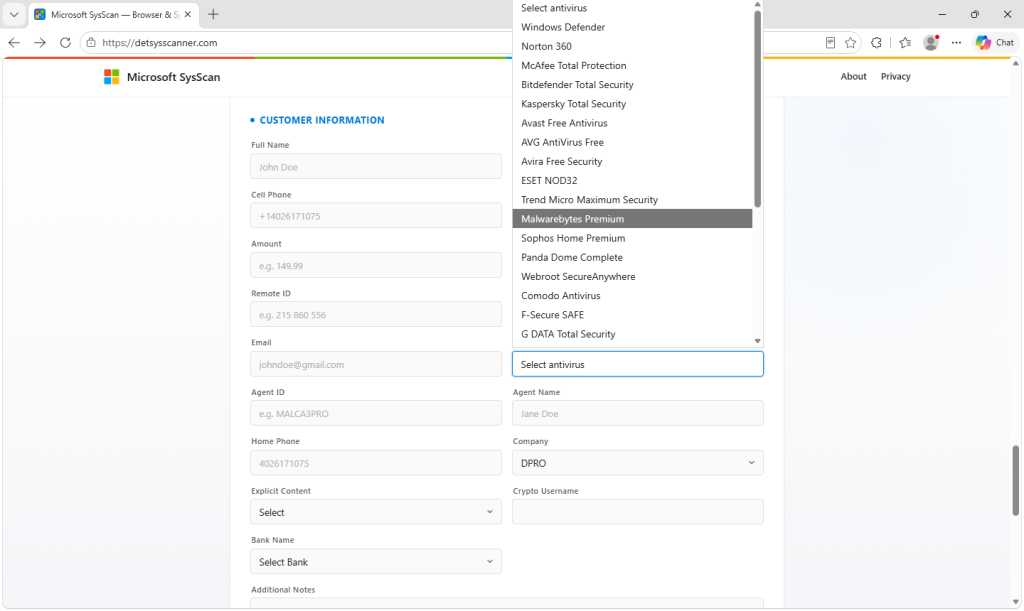
The site records which antivirus was removed from a list of 28 named products, plus an Other option. Enterprise security software also appears on the list, suggesting the scam is also prepared for people using work computers.
The claim is made more believable by distorting something that is true. Windows includes its own antivirus protection, Microsoft Defender Antivirus. When a compatible third-party antivirus product is installed, Defender can move into a passive state because the other product is providing protection.
That does not mean Windows no longer supports third-party antivirus.
The form appears built for the scammer, not the victim
After the scan, the site presents a customer information form.
It collects a name, address, phone numbers, email address, refund amount and reason, bank name, cryptocurrency username, antivirus product, and the ID and password for a remote-access session. Users can choose from 30 different remote-access tools.
It also requires an Agent ID, Agent Name, and Company.
Those fields strongly suggest the form is designed to be filled in by an operator during a call, potentially while they can see the victim’s screen. The code does not prove who types the information, but there is little reason for agent details to appear on a form intended solely for a customer.
One field even asks whether explicit content is involved. Embarrassment and shame can be powerful tools for scammers because victims may become less willing to discuss what happened with a partner, family member, or bank.
When the form is submitted, the browser bundles the customer, agent, remote-access, antivirus, and banking details into a single message and sends it directly to Telegram’s bot API.
There is no application backend involved, making the sites cheap to host and easy to abandon when they attract attention.
It also exposes another lie. The site states in several places that no data is sent and nothing is collected. Even before the form is submitted, it contacts external IP and geolocation services. Once the form is submitted, the information entered is sent to a Telegram group chat.
Then comes the supposed refund call
After submitting the form, the victim is sent to a page saying a refund manager will call within three to five minutes.
The page plays a looping video of a man in an office and prevents the victim from pausing it, switching it to full screen, or opening the right-click menu.
TRANSCRIPT
==========
Thank you for completing the form.
Your request has been successfully received and is now being reviewed.
A refund manager will be contacting you shortly to verify your information and assist with the next steps.
Please remain available to answer your phone.
We appreciate your patience.
Please keep your phone nearby and be prepared to answer the call so we can process your request as quickly as possible.
Thank you for choosing our services.
The apparent purpose is to keep the victim on the page while contact is arranged and reassure them that an official process is underway.
Whether the caller is a different scammer is not something the code can tell us, but the structure creates a clear handover point.
By the time anyone starts asking about bank details, the victim has already seen a Microsoft-branded security scan, been told their computer has serious problems, removed their antivirus, and entered information into what appears to be an official refund process.
The site shows signs of AI-generated code
The video on the waiting page is synthetic, and the clip is zoomed and cropped inside its frame.
The code points in a similar direction. It is heavily commented in the explanatory, self-narrating style often produced by AI coding tools, including notes explaining why the scan is deliberately paced and why spoken lines use a terse security-console tone.
Some comments describe the deception directly. Eight blocks of invented findings are labelled as fake, while around 20 checks that read genuine values are described as exaggerated.
One comment near the top of the file even states that no data leaves the device, a few hundred lines before the function that sends the form to Telegram.
Source code cannot prove how it was created. But the fraud-specific elements—including the US bank list, agent identifiers, and explicit-content field—appear to have been fitted into a broader scanner template.
How to spot a fake computer security scan
There are several warning signs that give scams like this away:
- A website claims to find deep problems with your computer. A web page can see some information your browser provides, but it cannot inspect things such as your firmware settings, antivirus status, memory vulnerabilities, or exact Windows patch level.
- Every result is bad. A diagnostic that cannot produce a passing result isn’t really diagnosing anything.
- You’re told to uninstall your antivirus. Microsoft continues to support third-party security software on Windows.
- You’re asked to install remote-access software. Legitimate refunds do not require someone to take control of your computer.
- You’re asked for banking or cryptocurrency information. A legitimate company should not need remote access or cryptocurrency to process a refund.
- The page relies on a familiar logo. A Microsoft or Apple logo on a website does not mean the company operates it. These sites can switch branding depending on the operating system they detect.
If this has already happened
If you’ve installed remote-access software or allowed someone to control your computer, disconnect the computer from the internet and remove the remote-access tool.
Reinstall the antivirus software you were told to remove, update it, and run a full scan.
If you gave the scammers banking information or allowed them to access your online banking, contact your bank immediately using a phone number you look up yourself. Tell them you may have been targeted by a refund scam.
Change your email and banking passwords from a different, trusted device.
If money was taken, report the scam to the Federal Trade Commission (FTC) at reportfraud.ftc.gov and the FBI’s Internet Crime Complaint Center (IC3) at ic3.gov.
And don’t let embarrassment stop you from telling your bank or someone you trust what happened. Creating that embarrassment can be part of the scam because it makes victims less likely to ask for help. Acting quickly gives you the best chance of limiting any loss.
Indicators of compromise (IOCs)
Hosting: 157.230.180.90
Domains:
detectsysscanner[.]atdetectsysscanner[.]comdetectsysscanner[.]dedetectsysscanner[.]in[.]netdetectsysscanner[.]xn--q9jyb4cdetsysscanner[.]comdetsysscanner[.]dedetsysscanner[.]xn--q9jyb4ctechsysscanner[.]comtechsysscanner[.]loltlcscanner[.]com