Google has issued updates for the Chrome browser patching a number of high‑severity vulnerabilities.
The update includes fixes for two critical vulnerabilities that can be used for remote code execution just by visiting a malicious website.
The stable channel has been updated to 148.0.7778.178/179 for Windows/Mac and 148.0.7778.178 for Linux, which will roll out over the coming weeks.
How to update Chrome
If you don’t want to wait for the rollout to reach you, manually updating is easy.
The easiest way to update is to allow Chrome to update automatically. But you can end up lagging behind if you never close your browser or if something goes wrong, such as an extension preventing the update.
To update manually, click the More menu (three dots), then go to Settings > About Chrome. If an update is available, Chrome will start downloading it. Restart Chrome to complete the update, and you’ll be protected against these vulnerabilities.
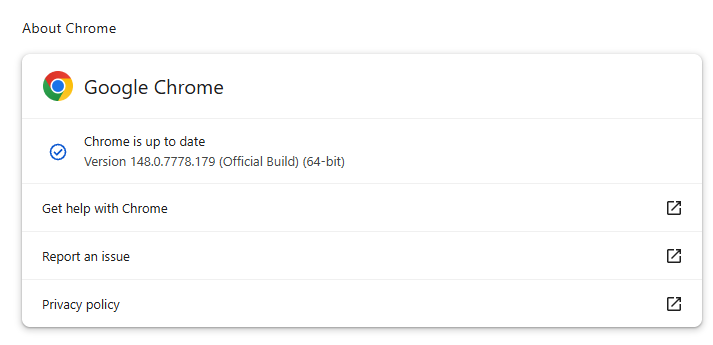
You can also find step-by-step instructions in our guide to how to update Chrome on every operating system.
Technical details
The update includes fixes for two critical vulnerabilities:
CVE-2026-9111: A use-after-free vulnerability in WebRTC allowed a remote attacker to execute arbitrary code on Linux via a crafted HTML page. Use-after-free is a class of vulnerability caused by incorrect use of dynamic memory during a program’s operation. If, after freeing a memory location, a program does not clear the pointer to that memory, an attacker may be able to use the error to manipulate the program.
So if an attacker manages to trick a Linux user into opening a malicious HTML file or visit a specially crafted website, they could compromise the device.
CVE-2026-9110: An inappropriate implementation in the UI on Windows allowed a remote attacker who had compromised the renderer process to perform UI spoofing via a crafted HTML page.
In practice, this meant that, if an attacker had already taken control of the browser’s internal rendering engine, they could trick the browser into showing you a fake window or dialog box that looked real. This fake window could, for example, make it seem like you were entering your password on a trusted site, even though you were actually giving it to the attacker.
For those expecting this update to include a fix for the accidentally leaked “Browser Fetch” flaw this will come as a disappointment: it did not.
For those that haven’t read about it, since its reporting 46 months ago, the “Browser Fetch” vulnerability remained unknown except to Chromium developers. Then on May 20, 2026, it was published to the Chromium bug tracker. The researcher who initially reported the vulnerability assumed it had finally been fixed. Shortly afterwards, she learned that it remained unpatched. While Google removed the post, it remains available on archival sites, along with the exploit code.
From reporting threats to removing them.
Cybersecurity risks should never spread beyond a headline. Keep threats off your devices by downloading Malwarebytes today.