A new scam is targeting people who publish Chrome extensions.
The scam arrives as an official-looking “copyright removal request” claiming your extension is about to be removed from the Chrome Web Store and that you have 48 hours to appeal.
It even looks personalized. After you enter your extension’s ID to “verify” it, the page pulls in your extension’s real name and icon. But it’s all part of a phishing attack designed to steal your Google username and password.
If attackers gain access to a developer account, they may be able to take over the extension, access developer resources, or potentially push malicious updates to users.
What’s actually going on
If you’ve published a Chrome extension, you might encounter a page that looks like an official Google notice warning that your extension is being removed for copyright infringement.
The page asks you to enter your extension ID, then displays your real extension details alongside a complaint number and countdown clock. It pressures you to sign in with Google to file an appeal before time runs out.
None of it is real. The page is not operated by Google. The complaint, deadline, and countdown are fabricated. The goal is to trick you into entering your Google username and password into a fake sign-in window controlled by the scammer.
The most important rule to remember: Genuine warnings about your extension appear in your Chrome Web Store developer dashboard, not on a third-party website.
Why scammers want developer accounts
Chrome extensions have access to users’ browsers, and they can be updated automatically.
If attackers gain control of a developer account, they may be able to modify an extension, access developer resources, or potentially distribute malicious updates to existing users.
That’s what makes developer accounts such attractive targets, and why scams like these are prevalent.
What the scam looks like
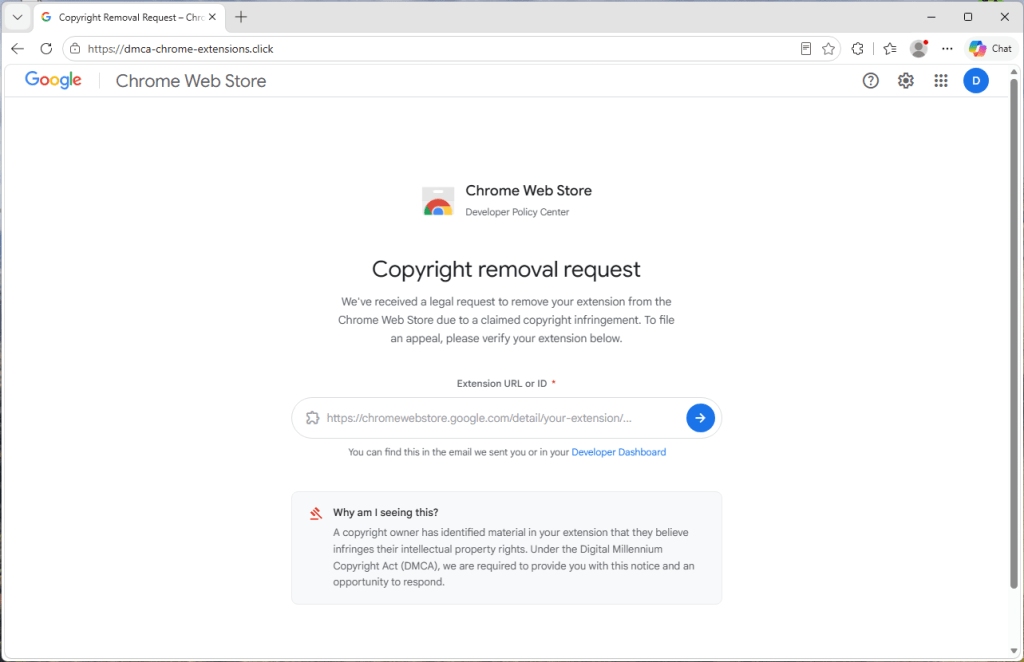
The page is hosted on a domain that has nothing to do with Google. In the version we analyzed, the site used the address dmca-chrome-extensions[.]click.
Despite that, it uses Google’s branding and presents itself as a “Chrome Web Store Developer Policy Center.”
The page first asks for the link or ID of your extension. That seems harmless, which is exactly why it works.
It uses your own extension to look convincing
After you enter your extension ID, the page briefly displays a “Looking up extension…” message and then builds a fake takedown notice around your real extension.
When we tested the scam with Malwarebytes Browser Guard, it displayed our genuine extension name, icon, and Chrome Web Store listing alongside the fake complaint.
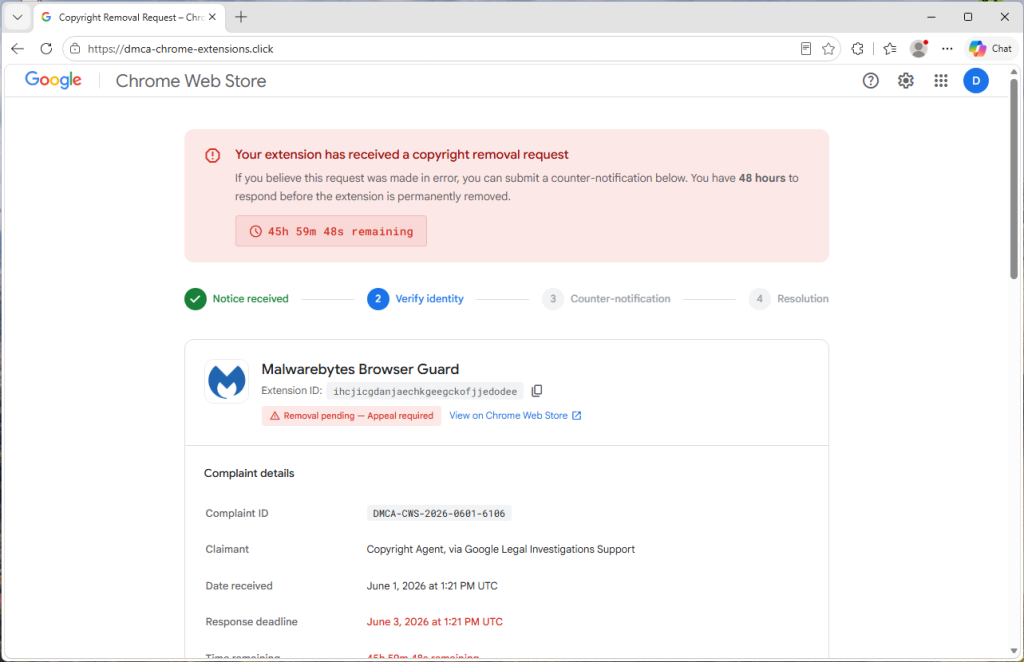
The site is simply pulling publicly available information from your extension’s Chrome Web Store page. Anyone can see that information. The scammers use it to make the fake notice appear legitimate.
Everything else is invented.
The complaint number, “date received,” 48-hour deadline, countdown timer, and timeline of events are generated by the scam page itself.
The countdown is there to rush you
A red warning banner claims your extension will be permanently removed unless you act within 48 hours, and a clock counts down by the second. The whole layout pushes you toward one button: sign in with Google to “verify your identity” and file your appeal.
The urgency is designed to create pressure so you react before taking the time to verify the claim.
The fake sign-in window
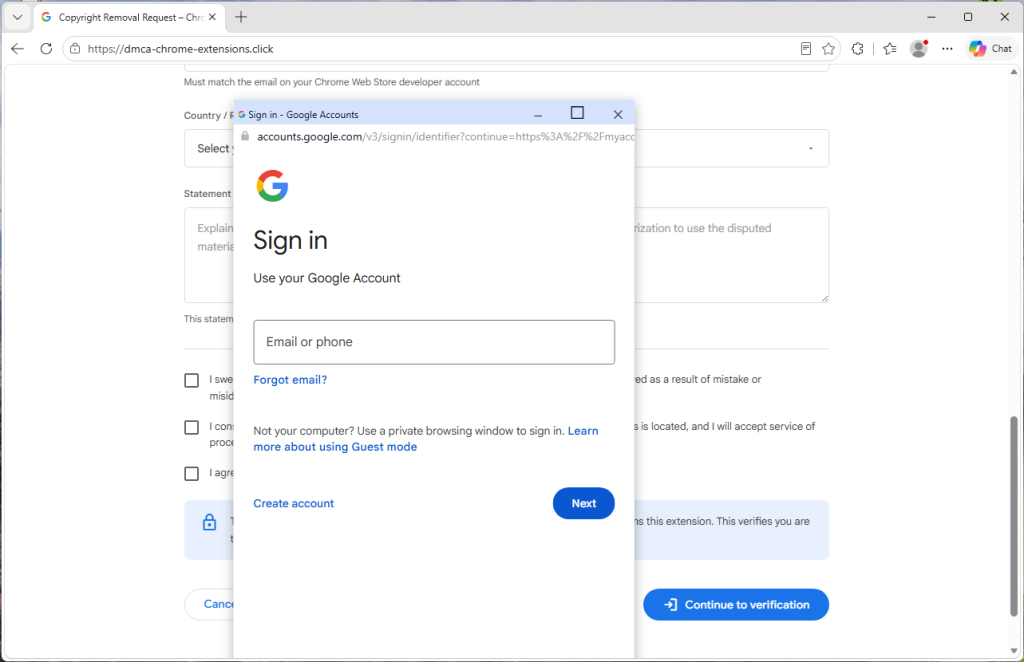
When you click “Continue to verification,” a Google sign-in window appears with a title bar, padlock, and address showing accounts.google.com.
It looks authentic, but it isn’t.
The “window” is actually part of the web page itself. The padlock and address are just graphics designed to look like a real browser window.
The scammers even tailor the appearance to match your operating system, showing Mac-style windows on macOS and Windows-style windows on Windows devices.
Anything typed into this fake sign-in form is sent directly to the scammers.
One giveaway is that the window cannot leave the browser page. Try dragging it to the edge of your screen and it stops at the browser border. Minimize the browser and it disappears as well.
Most importantly, your browser’s real address bar still shows the scam site’s address, not Google’s.
How to stay safe
The good news is that a few simple habits defeat this scam.
- Don’t trust the link. If you receive a warning about your extension, go directly to your Chrome Web Store developer dashboard and check there.
- Be suspicious of urgency. Legitimate policy processes don’t rely on countdown clocks to force immediate action.
- Check the address bar. A real Google sign-in page appears at accounts.google.com in your browser’s actual address bar.
- Test the window. If a sign-in window can’t be dragged outside the browser or disappears when the browser is minimized, it’s probably fake.
- Turn on stronger sign-in protection. Passkeys and hardware security keys make stolen passwords far less useful to attackers.
- Use security software with phishing and web protection. Our Browser Guard, which is also part of Malwarebytes Premium can help block malicious websites and phishing pages before you enter sensitive information.
This isn’t a crude phishing page. It uses your real extension details, mimics Google’s branding, and creates a convincing sense of urgency.
If you receive a warning about your extension, don’t follow the link and don’t race the countdown. Go directly to your Chrome Web Store developer dashboard and verify the claim there.
When in doubt, close the tab.
If you already entered your details
Act quickly.
- Change your Google password immediately from a trusted device.
- Sign out of all active sessions in your Google account security settings.
- Review connected apps and devices for anything unfamiliar.
- Turn on two-step verification, preferably using a passkey or security key.
- Check your Chrome Web Store listings for changes, uploads, or new versions you didn’t publish.
Indicators of Compromise (IOCs)
Domain
dmca-chrome-extensions[.]click
Stop threats before they can do any harm.
Malwarebytes Browser Guard blocks phishing pages and malicious sites automatically. Free, one click to install. Add it to your browser →