Microsoft issued a security update that fixes the zero-day vulnerability known as RoguePlanet in Microsoft Defender.
RoguePlanet is tracked as CVE-2026-50656, a Microsoft Defender elevation of privilege (EoP) vulnerability. As we reported last month, if successfully exploited, RoguePlanet can allow an attacker to elevate privileges from a standard user account to NT AUTHORITY\SYSTEM, the highest privilege level on Windows.
This means an attacker who gains access to a standard user account on your computer could use the vulnerability to take complete control of the system. They don’t need advanced hacking skills or administrator permissions to do this.
Microsoft fixed the vulnerability by releasing Microsoft Malware Protection Engine version 1.1.26060.3008, an update to the core scanning engine that powers Microsoft Defender and other Microsoft security products.
How to protect your system
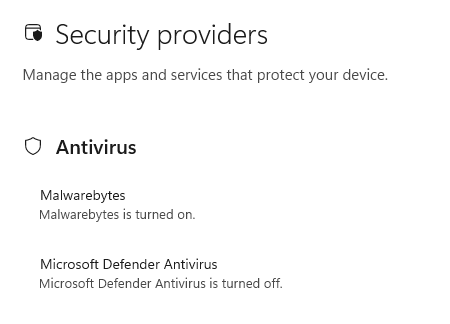
If Windows Security shows that another antivirus, such as Malwarebytes, is protecting your PC and Microsoft Defender Antivirus is turned off (as shown below), this particular vulnerability does not affect your system. Defender’s scanning engine isn’t running, so it can’t be exploited through this flaw.
Most users are already protected
By default, Microsoft Defender automatically updates both its malware definitions and the Microsoft Malware Protection Engine.
But if you’re in any doubt, you can check the version of the Malware Protection Engine on your system. Here’s how:
- Click the Start button, type Security, and choose Windows Security from the results.
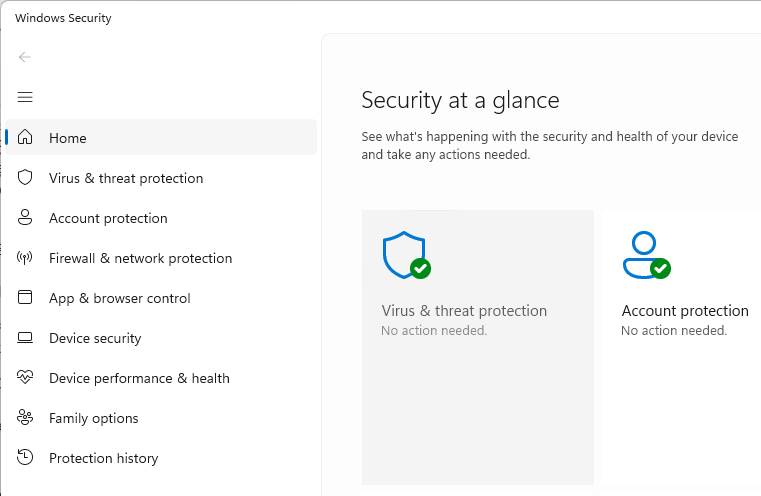
- Select Virus & threat protection, then under Virus & threat protection updates, click Check for updates.
- Click Settings (the cog icon) then select About.
- Look for a line called Engine Version. That number is the version of the Malware Protection Engine used by Microsoft Defender.
- If your Engine Version is 1.1.26060.3008 or higher, your system has the patched (or newer) engine.
- If your Engine Version is 1.1.26050.11 or lower, your system is still running a vulnerable engine. Run Windows Update and check for Defender updates again, or wait for the automatic update to complete.
Note: Version numbers are compared from left to right. For example, 1.1.26060.3008 is newer than 1.1.26050.11 because 26060 is higher than 26050.
If you use Windows Defender, leave automatic updates turned on. The Malware Protection Engine normally updates automatically, so most home users will receive the fix without doing anything. These steps are simply a way to double-check your system has the updated engine.
From reporting threats to removing them.
Cybersecurity risks should never spread beyond a headline. Keep threats off your devices by downloading Malwarebytes today.