Rumor has it that Apple deployed a new security feature in the fight against ClickFix.
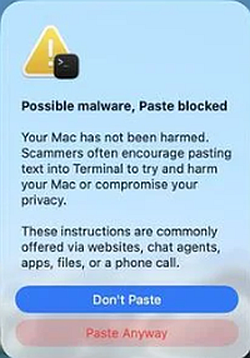
The new feature will be available for macOS Tahoe 26.4 and it will warn Mac users if they paste certain commands into the Terminal app that might be harmful. If such a command is pasted, macOS will warn the users with a prompt saying:
“Possible malware, Paste blocked. Your Mac has not been harmed. Scammers often encourage pasting text into Terminal to try and harm your Mac or compromise your privacy. These instructions are commonly offered via websites, chat agents, apps, files, or a phone call.”
Reportedly, ClickFix was responsible for more than half of all malware loader activity in 2025. One of the reasons for such success was the fact that the campaigns kept adding—and are continuing to add—new methods to trick users, along with different commands to avoid detection.
Generally speaking, ClickFix is a social engineering method that tricks users into infecting their own device with malware. Users are instructed to run specific commands which will download malware, usually an information stealer.
ClickFix started by targeting Windows computers, writing the malicious commands to the clipboard, but it didn’t take long before campaigns designed to target Mac users started to show up.
In the attacks, users are instructed to copy and paste commands to their Mac Terminal, which is where the new security feature will kick in. It is currently unknown which commands exactly trigger the warnings, but that is a good thing since that visibility would make it easier for the malware authors to get around them.
How to stay safe
MacOS Tahoe users now have an extra layer of protection, as long as they don’t click “Paste Anyway” too quickly even after receiving the security prompt. Malwarebytes Browser Guard users already enjoyed this kind of protection.
But with ClickFix running rampant and inventing new methods all the time, it’s important to be aware, careful, and protected.
- Slow down. Don’t rush to follow instructions on a webpage or prompt, especially if it asks you to run commands on your device or copy-paste code. Attackers rely on urgency to bypass your critical thinking, so be cautious of pages urging immediate action. Sophisticated ClickFix pages add countdowns, user counters, or other pressure tactics to make you act quickly.
- Avoid running commands or scripts from untrusted sources. Never run code or commands copied from websites, emails, or messages unless you trust the source and understand the action’s purpose. Verify instructions independently. If a website tells you to execute a command or perform a technical action, check through official documentation or contact support before proceeding.
- Limit the use of copy-paste for commands. Manually typing commands instead of copy-pasting can reduce the risk of unknowingly running malicious payloads hidden in copied text.
- Secure your devices. Use an up-to-date real-time anti-malware solution with a web protection component.
- Educate yourself on evolving attack techniques. Understanding that attacks may come from unexpected vectors and evolve helps maintain vigilance. Keep reading our blog!
Pro tip: Did you know that the free Malwarebytes Browser Guard extension warns you when a website tries to copy something to your clipboard?
From reporting threats to removing them.
Cybersecurity risks should never spread beyond a headline. Keep threats off your devices by downloading Malwarebytes today.