A trojanized copy of the open-source FTP client FileZilla 3.69.5 is circulating online. The archive contains the legitimate FileZilla application, but with a single malicious DLL added to the folder. When someone downloads this tampered version, extracts it, and launches FileZilla, Windows loads the malicious library first. From that moment on, the malware runs inside what appears to be a normal FileZilla session.
Because the infected copy looks and behaves like the real software, victims may not realize anything is wrong. Meanwhile, the malware can access saved FTP credentials, contact its command-and-control server, and potentially remain active on the system. The risk does not stop with the local computer. Stolen credentials could expose the web servers or hosting accounts the user connects to.
This attack does not exploit a vulnerability in FileZilla itself. It depends on someone downloading the modified copy from an unofficial website and running it. The spread mechanism is simple deception, such as lookalike domains or search poisoning, rather than automatic self-propagation.
A growing trend of trusted software, poisoned packages
The abuse of trusted open-source utilities appears to be growing. Last month, we reported on fake 7-Zip downloads turning home PCs into proxy nodes. Security researchers have also reported that a compromised Notepad++ update infrastructure delivered a custom backdoor through DLL sideloading for several months.
Now, FileZilla has been added to the list of software impersonated in this way. A lookalike domain, filezilla-project[.]live, hosts the malicious archive.
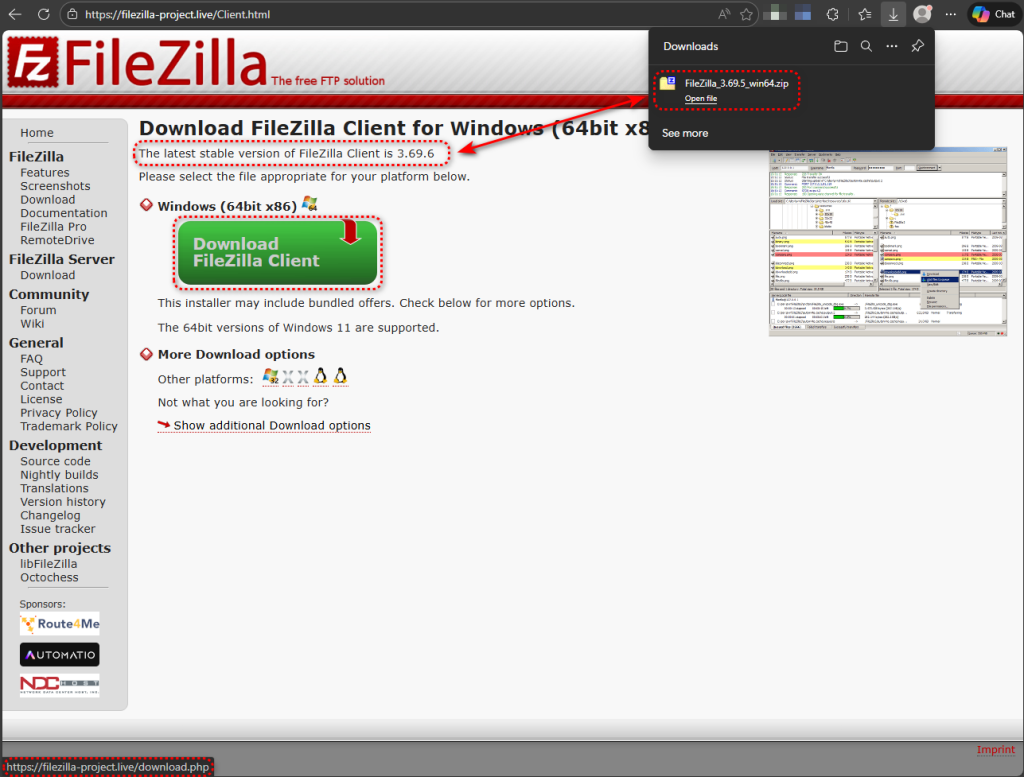
The method is straightforward: take a legitimate portable copy of FileZilla 3.69.5, place a single malicious DLL into the folder, re-zip it, and distribute the archive. The infection relies on a well-understood Windows behaviour called DLL search order hijacking, where an application loads a library from its own directory before checking the Windows system folder.
One file, one timestamp, one giveaway
The archive contains 918 entries. Of those, 917 carry a last-modified date of 2025-11-12, consistent with an official FileZilla 3.69.5 portable release. One entry stands out: version.dll, dated 2026-02-03, nearly three months newer than everything else in the archive.
A clean FileZilla portable distribution does not include a version.dll. The legitimate DLLs in the package are all FileZilla-specific libraries such as libfilezilla-50.dll and libfzclient-private-3-69-5.dll. The Windows Version API library—version.dll—is a system DLL that lives in C:\Windows\System32 and has no reason to be inside a FileZilla folder. Its presence is the entire attack.
Caught in the act: what Process Monitor showed us
We confirmed the sideloading on a live system using Process Monitor. When filezilla.exe starts, it needs to load a series of DLLs. For each one, Windows checks the application’s own directory first, then falls back to the system folder.
For system libraries like IPHLPAPI.DLL and POWRPROF.dll, the application directory returns NAME NOT FOUND, so Windows loads the legitimate copies from C:\Windows\System32. This is normal behaviour. But for version.dll, the trojanized copy is sitting in the FileZilla folder. Windows finds it there, maps it into memory, and never reaches System32. The malicious code now runs inside filezilla.exe‘s own process.
Seventeen milliseconds after loading, the malicious DLL searches for version_original.dll in the same directory and gets NAME NOT FOUND. This is a telltale sign of DLL proxying, a technique where the malicious DLL is designed to forward legitimate function calls to a renamed copy of the original library so the host application keeps working normally. In this case, the renamed original was not included in the archive, which may contribute to application instability.
FileZilla calls LoadLibrary with just the DLL filename rather than the full path, so Windows searches the application’s own directory first — exactly the behaviour attackers need to plant a malicious DLL. This is a common design behavior.
Built to detect analysis environments
The DLL includes multiple checks designed to detect virtual machines and sandboxes before executing its payload. Behavioural analysis reveals BIOS version checks, system manufacturer queries, VirtualBox registry key probing, disk drive enumeration, and memory allocation using write-watch, which is a technique that can detect memory scanning by analysis tools. Evasive sleep loops round out the anti-analysis toolkit.
These checks are selective rather than absolute. In sandboxed environments that closely resembled real user systems, the loader successfully resolved its C2 domain and attempted callbacks. In more obviously virtualised setups, it went dormant, producing no network activity beyond routine Windows DNS queries. On our own test system, FileZilla terminated almost immediately after launch, consistent with the DLL detecting the environment and killing the host process before reaching its network stage.
DNS-over-HTTPS: phoning home where nobody is listening
When the loader determines the environment is safe, it does not use traditional DNS to resolve its command-and-control domain. Instead, it sends an HTTPS request to Cloudflare’s public resolver:
https://1.1.1.1/dns-query?name=welcome.supp0v3[.]com&type=A
This technique, DNS-over-HTTPS, or DoH, bypasses corporate DNS monitoring, DNS-based blocklists, and security appliances that inspect traffic on port 53. It is the same evasion approach used in last month’s fake 7-Zip proxyware campaign.
Once the domain resolves, the loader calls back to its staging server. Memory analysis of the loader process uncovered the full configuration embedded at runtime:
{
"tag":"tbs",
"referrer":"dll",
"callback":"https://welcome.supp0v3.com/d/callback?utm_tag=tbs2&utm_source=dll"
}
The UTM-style campaign tracking suggests a structured operation with multiple distribution vectors. The tbs2 tag and dll source identifier likely differentiate this DLL sideloading distribution from other delivery methods within the same operation.
A second C2 channel on a non-standard port
Beyond the DoH callback, the malware also reaches out to 95.216.51.236 on TCP port 31415—a non-standard port on Hetzner-hosted infrastructure. Network capture shows ten connection attempts across two sessions, suggesting a persistent retry mechanism designed to maintain contact with its operator. The use of a high, non-standard port is a common technique for blending C2 traffic past firewalls that only inspect well-known service ports.
What the behavioural analysis flagged
Automated behavioural analysis of the archive flagged several additional capabilities beyond what we observed directly. Behavioural rules flagged credential harvesting from local FTP client software. Given that the malware is sideloaded by FileZilla, some of these detections may reflect FileZilla’s own legitimate access to its credential store, though the combination with the C2 callback infrastructure makes a benign explanation unlikely.
Additional behavioral indicators included:
• Creating suspended processes and writing to other processes’ memory
• Runtime .NET compilation via csc.exe
• Registry modifications consistent with autorun persistence
• Multiple file encryption API calls
Taken together, these behaviors suggest a multifunctional implant capable of credential theft, process injection, persistence, and potentially data encryption.
What to do if you may have been affected
Be cautious about where you download software. DLL sideloading is not new, and this campaign shows how adding a single malicious file to an otherwise legitimate archive can compromise a system. We have recently seen similar tactics involving fake 7-Zip downloads and other compromised distribution channels. Treat software downloaded outside official project domains with the same caution as unexpected email attachments.
- Check for
version.dllinside any FileZilla portable directory on your system. A legitimate FileZilla distribution does not ship this file. If present, treat the system as compromised. - Download FileZilla only from the official project domain at filezilla-project.org and verify the download hash against the value published on the site.
- Monitor for DNS-over-HTTPS traffic from non-browser processes. Outbound HTTPS connections to known DoH resolvers such as
1.1.1.1or8.8.8.8from applications that have no business making web requests should be investigated. - Block the domains and IP addresses listed in the IOC section below at your network perimeter.
- Inspect zip archives for timestamp anomalies before extracting and running applications. A single file with a different modification date from the rest of the archive is a simple but effective red flag.
Malwarebytes detects and blocks known variants of this threat.
Indicators of Compromise (IOCs)
File hashes (SHA-256)
665cca285680df321b63ad5106b167db9169afe30c17d349d80682837edcc755— trojanized FileZilla archive (FileZilla_3.69.5_win64.zip)e4c6f8ee8c946c6bd7873274e6ed9e41dec97e05890fa99c73f4309b60fd3da4— trojanizedversion.dllcontained in the archive
Domains
filezilla-project[.]livewelcome.supp0v3[.]com— C2 callback and staging
Network indicators
95.216.51[.]236:31415— C2 server
From reporting threats to removing them.
Cybersecurity risks should never spread beyond a headline. Keep threats off your devices by downloading Malwarebytes today.