Microsoft releases important security updates on the second Tuesday of every month, known as “Patch Tuesday.” This month’s update patches fix 59 Microsoft CVE’s including six zero-days.
Let’s have a quick look at these six actively exploited zero-days.
Windows Shell Security Feature Bypass Vulnerability
CVE-2026-21510 (CVSS score 8.8 out of 10) is a security feature bypass in the Windows Shell. A protection mechanism failure allows an attacker to circumvent Windows SmartScreen and similar prompts once they convince a user to open a malicious link or shortcut file.
The vulnerability is exploited over the network but still requires on user interaction. The victim must be socially engineered into launching the booby‑trapped shortcut or link for the bypass to trigger. Successful exploitation lets the attacker suppress or evade the usual “are you sure?” security dialogs for untrusted content, making it easier to deliver and execute further payloads without raising user suspicion.
MSHTML Framework Security Feature Bypass Vulnerability
CVE-2026-21513 (CVSS score 8.8 out of 10) affects the MSHTML Framework, which is used by Internet Explorer’s Trident/embedded web rendering). It is classified as a protection mechanism failure that results in a security feature bypass over the network.
A successful attack requires the victim to open a malicious HTML file or a crafted shortcut (.lnk) that leverages MSHTML for rendering. When opened, the flaw allows an attacker to bypass certain security checks in MSHTML, potentially removing or weakening normal browser or Office sandbox or warning protections and enabling follow‑on code execution or phishing activity.
Microsoft Word Security Feature Bypass Vulnerability
CVE-2026-21514 (CVSS score 5.5 out of 10) affects Microsoft Word. It relies on untrusted inputs in a security decision, leading to a local security feature bypass.
An attacker must persuade a user to open a malicious Word document to exploit this vulnerability. If exploited, the untrusted input is processed incorrectly, potentially bypassing Word’s defenses for embedded or active content—leading to execution of attacker‑controlled content that would normally be blocked.
Desktop Window Manager Elevation of Privilege Vulnerability
CVE-2026-21519 (CVSS score 7.8 out of 10) is a local elevation‑of‑privilege vulnerability in Windows Desktop Window Manager caused by type confusion (a flaw where the system treats one type of data as another, leading to unintended behavior).
A locally authenticated attacker with low privileges and no required user interaction can exploit the issue to gain higher privileges. Exploitation must be done locally, for example via a crafted program or exploit chain stage running on the target system. An attacker who successfully exploited this vulnerability could gain SYSTEM privileges.
Windows Remote Access Connection Manager Denial of Service Vulnerability
CVE-2026-21525 (CVSS score 6.2 out of 10) is a denial‑of‑service vulnerability in the Windows Remote Access Connection Manager service (RasMan).
An unauthenticated local attacker can trigger the flaw with low attack complexity, leading to a high impact on availability but no direct impact on confidentiality or integrity. This means they could crash the service or potentially the system, but not elevate privileges or execute malicious code.
Windows Remote Desktop Services Elevation of Privilege Vulnerability
CVE-2026-21533 (CVSS score 7.8 out of 10) is an elevation‑of‑privilege vulnerability in Windows Remote Desktop Services, caused by improper privilege management.
A local authenticated attacker with low privileges, and no required user interaction, can exploit the flaw to escalate privileges to SYSTEM and fully compromise confidentiality, integrity, and availability on the affected system. Successful exploitation typically involves running attacker‑controlled code on a system with Remote Desktop Services present and abusing the vulnerable privilege management path.
Azure vulnerabilities
Azure users are also advised to take note of two critical vulnerabilities with CVSS ratings of 9.8:
- CVE-2026-21531 affecting Azure SDK
- CVE-2026-24300 affecting Azure Front Door
How to apply fixes and check you’re protected
These updates fix security problems and keep your Windows PC protected. Here’s how to make sure you’re up to date:
1. Open Settings
- Click the Start button (the Windows logo at the bottom left of your screen).
- Click on Settings (it looks like a little gear).
2. Go to Windows Update
- In the Settings window, select Windows Update (usually at the bottom of the menu on the left).
3. Check for updates
- Click the button that says Check for updates.
- Windows will search for the latest Patch Tuesday updates.
- If you have selected automatic updates earlier, you may see this under Update history:
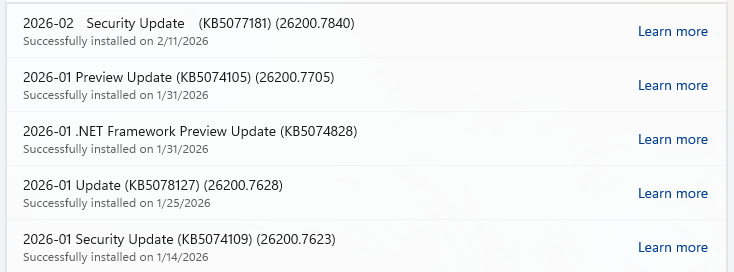
- Or you may see a Restart required message, which means all you have to do is restart your system and you’re done updating.
- If not, continue with the steps below.
4. Download and Install
- If updates are found, they’ll start downloading right away. Once complete, you’ll see a button that says Install or Restart now.
- Click Install if needed and follow any prompts. Your computer will usually need a restart to finish the update. If it does, click Restart now.
5. Double-check you’re up to date
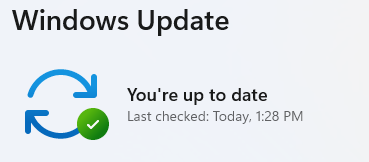
- After restarting, go back to Windows Update and check again. If it says You’re up to date, you’re all set!
From reporting threats to removing them.
Cybersecurity risks should never spread beyond a headline. Keep threats off your devices by downloading Malwarebytes today.