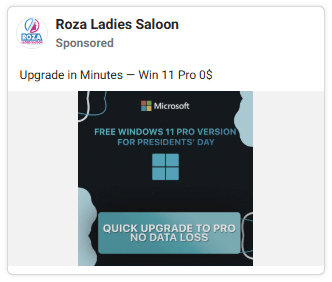
Attackers are running paid Facebook ads that look like official Microsoft promotions, then directing users to near-perfect clones of the Windows 11 download page. Click Download Now and instead of a Windows update, you get a malicious installer—one that silently steals saved passwords, browser sessions, and cryptocurrency wallet data.
“I just wanted to update Windows”
The attack starts with something completely ordinary: a Facebook ad. It looks professional, uses Microsoft branding, and promotes what appears to be the latest Windows 11 update. If you have been meaning to keep your PC current, it feels like a convenient shortcut.

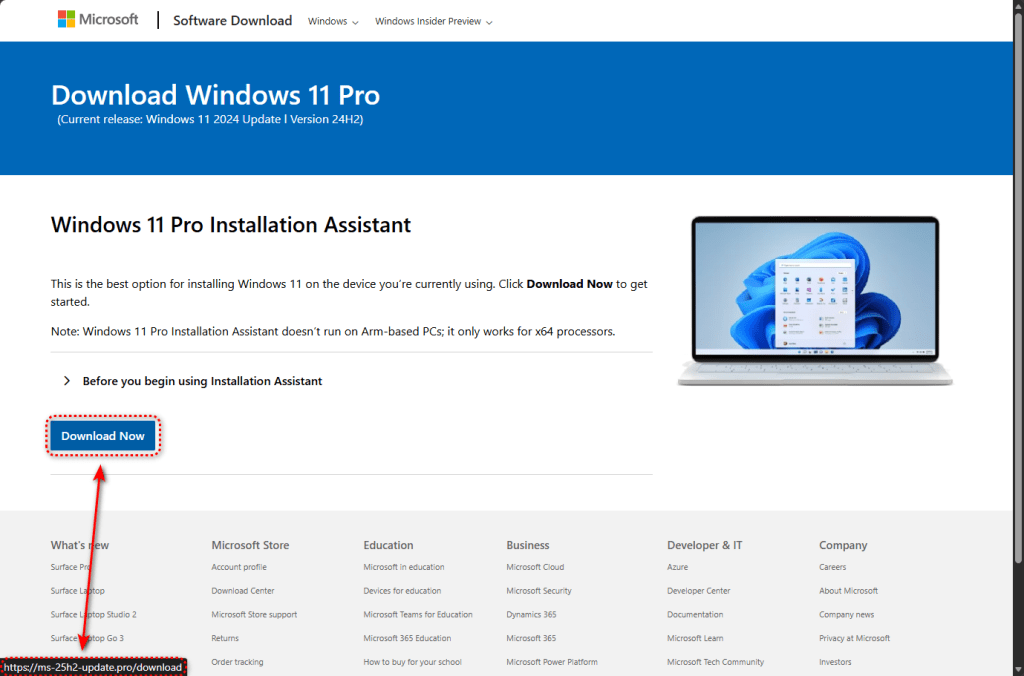
Click the ad and you land on a site that looks almost identical to Microsoft’s real Software Download page. The logo, layout, fonts, and even the legal text in the footer are copied. The only obvious difference is in the address bar. Instead of microsoft.com, you’ll see one of these lookalike domains:
- ms-25h2-download[.]pro
- ms-25h2-update[.]pro
- ms25h2-download[.]pro
- ms25h2-update[.]pro
The “25H2” in domain names is deliberate. It mimics the naming convention Microsoft uses for Windows releases—24H2, the current version, was on everyone’s lips when this campaign launched, making the fake domains look plausible at a glance.
Geofencing: only the right targets get the payload
This campaign does not blindly infect everyone who visits the site.
Before delivering the malware, the fake page checks who you are. If you connect from a data center IP address—often used by security researchers and automated scanners—you get redirected to google.com. The site looks harmless.
Only visitors who appear to be regular home or office users receive the malicious file.
This technique, known as geofencing combined with sandbox detection, is what allowed this campaign to run for as long as it did without being caught and shut down by automated systems. The infrastructure is configured to evade automated security analysis.
When a targeted user clicks Download now, the site triggers a Facebook Pixel “Lead” event—the same tracking method legitimate advertisers use to measure conversions. The attackers are monitoring which victims take the bait and optimizing their ad spend in real time.
A 75 MB “installer” served straight from GitHub
If you pass the checks, the site downloads a file named ms-update32.exe. At 75 MB, it feels like a legitimate Windows installer.
The file is hosted on GitHub, a trusted platform used by millions of developers. That means the download arrives over HTTPS with a valid security certificate. Because it comes from a reputable domain, browsers do not automatically flag it as suspicious.
The installer was built using Inno Setup, a legitimate tool often abused by malware authors because it creates professional-looking installation packages.
What happens when you run it
Before doing anything damaging, the installer checks whether it is being watched. It looks for virtual machine environments, debugger software, and analysis tools. If it finds any of them, it stops. This is the same evasion logic that lets it slip past many automated security sandboxes—those systems run inside virtual machines by design.
On a real user’s machine, the installer proceeds to extract and deploy its components.
The most significant component is a full Electron-based application installed to C:\Users\<USER>\AppData\Roaming\LunarApplication\. Electron is a legitimate framework used by apps like Slack and Visual Studio Code. That makes it a useful disguise.
The choice of name is not accidental. “Lunar” is a brand associated with cryptocurrency tooling, and the application comes bundled with Node.js libraries specifically designed to create ZIP archives—suggesting it collects data, packages it up, and sends it out. Likely targets include cryptocurrency wallet files, seed phrases, browser credential stores, and session cookies.
At the same time, two obfuscated PowerShell scripts with randomised filenames are written to the %TEMP% folder and executed with a command line that deliberately disables Windows script-signing protections:
powershell.exe -NoProfile -NoLogo -InputFormat Text -NoExit -ExecutionPolicy Unrestricted -Command -
Hiding in the registry, covering its tracks
To survive reboots, the malware writes a large binary blob to the Windows registry under: HKEY_LOCAL_MACHINE\SYSTEM\Software\Microsoft\TIP\AggregateResults.
The TIP (Text Input Processor) registry path is a legitimate Windows component, which makes it less likely to raise suspicion.
Telemetry also shows behavior consistent with process injection. The malware creates Windows processes in a suspended state, injects code into them, and resumes execution. This allows the malicious code to run under the identity of a legitimate process, reducing the chance of detection.
Once execution is established, the installer deletes temporary files to reduce its forensic footprint. It can also initiate system shutdown or reboot operations, potentially to interfere with analysis.
The malware uses multiple encryption and obfuscation techniques, including RC4, HC-128, XOR encoding, and FNV hashing for API resolution. These methods make static analysis more difficult.
The Facebook ads angle
The use of paid Facebook advertising to distribute malware is worth pausing on. This is not a phishing email that lands in a spam folder, or a malicious result buried in a search page. These are paid Facebook ads appearing alongside posts from friends and family.
The attackers ran two parallel ad campaigns, each pointing to separate phishing domains. Each campaign used its own Facebook Pixel ID and tracking parameters. If one domain or ad account gets shut down, the other can continue running.
The use of two parallel domains and two separate advertising campaigns suggests the operators have redundancy built in—if one domain is taken down or one ad account is suspended, the other continues running.
What to do if you think you’ve been affected
This campaign is technically polished and operationally aware. The infrastructure demonstrates awareness of common security research and sandboxing techniques. They understand how people download software and have chosen Facebook advertising as their delivery vector precisely because it reaches real users in a context where trust is high.
Remember: Windows updates come from Windows Update inside your system settings—not from a website and never from a social media ad. Microsoft does not advertise Windows updates on Facebook.
And a pro tip: Malwarebytes would have detected and blocked the identified payload and associated infrastructure.
If you downloaded and ran a file from either of these sites, treat the system as compromised and act quickly.
- Do not log into any accounts from that computer until it has been scanned and cleaned.
- Run a full scan with Malwarebytes immediately.
- Change passwords for important accounts like email, banking, and social media from a different, clean device.
- If you use cryptocurrency wallets on that machine, move funds to a new wallet with a new seed phrase generated on a clean device.
- Consider alerting your bank and enabling fraud monitoring if any financial credentials were stored on or accessible from that device.
For IT and security teams:
- Block the phishing domains at DNS and web proxy
- Alert on PowerShell execution with
-ExecutionPolicy Unrestrictedin non-administrative contexts - Hunt for the LunarApplication directory and randomized
.yiz.ps1/.unx.ps1files in%TEMP%
Indicators of Compromise (IOCs)
File hash (SHA-256)
- c634838f255e0a691f8be3eab45f2015f7f3572fba2124142cf9fe1d227416aa (ms-update32.exe)
Domains
- ms-25h2-download[.]pro
- ms-25h2-update[.]pro
- ms25h2-download[.]pro
- ms25h2-update[.]pro
- raw.githubusercontent.com/preconfigured/dl/refs/heads/main/ms-update32.exe (payload delivery URL)
File system artifacts
- C:\Users\<USER>\AppData\Roaming\LunarApplication\
- C:\Users\<USER>\AppData\Local\Temp\[random].yiz.ps1
- C:\Users\<USER>\AppData\Local\Temp\[random].unx.ps1
Registry
- HKEY_LOCAL_MACHINE\SYSTEM\Software\Microsoft\TIP\AggregateResults (large binary data — persistence)
Facebook advertising infrastructure
- Pixel ID: 1483936789828513
- Pixel ID: 955896793066177
- Campaign ID: 52530946232510
- Campaign ID: 6984509026382