As part of our investigation into a job-themed phishing campaign, we came across several suspicious URLs that all looked like this:
https://forms.google.ss-o[.]com/forms/d/e/{unique_id}/viewform?form=opportunitysec&promo=
The subdomain forms.google.ss-o[.]com is a clear attempt to impersonate the legitimate forms.google.com. The “ss-o” is likely introduced to look like “single sign-on,” an authentication method that allows users to securely log in to multiple, independent applications or websites using one single set of credentials (username and password).
Unfortunately, when we tried to visit the URLs we were redirected to the local Google search website. This is a common phisher’s tactic to prevent victims from sharing their personalized links with researchers or online analysis.
After some digging, we found a file called generation_form.php on the same domain, which we believe the phishing crew used to create these links. The landing page for the campaign was: https://forms.google.ss-o[.]com/generation_form.php?form=opportunitysec
The generation_form.php script does what the name implies: It creates a personalized URL for the person clicking that link.
With that knowledge in hand, we could check what the phish was all about. Our personalized link brought us to this website:
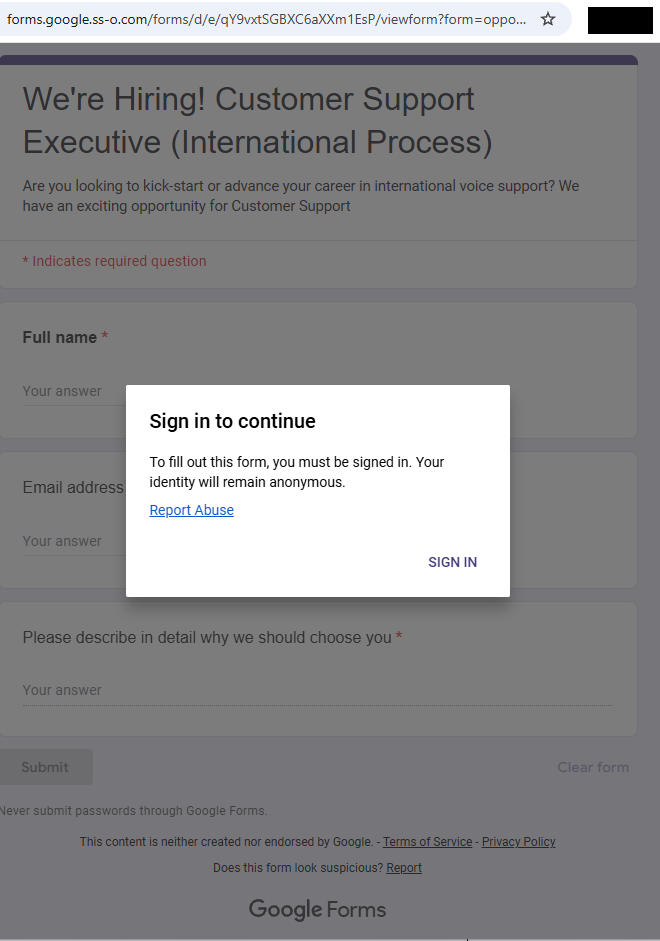
The greyed out “form” behind the prompt promises:
- We’re Hiring! Customer Support Executive (International Process)
- Are you looking to kick-start or advance your career…
- The fields in the form: Full Name, Email address, and an essay field “Please describe in detail why we should choose you”
- Buttons: “Submit” and “Clear form.”
The whole web page emulates Google Forms, including logo images, color schemes, a notice about not “submitting passwords,” and legal links. At the bottom, it even includes the typical Google Forms disclaimer (“This content is neither created nor endorsed by Google.”) for authenticity.
Clicking the “Sign in” button took us to https://id-v4[.]com/generation.php, which has now been taken down. The domain id-v4.com has been used in several phishing campaigns for almost a year. In this case, it asked for Google account credentials.
Given the “job opportunity” angle, we suspect links were distributed through targeted emails or LinkedIn messages.
How to stay safe
Lures that promise remote job opportunities are very common these days. Here are a few pointers to help keep you safe from targeted attacks like this:
- Do not click on links in unsolicited job offers.
- Use a password manager, which would not have filled in your Google username and password on a fake website.
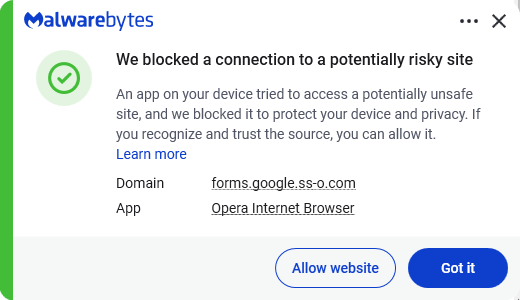
- Use an up to date, real-time anti-malware solution with a web protection component.
Pro tip: Malwarebytes Scam Guard identified this attack as a scam just by looking at the URL.
IOCs
id-v4[.]com
forms.google.ss-o[.]com
Something feel off? Check it before you click.
Malwarebytes Scam Guard helps you analyze suspicious links, texts, and screenshots instantly.
Available with Malwarebytes Premium Security for all your devices, and in the Malwarebytes app for iOS and Android.