A fraudulent website dressed in Avast’s brand is tricking French-speaking users into handing over their full credit card details—card number, expiry date, and three-digit security code—under the cover story of processing a €499.99 refund that was never owed to them.
The operation combines live chat “support,” a hardcoded alarming transaction amount, and a convincing replica of Avast’s visual identity to create urgency and harvest payment data at scale.
“You were charged €499.99 today“
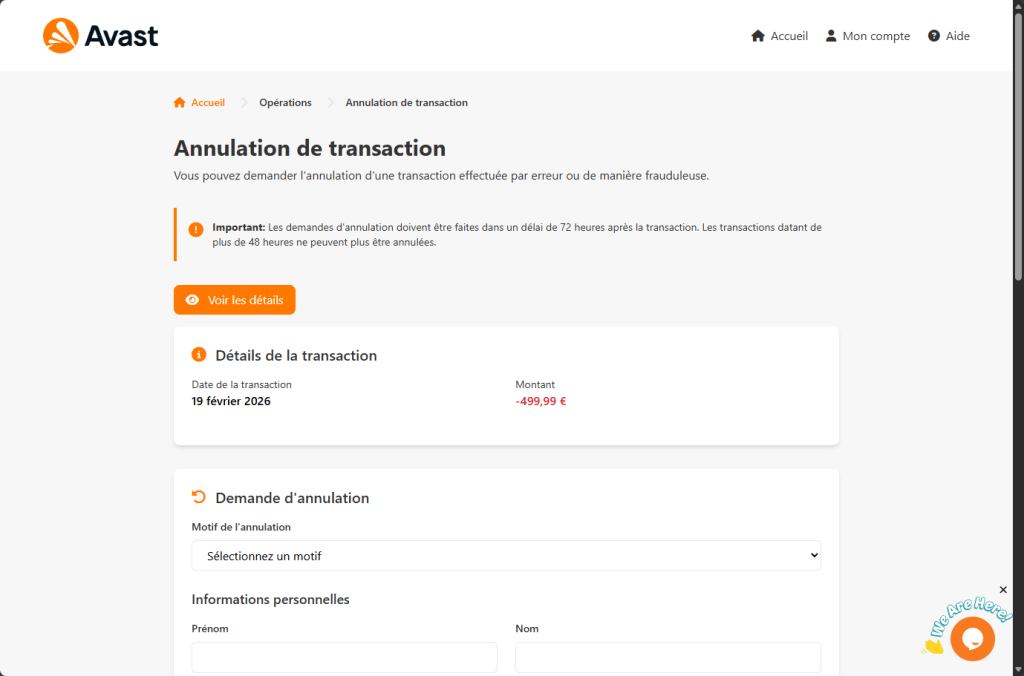
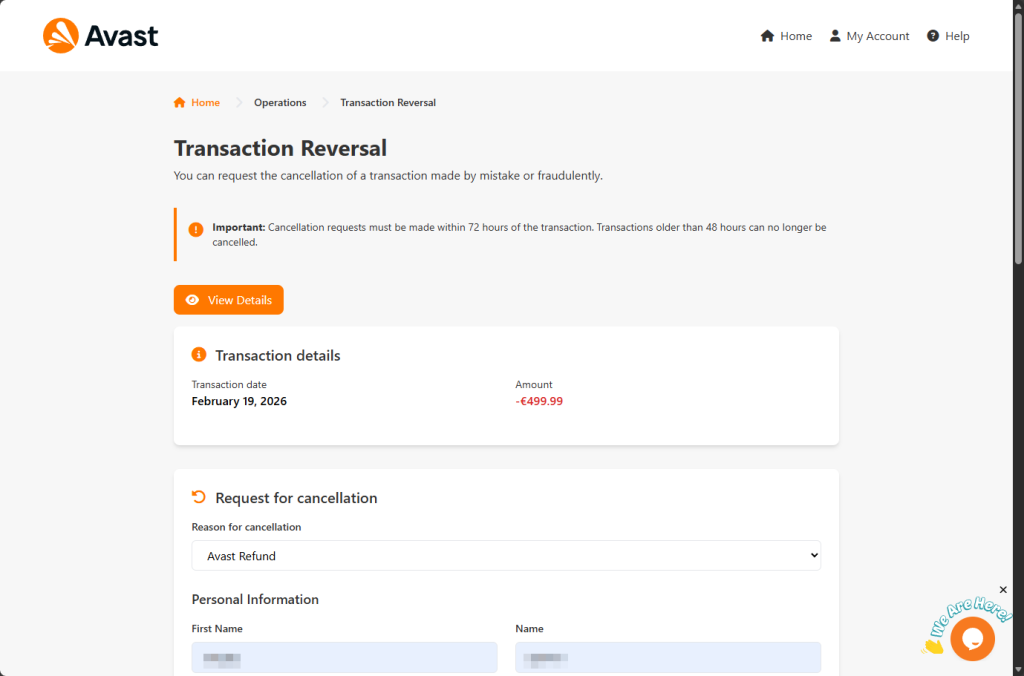
The phishing page opens with what appears to be a legitimate Avast web portal. The Avast logo is loaded directly from Avast’s own content delivery network—a deliberate touch that ensures the orange-and-white shield renders perfectly and passes a casual visual check. The page header offers links to “Home,” “My Account,” and “Help,” all styled to match Avast’s real interface.
Below the header, a warning box in Avast’s signature orange catches the eye: cancellation requests must be filed within 72 hours, it says. Then, in the same breath, warns that transactions older than 48 hours “can no longer be cancelled.” The internal contradiction is easy to miss when your attention is fixed on the larger claim just below it.
That claim is a transaction record showing today’s date and a debit of -€499.99. The date is not hardcoded. A single line of JavaScript reads the visitor’s local system clock and writes the current date into the page at load time. Whenever a victim arrives, whether on a Tuesday in February or a Friday in August, the charge appears to have happened that very morning.
The amount, however, is fixed. Every visitor sees exactly -€499.99, a sum carefully chosen to be large enough to provoke immediate action but not so large as to strain credibility for a software subscription.
There is no real transaction. No Avast account has been accessed. The number exists solely to make the visitor feel robbed.
What the form asks for and where the data goes
The cancellation form below asks for a reason for the refund (a dropdown offers “Avast refund,” “Fraudulent transaction,” “Duplicate transaction,” and “Other”), followed by a full set of personal information: first name, last name, email address, phone number, street address, city, region, and postal code. Filling in this section is framed as routine identity verification—necessary, the page implies, before any refund can be processed.
Once the form is submitted, a modal dialogue appears titled “Card Information.” The page asks for the victim’s credit card number, expiry date, and CVV security code, supposedly so the refund can be credited back to the original payment method.
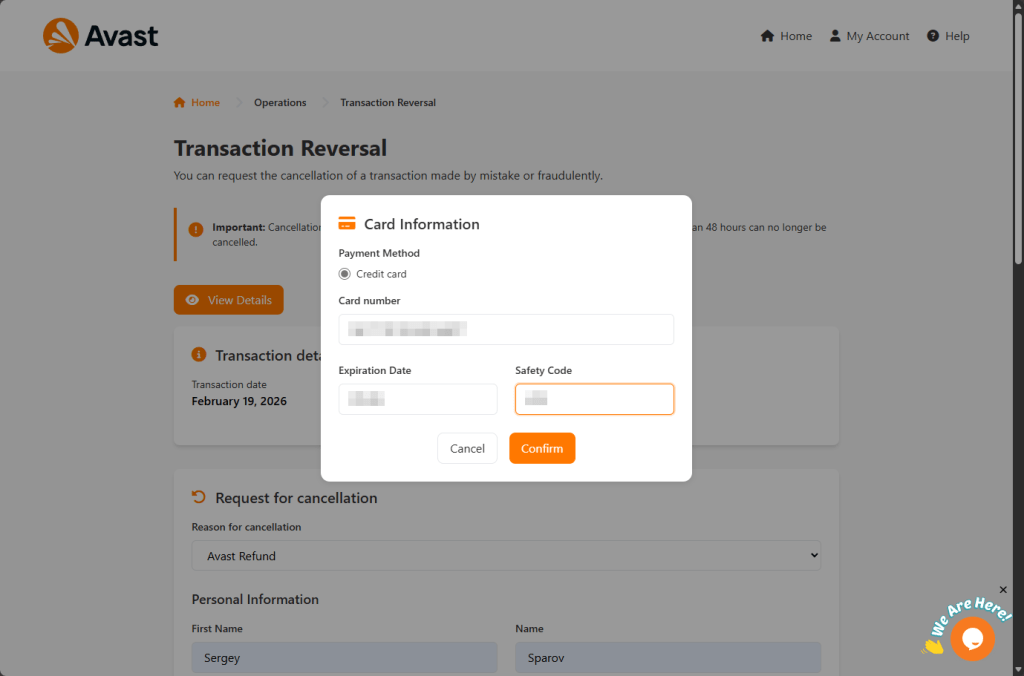
This is the moment the operation has been building toward.
The page even implements Luhn algorithm validation (the mathematical check banks use to verify card numbers) so test numbers or accidental typos are rejected before submission. Only structurally valid card numbers are accepted.
When the Confirm button is clicked, the browser sends a POST request to send.php; a backend file that receives the entire payload as a JSON object. That payload contains every field the victim filled in: name, address, contact details, card number, expiry, and CVV.
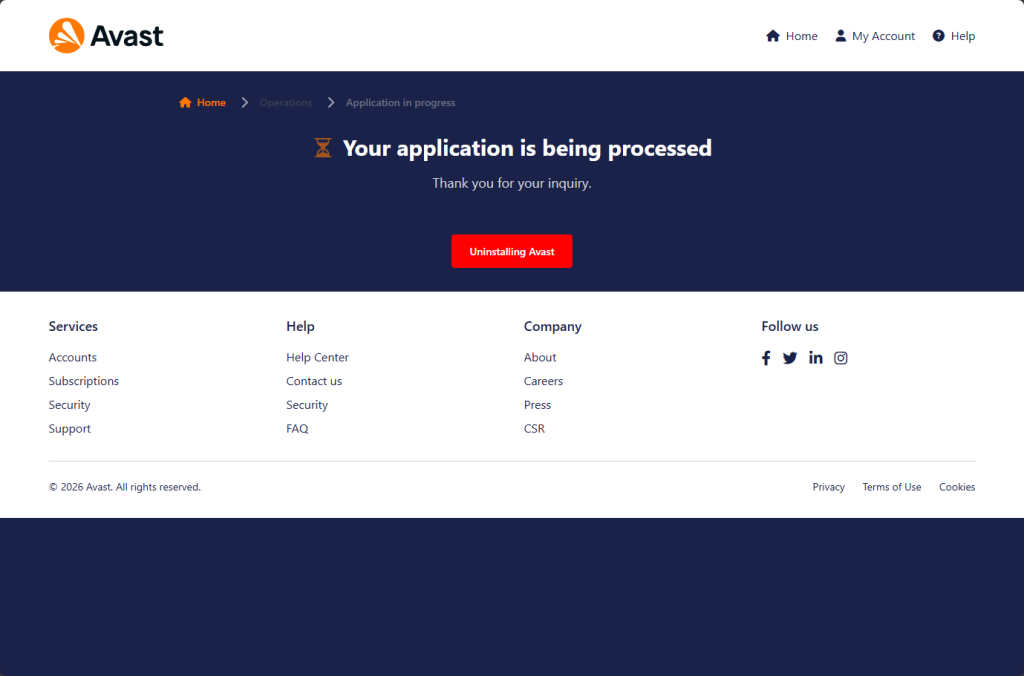
After the data is dispatched, the victim is redirected to a confirmation page that reads:
“Your application is being processed — Thank you for your inquiry.”
Below that reassuring message sits a button labeled “Uninstalling Avast”. A final social engineering nudge encouraging the victim to remove the very security software that might otherwise alert them to what has just happened.
Why is there live chat on a phishing page?
What sets this campaign apart from many phishing pages is the presence of a real-time live chat widget embedded in the bottom-right corner of the screen. The widget is provided by Tawk.to, a legitimate customer support platform, and carries the account identifier 689773de2f0f7c192611b3bf with widget code 1j27pp82q.
This means someone (almost certainly the operators of the phishing site) can see when a visitor is on the page and engage them in live conversation.
The tactical value is significant. A confused visitor who notices the timing mismatch (“72 hours” vs “48 hours”), or who hesitates before entering card details, can be nudged forward by a “support agent” offering reassurance in real time.
It transforms a static phishing page into an interactive fraud operation.
Who is this page designed to catch?
What makes this page unusually effective is that it does not need to target a specific type of person. It is built to catch four entirely different kinds of visitor with the same form, each with a different reason to comply.
- The Avast customer: someone who bought a license, did not want the renewal, and sees this page as a legitimate route to dispute the charge. Their existing relationship with the brand makes the interface feel familiar.
- The forgotten subscriber: They have an Avast account but do not remember signing up. Perhaps it was years ago or bundled with another product. They see -€499.99, conclude they are being wrongly charged, and never think to log into an account they barely remember having.
- The alarmed non-customer: They have never used Avast. They see the charge and assume their card details have been stolen and used without their knowledge. They arrive already convinced that a crime has been committed against them, already in a hurry, and already primed to trust any official-looking process that offers to fix it. This is the most dangerous profile as the 72-hour window is not just a detail to them, it feels like a deadline.
- The opportunist: someone who knows they were not charged but believes they have found €499.99 waiting to be claimed. They attempt to collect money that was never theirs, only to lose their own card details in the process.
The page never has to distinguish between these visitors. It asks no questions that would reveal which profile a person belongs to. No account login, or license key, or proof of purchase. Just a charge, a form, and a card field.
How to tell if a refund page is a scam
Refund scams like this are not limited to Avast. Any brand can be impersonated. Here are the warning signs to watch for:
- A charge you don’t recognize that appears “today”: Scammers often insert the current date automatically to make the transaction feel urgent and real.
- Urgent cancellation windows: Messages claiming you have limited time to act are designed to pressure you into rushing.
- Requests for full credit card details to “process” a refund: Legitimate refunds do not require you to re-enter your full card number and CVV on a random page.
- No login, license key, or proof of purchase required: Real companies verify your account. Scam pages skip verification and go straight to payment details.
- Live chat pushing you to complete the process: Real-time reassurance from a “support agent” can be part of the scam, not proof the site is legitimate.
- Instructions to uninstall your security software: No genuine refund process will ever require you to remove your protection.
- Lookalike domains: Slightly altered website names are a major red flag. Always type the official company website directly into your browser instead of clicking links.
Spotting even one of these signs should make you stop. Do not enter personal or financial information on a page you reached through an unsolicited message or suspicious link.
What to do if you entered your details
If you submitted your card details:
- Contact your bank or card issuer immediately and cancel the card
- Dispute any unauthorized charges
- Do not wait for fraud to appear — stolen card data is often used quickly
- Change passwords for accounts linked to the email address you provided
- Run a full scan with a reputable security product
Other ways to stay safe:
- Keep your device and software up to date
- Use active anti-malware protection with web protection enabled
- If you’re unsure whether something is a scam, Malwarebytes users can submit suspicious messages to Scam Guard for review
Something feel off? Check it before you click.
Malwarebytes Scam Guard helps you analyze suspicious links, texts, and screenshots instantly.
Available with Malwarebytes Premium Security for all your devices, and in the Malwarebytes app for iOS and Android.