What you need to know:
- Fake CAPTCHA pages imitate the familiar “prove you’re not a robot” test to trick people into running malware.
- They often spread through phishing emails or hacked websites.
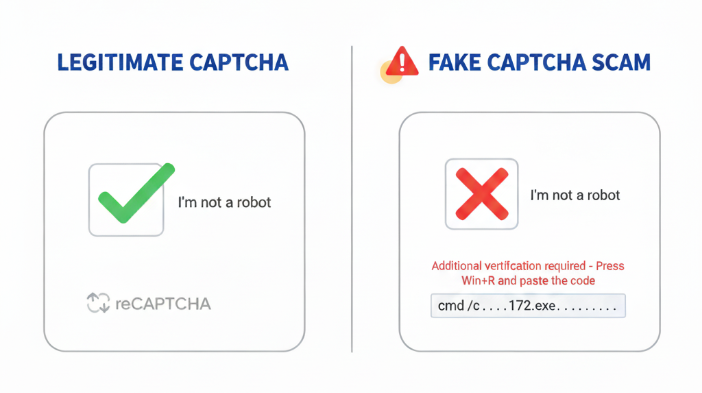
- Real CAPTCHAs only ask you to tick a box or solve a quick puzzle. You shouldn’t be asked to download files or paste commands.
- Clicked on one by mistake? Close the site and run a full antivirus scan. Delete any downloads and change passwords from a safe device.
You can protect yourself by checking the site address before you solve CAPTCHAs and limiting potentially harmful features like the Windows Run dialog.
What is a CAPTCHA verification?
CAPTCHA verification is a security tool designed to tell people and machines apart. The name stands for “Completely Automated Public Turing test to tell Computers and Humans Apart.” You can see why they shortened it.
We’ve all met these when signing up for an account or posting on a forum. Human verification CAPTCHAs are designed to make sure it’s a real person and not an automated script accessing a site. They help keep websites safe from spam and fake accounts.
How does a CAPTCHA work?
CAPTCHAs present small tests that most humans can solve easily, but that automated programs find difficult. Some ask you to type a set of distorted letters or numbers.
Others display a grid of images where you click on traffic lights, bicycles, or crosswalks. We’ve all seen them. Audio versions let you hear a series of numbers and type what you hear. These tasks protect websites by blocking scripts and bots that can’t complete them reliably. Because traditional CAPTCHAs can be slow or frustrating, many websites now use Google’s newer version called reCAPTCHA.
What is reCAPTCHA?
reCAPTCHA is Google’s more advanced take on the original CAPTCHA idea. Instead of forcing users to decipher hard-to-read text, reCAPTCHA often gives you a simple checkbox labeled I’m not a robot. It may alternatively offer a quick image puzzle.
So how does reCAPTCHA work? It quietly analyzes browsing patterns in the background to judge whether you’re a person or a bot. This means it is less disruptive and generally accurate. As a result, reCAPTCHA has become the most common verification system on the internet. According to BuiltWith, it is used by more than 11 million websites.
How do scammers turn CAPTCHAs into a trap?
Criminals have learned that people trust CAPTCHA challenges, especially the familiar “I’m not a robot” box. Scammers can lure people to a fake website and give it an air of legitimacy by having a CAPTCHA. Or sometimes attackers copy well-known brand sites, giving them a subtly different web address, then add a fake CAPTCHA to it that actually delivers malware. Some pages copy Google’s reCAPTCHA design so closely that most visitors don’t think twice. Bogus CAPTCHAs often arrive through shady pop-ups or links on compromised websites.
Fake CAPTCHAs work by mixing something routine with instructions that aren’t. Instead of simply clicking a checkbox, you might be asked to download a file to complete an extra verification step. Because the CAPTCHA itself looks legitimate, many users follow along, giving scammers the opening they need to plant malware or steal information.
How do fake CAPTCHA scams work in practice?
Fake CAPTCHA scams can take multiple forms. The most common trick is a fake CAPTCHA that claims you must complete additional verification. The page automatically copies a malicious command to your clipboard. It then tells you to run it in the Windows Run dialog (Win + R) to install information stealers.
We’ve even seen fake CAPTCHA pages include step-by-step tutorial videos to guide victims through the process.
There are other variations of CAPTCHA scams. Techniques might include:
- Hiding harmful instructions in PowerShell or mshta.exe commands to make them difficult to detect.
- Smuggling malware inside everyday file types like MP3s and JPGs
- Using fileless execution, where the payload runs entirely in memory rather than saving to disk. This means there are fewer traces for antivirus tools to find.
What kind of malware do fake CAPTCHAs install?
Many of these CAPTCHA scams don’t just gather data. They may install malicious software designed to spy on you or take control of your system. Some of the most common payloads include info stealers.
Some install Lumma stealer or similar harmful software. They can harvest passwords and browser cookies. Some can even access your cryptocurrency wallets.
Others deliver Remote Access Trojans (RATs). These include:
- AsyncRAT
- SecTopRAT
- XWorm
These tools can allow attackers to browse files or open backdoors into business networks. The fallout can be severe and includes identity theft or a hidden foothold inside your company’s systems. This can all stem from just one breach.
How can you tell a real CAPTCHA from a fake one?
Spotting a fake CAPTCHA isn’t always obvious. There are some potential signs. Legitimate CAPTCHAs appear on trusted sites and use simple visual or audio checks.
Malicious or fake CAPTCHAs tend to request more. They ask you to download files or enable notifications. If they ask you to paste text into your computer, then your alarm bells should be ringing. Another red flag is where the CAPTCHA shows up. Real versions are embedded within pages you trust. Fake ones often end up on unfamiliar or suspicious-looking domains. If the domain name looks anything like js3820_xxZhry.strangesite-name.yzx, then you should not automatically trust it. Fake or unofficial sounding domains are always a red flag.
If there is a pop-up for the CAPTCHA, this is also a reason for suspicion. Very few legitimate sites do things this way.
What should you do if you clicked on a fake CAPTCHA?
Clicking on a fake CAPTCHA provides a risk to your system and you shouldn’t take chances. Acting fast can stop an infection before it spreads or limit the damage if malware has already launched. Close the browser tab immediately, disconnect from the internet and run a full antivirus scan to limit any damage.
Run a complete antivirus or anti-malware scan. Make sure the tool is up to date so it can detect the newest threats. If the scam prompted you to download a file, delete it. Do not open it as this may run harmful scripts. Empty your trash or recycling bin so it’s gone for good.
Then clean your browser by clearing cache, cookies, and removing any extensions you don’t recognize. Some fake CAPTCHA pages attempt to plant malicious add-ons that survive even after you leave the site.
Once your system looks clean, change the passwords for your most sensitive accounts from another secure device. If you reuse passwords anywhere this is a good time to update those. Malware often targets saved credentials.
Monitor your accounts even more closely over the next few weeks. Watch for suspicious sign-ins or unexpected messages on social media. Many attackers wait before using stolen data, hoping you’ll let your guard down. Staying alert can help you catch fraud before it snowballs into something worse.
Recap:
- Close the site and disconnect from the internet.
- Run a full antivirus or anti-malware scan.
- Delete any suspicious downloads without opening them.
- Clear your browser’s cache, cookies, and unknown extensions.
- Change passwords from a secure device.
- Keep monitoring financial accounts for unusual activity.
How can you protect yourself from fake CAPTCHA scams?
Staying safe starts with slowing down whenever a CAPTCHA seems out of place.
We’ve already discussed the need to check some of the details such as the site address and being cautious if the CAPTCHA appears in a pop-up. If it doesn’t match the site you meant to visit, close the page instead of taking a risk.
Good device security adds another layer of defense. Keep your operating system and antivirus software up to date so they can block new threats. Many security programs can also scan pages for suspicious scripts before you interact with them. Some browsers include built-in protection against harmful code. It’s worth exploring those settings.
There are even more steps that can be taken. Limiting or disabling the Windows Run dialog on shared PCs stops attackers from abusing it. Using script-blocking extensions or turning off JavaScript on risky sites helps cut down on hidden commands.
Why are fake CAPTCHA scams becoming more common?
Scammers use fake CAPTCHA pages because they exploit something we all recognize. Most people see the familiar “I’m not a robot” checkbox and solve it without thinking. The built-in trust is what makes the scam so effective. Instructions like “paste this code to finish verification” don’t always set off alarms because they seem like they could be part of the process.
Another reason is economics. Launching these scams doesn’t require deep technical skills anymore. Malware-as-a-Service kits provide ready-made scripts and hosting. This means anyone willing to pay can run an attack.
Many scammers target industries rich in data or assets. Online stores are attractive for their payment details and gaming platforms may hold accounts linked to valuable digital items or cryptocurrency. Any site where people log in and move money is a tempting target. ps that could be put in place. Networks are all different. It is definitely worth checking what they offer to prevent these kinds of issues from happening.
Related articles
What are the dangers of a trojan virus in fake CAPTCHA scams?
What are the most common types of online scams today?
What role does social engineering play in fake CAPTCHA scams?