What you need to know:
- SIM swapping is when a scammer takes control of your phone number.
- The SIM can then be used to intercept text-based account verification for your bank or social media accounts.
- Warning signs include sudden loss of service or login lockouts.
- You can stay protected with carrier PINs and stronger 2FA.
- If it happens to you, act fast—contact your carrier for help to secure your accounts.
Imagine losing access to your phone. It’s a nightmare for a lot of people who storelots of important information on their devices.
Dropping or having your phone stolen are not the only ways you can lose your phone.It’s possible someone else has taken control of your number. SIM swapping is a technique cybercriminals use to do exactly that. Once they succeed, they can intercept calls and text messages, and use them to access accounts protected by text-based verification.
It often starts with small warning signs. Your calls stop coming through, your signal vanishes, or you’re suddenly logged out of important apps. The faster you recognize these red flags, the better your chances of shutting down the attack before serious damage is done.
Setting up a carrier PIN and switching to stronger two-factor authentication can make you a far harder target. And if the worst happens, speed matters. You’ll need to alert your carrier and lock down your accounts immediately.
What is SIM swapping?
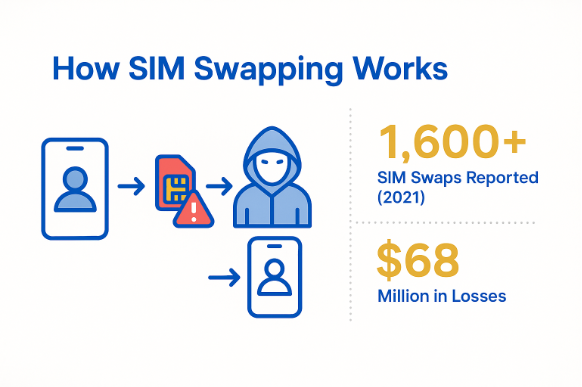
SIM swapping happens when a fraudster convinces your mobile carrier to move your phone number onto a SIM card they control. The transfer can happen over the phone or even in person at a store; the scammers impersonate you and claim the original SIM was lost or damaged.
Once the transfer goes through, your phone loses service. Every call or text meant for you goes to the attacker instead. This can include one-time passcodes and verification messages that many services send by text to confirm your identity, giving attackers a way into your accounts.
This is a growing problem. According to the FBI’s Internet Crime Complaint Center (IC3) more than 1,600 SIM swaps complaints were reported in 2021 alone, with losses exceeding $68 million.
How scammers pull it off
Taking over a phone number isn’t as complicated as it might sound. For a determined scammer, the hardest part is often gathering enough details to convince a mobile carrier they’re the real account holder.
Step-by-step: Inside a SIM swap
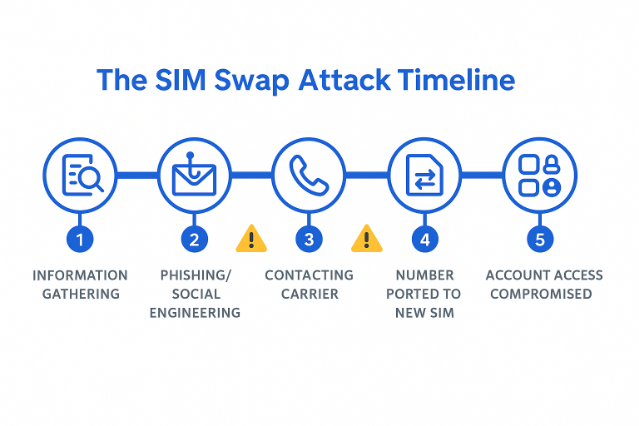
The process usually begins with information gathering. Criminals may dig through data breaches or reuse details stolen through phishing emails, or piece together personal facts from social media posts.
Armed with enough of this information, they contact your mobile carrier, sometimes by phone, other times via online support. Posing as you, hey claim their SIM card has been lost or damaged and request that the number be transferred to a new SIM. If the carrier approves the request, your number is instantly activated on the scammer’s device.
At that point, you lose service without warning and the attacker starts receiving your calls and text messages.
Common tricks used
Scammers often rely on phishing messages that appear to come from your mobile provider, prompting you to “verify” your account or click a malicious link. Even harmless-looking social media updates can give away answers to common security questions, like your birthday or pet’s name.
In some situations, an attacker may have help from someone inside the carrier who processes the SIM transfer directly, bypassing normal customer verification steps.
What are signs of SIM swapping?
When a SIM swap happens, the clues often appear suddenly. You might be in the middle of using your phone when calls stop coming through or messages no longer arrive. Other warning signs can follow quickly.
Red flags to watch for
There are some telltale signs that something is not right with your SIM:
- Your phone suddenly shows “no signal” or loses service without explanation.
- You’re locked out of accounts and can’t receive text-based security codes to get back in.
- You notice unexpected activity, such as bank withdrawals, or password reset messages appear you didn’t request.
- Your mobile carrier confirms that your number has been activated on a different SIM or device.
The sooner you recognize these symptoms, the more chance you have of cutting the attacker off before they do serious damage.
What to do if you’re a victim
Speed is everything after a SIM swap. The longer an attacker has your number, the more opportunities they have to compromise your accounts.
Act fast to limit the damage
It’s easy to panic in this situation, but it’s best to stay calm and act quickly to limit the fallout.
- Call your mobile carrier right away and ask them to reverse the SIM transfer. Be prepared to provide them with ID.
- Sign in to your most important accounts and change your passwords, starting with email, banking and social media.
- Replace SMS-based two-factor authentication with an authenticator app such as Google Authenticator or Authy wherever possible. These are not vulnerable to intercepted text messages after a SIM swap.
- Keep a close eye on your bank, payment apps and credit accounts for suspicious activity.
Every minute counts if you are a victim of a SIM swap. Regaining control of your number should be your first priority and this will enable you to secure other accounts more effectively.
How to protect yourself from SIM swapping
Preventing a SIM swap is far easier than recovering from one. It starts with tightening control over your mobile account. The idea is to make it harder for anyone to impersonate you with your carrier.
Setting up a strong, unique PIN or password on your account is one of the most effective measures. Avoid predictable choices such as your birth year or simple number patterns, which attackers can often guess or find.
If your provider offers a SIM lock or account freeze feature, enable it. These tools add extra checks before changes are made to your account and can stop unauthorized SIM transfers.
Secure your phone account
Many carriers now have extra security features you can activate. These can stop someone from transferring your number without your direct approval. Even a small additional step can block an attacker who has gathered personal details about you.
Use safer authentication methods
You may choose to move away from text message–based two-factor authentication which is vulnerable to both [SIM swapping and phishing attacks](https://www.malwarebytes.com/blog/news/2024/05/scammers-can-easily-phish-your-multi-factor-authentication-codes-heres-how-to-avoid-it). Authenticator apps like Authy or Google Authenticator generate codes on your device and don’t rely on your phone number, making them more resistant to SIM-based attacks. For even stronger protection, consider a physical security key. Some of these require someone to physically have the device in hand to log in.
Practice smarter online habits
Most SIM swap attempts start with stolen personal information. Be careful about clicking links from unknown sources. Always think twice before replying to unsolicited messages that ask for account details.
Limit the amount of personal information you share on social media, and consider using different email addresses for banking and social accounts so that one breach doesn’t open the door to everything else.
Bonus protection: What your carrier can do
Your mobile provider plays a major role in preventing SIM swap attacks. While the specific options vary between carriers, most now offer extra security layers you can request.
Some carriers can lock your account so that no SIM changes or number transfers happen without additional verification. Others will send alerts if a change is attempted, giving you a chance to intervene before it’s completed.
Tools worth asking about
It’s worth checking whether your carrier offers fraud detection systems that flag unusual activity, or extra identity checks before account changes are processed.
Many providers now have mobile apps where you can review and manage your account’s security settings yourself, giving you more control without having to call support. Ask them about fraud detection methods they may use, or extra verification steps that could be put in place. Networks are all different. It is definitely worth checking what they offer to prevent these kinds of issues from happening.
Related articles
What are the warning signs of a hacked phone?
What role does two-factor authentication play in preventing SIM swapping?
What are the warning signs of identity theft you should know?
How does credential stuffing relate to SIM swapping attacks?